The 3-2-1 backup rule requires three total copies of your data, stored on two different types of media, with one copy kept off-site. That is the standard baseline for data backup options that CISA recommends for any organization that cannot afford to lose its files permanently, and if you run a business with customer records, financial data, or production systems, you cannot.
Before you read another paragraph, run this checklist against what you have today:
- You have three copies of critical data: the live version plus two backups, not just two versions of the same synced folder.
- Those copies live on at least two different media types, such as a local disk and a cloud storage service.
- At least one copy sits somewhere physically or logically separate from your main office or server room.
Pro Tip: A backup job that reports "success" every night is not the same as a backup you can actually restore. Ransomware attacks routinely encrypt data silently for weeks before detection, and if nobody has test-restored a file in that window, you may discover your "successful" backups are worthless right when you need them most.
Key Takeaways
The 3-2-1 backup rule works because it eliminates single points of failure across copies, media types, and location, and pairing it with restore testing is what makes the strategy trustworthy rather than theoretical.
| Point | Details |
|---|---|
| Classify critical data first | Identify which systems your business truly cannot operate without before choosing backup targets. |
| Implement the 3-2-1 baseline | Maintain three copies, two media types, and one off-site location as your minimum standard. |
| Schedule restore testing | Test partial restores monthly and full restores quarterly to confirm backups are actually usable. |
| Upgrade for ransomware exposure | Add an immutable or offline copy (3-2-1-1-0) if your business handles sensitive or regulated data. |
| Consider a managed provider | Collett Systems LLC builds monitored, tested backup and disaster recovery into fixed per-user managed IT plans. |
Table of Contents
- What Is the 3-2-1 Backup Rule, Exactly?
- How 3-2-1 Backup Architecture Actually Works Day to Day
- Is the 3-2-1 Rule Still Enough? Meet 3-2-1-1-0
- Cloud Backup vs. Physical Off-Site: Which Fits Your Business?
- Implementing 3-2-1 Backup: A Step-by-Step Roadmap for Growing Businesses
- Protecting Backups From Tampering and Ransomware
- Testing and Recovery: Proving Your Backups Actually Work
- What 3-2-1 Backup Costs and the Mistakes That Waste the Investment
- How a Managed Provider Puts 3-2-1 Into Practice
- What Small Businesses Get Wrong About Backup Priorities
- Let Collett Systems LLC Handle Your Backup Strategy
- Primary Sources for Backup Best Practices
- Frequently Asked Questions
- Sources
What Is the 3-2-1 Backup Rule, Exactly?
The rule breaks into three distinct requirements, and small business owners get tripped up most often by assuming they already meet all three when they meet one.
Three copies means your live production data plus two additional, independent copies. Your working file on the office server counts as copy one. A nightly backup to a network-attached storage device counts as copy two. A cloud backup counts as copy three. What does not count: two folders on the same hard drive, or a file and its automatically synced twin sitting in the same cloud account. If one failure event (a drive crash, a ransomware encryption, an accidental bulk delete) can wipe out both "copies" at once, you only have one copy.
Two different media types means avoiding a single point of failure tied to one storage technology. A common valid pairing is an internal server drive plus an external HDD or NAS. Another is a local NAS plus a cloud backup service. Tape still shows up in this mix for businesses with large, compliance-driven retention needs, paired with disk-based primary storage. The goal is that a flaw or failure specific to one media type, a bad firmware update, a controller failure, a specific ransomware strain, doesn't take out every copy simultaneously.
One off-site copy means at least one backup exists somewhere geographically or logically separate from your main location. A cloud backup satisfies this automatically. A rotated external drive taken home by an employee or stored at a bank safe deposit box satisfies it too, though with more manual overhead. A second office location or a colocated data center works as well. The point is protecting against site-level events: fire, flood, theft, or a break-in that takes out your server room along with every backup sitting next to it.
How 3-2-1 Backup Architecture Actually Works Day to Day
Most small businesses land on one of three practical architectures, and the right one depends on how much data you generate and how fast you need it back.
The simplest pattern pairs an on-premises primary server with a local backup appliance, then adds a cloud copy for off-site protection. Your production data lives on the server. A local NAS or backup device pulls a nightly incremental backup, giving you a fast restore option for everyday mistakes like a deleted folder. A cloud service then syncs a copy of that backup off-site, protecting you if the building itself is compromised.

A second common pattern replaces the local server entirely: a NAS device serves as primary storage for a small office, with automated backup jobs pushing data to a cloud provider on a schedule. This works well for businesses under 20 employees with modest data volumes.
A third pattern, common in businesses running virtualized servers, relies on snapshot-based backups. The hypervisor takes point-in-time snapshots of entire virtual machines, those snapshots get copied to local backup storage, and a subset gets shipped off-site, sometimes to physical tape stored in a vault, sometimes to cloud object storage.
What counts as "different media" in each case matters more than people assume. Two folders on the same NAS are not different media, even if one is labeled "backup." A different storage class (spinning disk versus cloud object storage), a physically separate device, or a genuine air gap between systems all qualify. Logical separation, meaning the backup system uses different credentials and a different network path than production, also strengthens this even when the physical media is similar.
A short operational checklist for keeping this running without daily babysitting:
- Automate every backup job. Manual backups get skipped the week you need them most.
- Set a retention policy before you need it. NIST recommends keeping roughly 52 weekly full backup snapshots plus more frequent incremental backups for a year of recovery flexibility.
- Verify job completion logs daily and schedule an actual restore test at least monthly.
Is the 3-2-1 Rule Still Enough? Meet 3-2-1-1-0
The 3-2-1 rule was built for an era of hardware failures and office fires. Ransomware changes the threat model, because it actively hunts for and encrypts backups reachable from a compromised network. That gap gave rise to an expanded version practitioners increasingly cite: 3-2-1-1-0.
The formula keeps the original three copies, two media types, and one off-site copy, then adds two more requirements. The extra "1" stands for one copy that is immutable or air-gapped, meaning it cannot be altered, encrypted, or deleted even by someone holding valid administrator credentials for a set retention window. This might be an offline tape sitting in a vault, or cloud storage configured with write-once-read-many (WORM) locking so that even a compromised admin account can't touch it. The "0" stands for zero unverified backups, meaning you never assume a backup works. You confirm it through actual restore testing.
Ransomware specifically targets backup infrastructure because attackers know a working backup is what lets a victim refuse to pay. CISA's ransomware guidance recommends offline, encrypted backups precisely because a backup that's reachable over the network with the same credentials as production is a backup an attacker can destroy in the same breach.
Should every small business adopt the full 3-2-1-1-0 model immediately? Not necessarily. A five-person consulting firm with low-sensitivity data may get adequate protection from disciplined 3-2-1 with a genuinely offline weekly copy. A manufacturer running production-line software, or a financial services firm bound by retention regulations, has a much stronger case for the immutable copy and formal verification process from day one.
Pro Tip: If budget forces a choice, spend it on the immutable or offline copy before spending it on faster restore speed. A slow restore is an inconvenience. A backup an attacker deleted alongside your production data is a business-ending event.
Cloud Backup vs. Physical Off-Site: Which Fits Your Business?
Cloud backup services solve the off-site requirement without anyone driving a hard drive across town. Storage scales up as your data grows, providers handle the underlying durability engineering, and most services support automated scheduling out of the box. The tradeoff is that a cloud backup account tied to the same compromised credentials as your production environment can be reachable by the same attacker, and a lot of businesses confuse file sync services with actual backup, which is a costly misunderstanding. Sync tools propagate a deletion or an encryption event to every connected copy in near real time. A true backup takes independent, versioned snapshots that survive exactly that scenario.
Physical off-site storage, whether tape or rotated external drives kept in a vault or safe deposit box, offers something cloud struggles to match: a genuine air gap. Nobody hacks a tape sitting in a locked box with no network connection. The tradeoff is operational discipline. Someone has to physically rotate the media on schedule, transport it securely, and store it somewhere with real environmental controls. Skip a rotation for a month and your off-site copy is a month stale.
Bandwidth deserves a hard look before committing to a cloud-only strategy. A business generating a few gigabytes of daily change might upload comfortably overnight on standard business internet. A business with hundreds of gigabytes of daily database churn may find its upload pipe becomes the bottleneck, stretching a backup window into the following business day. Egress costs, the fees some cloud providers charge to pull data back out during a restore, deserve equal attention; they rarely show up in the sales conversation but show up fast on the invoice during an actual recovery event.
Most SMBs land on a hybrid: local backup for fast, everyday restores, plus cloud or physical off-site for disaster-level protection.
- Cloud backup fits businesses with moderate daily data change and reasonable upload bandwidth.
- Physical off-site rotation fits businesses with strict air-gap requirements or very large datasets where cloud egress costs would be punishing.
- A hybrid combining both gives you fast local recovery for everyday errors and genuine geographic separation for the worst-case event.
Implementing 3-2-1 Backup: A Step-by-Step Roadmap for Growing Businesses
Getting from "we have some backups" to a documented, working 3-2-1 strategy follows a predictable sequence.
Step one: discover. Inventory every system, server, and application that generates or stores data your business cannot operate without. Most businesses find data scattered across more locations than they expected, including local machines nobody thought to include.
Step two: classify. Not every file needs the same protection. Separate data into tiers based on how quickly you'd need it back and how much loss you could tolerate. This step directly informs your Recovery Time Objective (how long you can be down) and Recovery Point Objective (how much data loss between backups is acceptable).
Step three: choose targets. Pick your local backup medium and your off-site or cloud target based on the architecture patterns described earlier, sized to your actual data volume and bandwidth.
Step four: automate. Set backup jobs to run on a schedule that matches your RPO, not an arbitrary default. NIST's guidance suggests full backups monthly with incremental backups weekly or more often, depending on business need.
Step five: protect. Add encryption, access controls, and at least one immutable or offline copy before calling the system complete.
Step six: test. Schedule your first restore test before you consider the project finished, not six months later.
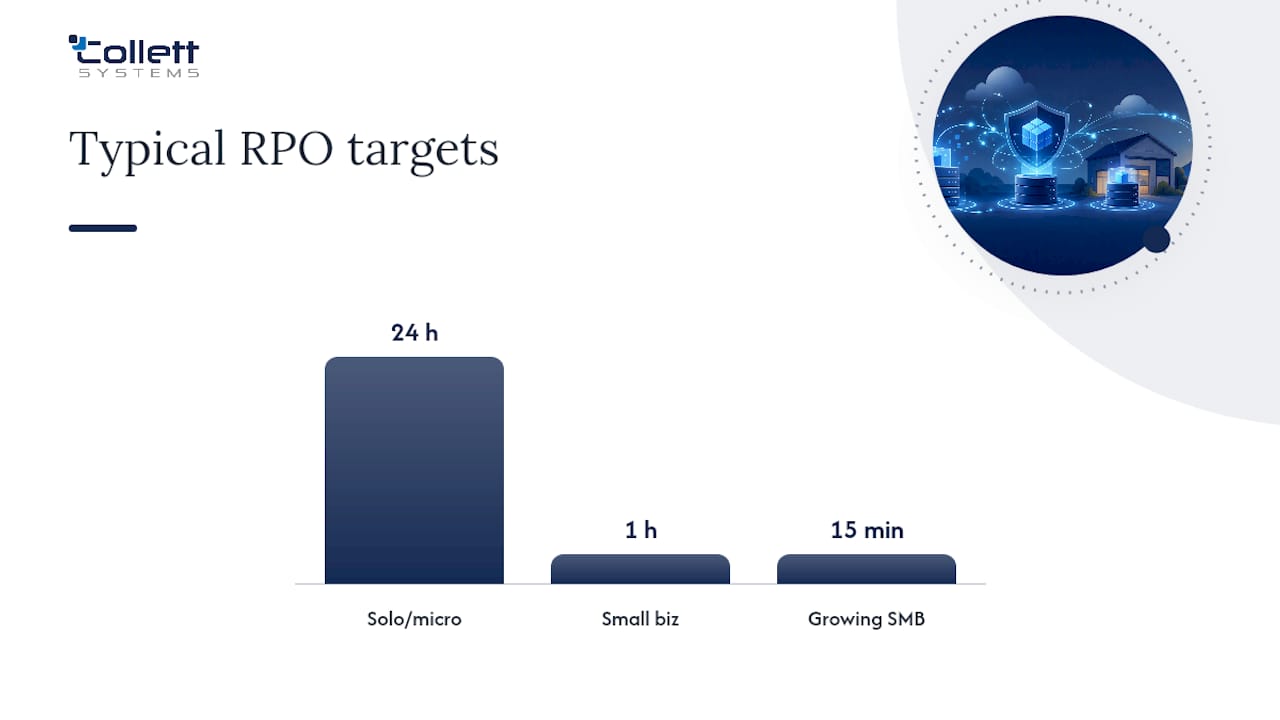
Here's how RTO and RPO targets typically shift by business size and system criticality:
| Business Profile | Typical RTO Target | Typical RPO Target |
|---|---|---|
| Solo operator or micro-business, general files | 24 hours | 24 hours |
| Small business, line-of-business apps | 8 hours | 1 hour |
| Growing SMB with production or financial systems | 1-2 hours | 15 minutes |
A solo consultant losing a day of email is an inconvenience. A manufacturer whose production scheduling system goes down for eight hours is a payroll problem. Set your targets based on what a specific system's downtime actually costs you, not on what sounds achievable.
Deployment timelines vary with complexity: a basic 3-2-1 setup for a small office typically takes one to two weeks from assessment to first verified restore. A ransomware-hardened 3-2-1-1-0 rollout with immutable storage and formal runbooks often runs four to six weeks, mostly due to the process documentation and initial full restore testing cycle.
Protecting Backups From Tampering and Ransomware
A backup that anyone on your network can reach, modify, or delete is not really a backup. It's a second copy of the same vulnerability.
Encryption belongs at two points: in transit, as data moves from production to backup storage or up to the cloud, and at rest, once it lands on the backup medium itself. NIST recommends full encrypted backups at least monthly with keys managed and stored separately from the backup data. If your encryption keys sit in the same location as the encrypted backups, an attacker who compromises one compromises both.
Immutable storage and air-gapped workflows close the gap that ransomware exploits most. Object storage configured with WORM locking rejects modification or deletion requests for a defined retention period, no matter what credentials make the request. An offline copy, whether tape in a vault or a drive disconnected from the network after each backup job, achieves the same result through physical isolation rather than software policy.
Access to restore operations deserves its own scrutiny. The account that runs nightly backup jobs should not be the same account an IT staffer uses to check email, and it should carry the minimum privilege needed to do its job. NIST's ransomware preparation guidance specifically recommends keeping backups isolated so an attacker who compromises one set of credentials can't reach and destroy them. Layering identity-first access controls on top of your backup infrastructure closes exactly this hole.
Ongoing monitoring rounds out the picture: integrity checks that flag corruption before you need the backup, and alerting that notifies someone immediately if a scheduled job fails or a file count drops unexpectedly.
- Encrypt data both in transit and at rest, with keys stored apart from the backups they protect.
- Maintain at least one immutable or air-gapped copy outside normal administrative reach.
- Restrict restore and delete permissions to a small, separately credentialed group.
- Monitor job completion and set alerts for failures, not just successes.
Pro Tip: Segment the account that manages your backup infrastructure from your everyday domain admin account. If both use the same login, a single phishing email can hand an attacker the keys to your production systems and your escape hatch in one move.
Testing and Recovery: Proving Your Backups Actually Work
A backup you've never restored is a theory, not a plan. CISA's guidance is explicit on this point: businesses should be able to restore data fully and partially within a defined window, and regularly confirm backups aren't corrupted.
The recommended cadence mixes two testing types. Randomized partial restores, pulling a handful of individual files or folders and confirming they open correctly, should happen monthly at minimum. Full system restores, rebuilding an entire server or application environment from backup, should happen at least quarterly, and always after any major infrastructure change.
A working runbook needs a few essential elements regardless of business size:
- Named roles: who initiates a restore, who approves it, and who verifies success.
- A priority order for which systems come back online first, mapped to your Maximum Tolerable Downtime for each.
- Documented RTO and RPO targets for each critical system, not a single blanket number for the whole business.
- A verification checklist confirming restored data matches expected state before declaring the incident resolved.
| Test Type | Recommended Frequency | What It Proves |
|---|---|---|
| Randomized file/folder restore | Monthly | Backup data is intact and individually retrievable |
| Full system or server restore | Quarterly | Complete recovery is achievable within RTO |
| Tabletop incident walkthrough | Semiannually | Staff know their roles under real time pressure |
Use every test result to adjust, not just to check a box. If a restore takes longer than your documented RTO, that's a signal to either speed up the restore process or revise the RTO to something achievable. If a file test turns up corruption, that's a signal your retention window or verification frequency needs tightening. Ready.gov's recovery planning guidance frames this the same way: a recovery plan is only as good as the last time someone actually tested it.
What 3-2-1 Backup Costs and the Mistakes That Waste the Investment
Budget for a 3-2-1 setup breaks into a handful of predictable line items: local backup hardware or NAS storage, cloud storage capacity sized to your retention policy, bandwidth if your current internet plan can't handle nightly uploads, and either internal staff time or a managed service fee to keep the whole system running and tested.
A basic 3-2-1 setup for a small office, without immutable storage or formal runbooks, is the faster and cheaper path to deploy but leaves the ransomware-specific gaps open. A ransomware-hardened 3-2-1-1-0 build costs more upfront in immutable storage fees and setup time, but that gap closes the exact vulnerability attackers rely on most.
The mistakes that quietly undermine an otherwise reasonable backup strategy show up constantly, and they're almost always avoidable:
- Counting a synced folder as a backup. Sync tools propagate deletions and encryption instantly. A real backup takes independent, versioned snapshots. Partner guidance on QuickBooks Online backups walks through exactly how software-level syncs can look successful while leaving no real recovery path.
- Never testing a restore. A green checkmark on a backup job log tells you the job ran, not that the data inside is usable.
- Storing encryption keys next to the backups they protect. If both are compromised together, encryption adds no real protection.
- Treating ransomware recovery as a backup problem alone. Restoring files doesn't remove an attacker's foothold; recovery is a broader process that includes containment and forensics, not just a restore job.
- Skipping staff training. Someone needs to know the runbook exists and where to find it before the night a server goes down.
How a Managed Provider Puts 3-2-1 Into Practice
Most small businesses don't have a dedicated backup administrator, and that's exactly the gap a managed IT provider fills. At Collett Systems LLC, our approach to backup and disaster recovery starts the same way every solid implementation should: with an assessment of what data actually exists, where it lives, and how critical each system is to daily operations.
From there, we design the architecture, choosing local and off-site targets sized to actual data volume and defining RTO and RPO for each critical system rather than applying one blanket target to everything. Deployment includes automated backup jobs, an immutable or offline copy, and encryption in transit and at rest. Verification isn't an afterthought. It's built into the ongoing service, with scheduled restore tests and documented results rather than an assumption that a green status light means the job is done.
What a client should expect from a managed backup and disaster recovery arrangement includes 24/7 monitoring with alerting on job failures, immutable copies protected from tampering even by compromised credentials, written RTO and RPO commitments per system, and regularly scheduled restore testing with documented proof rather than a verbal assurance. Our guide to managed backup and disaster recovery walks through how these pieces fit together for a typical SMB client.
Pro Tip: When scoping a managed backup provider, ask specifically how often they perform full restore tests and whether they'll show you documented results. A provider who can't answer that clearly hasn't actually proven their own backups work either.
What Small Businesses Get Wrong About Backup Priorities
Most backup advice treats every business the same, and that's where it goes wrong. A five-person accounting firm and a forty-person manufacturer have wildly different risk profiles, and spending the same amount on the same architecture for both is a mismatch in one direction or the other.
The first thing I'd fix in most small businesses isn't the backup technology. It's the testing gap. I've seen plenty of setups with solid architecture, cloud copies, local copies, reasonable retention, that had never once been restore tested. The technology was fine. The confidence in it was fiction. If you fix one thing this month, make it a scheduled restore test, even a basic one covering a handful of files.
The second priority, once testing is in place, is closing the ransomware-specific gap with an immutable or offline copy. This is where I'd push back on businesses that treat 3-2-1-1-0 as an unnecessary upgrade for "someday." Ransomware doesn't wait for your maturity roadmap to catch up. If your backup infrastructure shares credentials or network reachability with your production environment, you don't have a backup strategy. You have a slightly delayed single point of failure.
Where I'd counsel against overspending is chasing recovery speed before you've nailed reliability. A business obsessing over shaving an RTO from four hours to one hour, while its restore process has never actually been tested end to end, has its priorities backward. Reliability first, speed second. Every time.
Let Collett Systems LLC Handle Your Backup Strategy
Collett Systems LLC builds backup and disaster recovery into every managed IT engagement as a standard part of the stack, not an upsell you discover later. That means fixed per-user pricing already accounts for 24/7 monitoring, documented RTO and RPO targets, and scheduled restore testing, so you're not left guessing what protection you're actually paying for or bolting on a separate backup vendor down the road.
What that looks like in practice: an assessment that maps your critical systems and current backup gaps, a design phase that sets real recovery targets instead of generic defaults, and ongoing monitoring with alerting the moment a job fails rather than a surprise discovered mid-crisis.
- Fixed per-user pricing with backup and disaster recovery included, not billed as a surprise add-on.
- 24/7 monitoring and alerting on backup job status.
- Documented RTO and RPO per critical system, agreed with you upfront.
- Scheduled restore testing with proof, not just a status report.
If your current backup setup has never been restore tested, or you're not sure whether it would survive a ransomware event, our Backup & Disaster Recovery services for Wisconsin businesses start with an IT & Security Assessment that shows you exactly where the gaps are. Book the assessment and get a straight answer on where you stand before an outage forces the question.
Primary Sources for Backup Best Practices
- Back Up Business Data | CISA: CISA's small business guidance on restore testing windows and backup verification.
- Data Backup Options | CISA: The original government reference defining the 3-2-1 rule's three components.
- Small Business Information Security: the Fundamentals (NIST IR 7621r1): NIST's operational guidance on backup frequency, encryption, and retention sizing.
- Ransomware Guide | CISA: Federal guidance on offline and immutable backups as a ransomware mitigation.
- Ready: Business continuity planning guidance covering recovery plan documentation and testing.
Frequently Asked Questions
What is the 3-2-1 backup rule in simple terms? It means keeping three total copies of your data, storing them on two different types of media, and keeping at least one copy off-site from your main location, following the standard 3 2 1 backup strategy recommended by CISA.
Is the 3-2-1 backup rule still the standard in 2026? Yes, as a baseline. Most security practitioners now recommend extending it to 3-2-1-1-0 for ransomware protection by adding an immutable or offline copy and requiring verified, tested restores.
What's the difference between 3-2-1 and 3-2-1-1-0? 3-2-1-1-0 keeps the original three copies, two media, and one off-site requirement, then adds one immutable or air-gapped copy that ransomware can't reach or alter, plus a rule of zero unverified backups through regular restore testing.
Does a cloud sync service like Dropbox or OneDrive count as a backup? No. Sync services propagate deletions and encryption changes across all connected devices almost instantly, which means a ransomware attack or accidental deletion can wipe every "copy" at once. A true backup takes independent, versioned snapshots.
How often should a small business test its backups? Randomized file or folder restores should happen at least monthly, with full system restore tests at least quarterly, matching the testing expectations CISA outlines for small and medium businesses.
What's a reasonable budget timeline for implementing 3-2-1 backup? A basic setup typically takes one to two weeks to deploy. A ransomware-hardened version with immutable storage and documented runbooks usually takes four to six weeks due to the added testing and documentation work.
Should I build 3-2-1 backup myself or hire a managed provider? It depends on whether you have staff with the time and expertise to manage encryption, retention, and regular restore testing. Many small businesses find a managed provider like Collett Systems LLC delivers more reliable protection at a predictable cost than a part-time internal effort.