A change management policy governs how your team proposes, reviews, approves, tests, deploys, and audits every change to production systems, and it exists to stop outages before they start while giving auditors a clean trail to follow. Before you build one from scratch, here's what a working policy needs:
- Scope that names which systems, environments, and teams the policy covers
- Change categories (standard, normal, emergency) with matching approval paths
- A defined approval matrix so nobody guesses who signs off
- Testing and rollback requirements attached to every change record
- Documentation standards that hold up under a SOC 2 or ISO 27001 audit
We've built a downloadable, editable policy package with all five pieces already drafted. Grab it below and adapt it in an afternoon instead of a quarter.
Key Takeaways
A change management policy works because it matches approval rigor to actual risk, giving low-risk changes a fast automated path while reserving deeper review for the changes that could cause real damage.
| Point | Details |
|---|---|
| Classify before you approve | Sort changes into standard, normal, and emergency tiers so approval effort matches actual risk. |
| Segregate implementer and approver | Never let the person executing a change be its sole sign-off, per internal audit guidance. |
| Require rollback plans upfront | No change reaches approval without a documented, validated backout plan. |
| Automate the routine | Standard-change automation frees approvers to focus on genuinely risky work. |
| Get help operationalizing it | Collett Systems LLC configures ticketing workflows, automates standard changes, and maintains audit trails for small and mid-sized teams adopting a new policy. |
A Managed IT Provider's View on Policy Adoption
Most small and mid-sized organizations don't fail at writing a change policy. They fail at operating it: nobody configures the ticketing fields, nobody automates the standard changes, and the audit trail stays incomplete until an auditor asks for it. A managed partner closes that gap by building the workflow, not just the document.
Table of Contents
- What's Included in the Change Management Policy Template
- What Should the Purpose and Scope Section Cover?
- Who Owns Each Step? Roles and Responsibilities
- How Should You Classify Changes by Risk?
- The Step-by-Step Change Lifecycle
- Building an Approval Matrix That Doesn't Slow You Down
- Why Rollback Plans Matter as Much as the Change Itself
- How Do You Communicate Changes to the Right People?
- What Documentation and Metrics Prove the Policy Is Working?
- Definitions, Exceptions, and Enforcement Language
- Best Practices and Common Pitfalls in Change Management
- A 90-Day Roadmap to Roll Out Your Policy
- What Rule of Thumb Works Best for Smaller Organizations?
- How Collett Systems Helps You Operationalize a Change Policy
- Sources
- FAQ
What's Included in the Change Management Policy Template
The package gives you five working documents, not a theoretical framework you have to translate into practice yourself:
- The core policy document (purpose, scope, definitions, enforcement language)
- A RACI table mapping roles to each stage of the change lifecycle
- An approval matrix with editable risk thresholds
- An exception/waiver request form
- A rollback and backout checklist you attach to every change ticket
Adapting it takes four steps:
- Replace organizational names and team labels with your own structure.
- Map your actual services and systems into the scope section.
- Set approval thresholds that match your risk tolerance, not a generic default.
- Set a review cadence (quarterly works for most mid-sized teams).
Small teams should consolidate roles rather than delete them. A five-person IT shop can have one person acting as both change owner and implementer, but the approver should still be someone else. Enterprise teams need the opposite adjustment: split the CAB into a technical review board and a business-impact board so neither becomes a bottleneck. Either way, validate the finished draft by running one real change through it before you publish it internally.
What Should the Purpose and Scope Section Cover?
The purpose statement should say, in one or two sentences, why the policy exists: reducing unplanned outages, creating an auditable trail, and making change timing predictable for the business. A documented change policy that skips this framing tends to get treated as red tape instead of protection, which hurts adoption from day one.
Scope should draw a hard line around what's covered:
- In scope: production systems, network infrastructure, security tooling, customer-facing applications
- Out of scope (usually): internal documentation updates, sandbox or test environments, cosmetic UI copy changes
Name your audience explicitly in the policy text: IT staff who execute changes, product teams who request them, and business stakeholders who need visibility into anything that touches customer systems or compliance scope.
Who Owns Each Step? Roles and Responsibilities
Every effective change management framework needs a small, fixed set of roles rather than an ad hoc cast that shifts project to project. At minimum, define a change requester, change owner, implementer, change approver, service owner, change manager, QA/test lead, and communications owner. Internal audit guidance from The IIA is specific on one point: the person implementing a change should not be its sole approver. That segregation of duties is what lets an auditor trust the record instead of just the outcome.

Here's a starting RACI you can drop directly into your policy:
| Stage | Change Requester | Change Owner | Approver | Implementer |
|---|---|---|---|---|
| Submit request | Responsible | Consulted | Informed | Informed |
| Review & risk score | Consulted | Responsible | Accountable | Informed |
| Approve | Informed | Consulted | Accountable | Informed |
| Implement | Informed | Informed | Informed | Responsible |
| Validate & close | Consulted | Responsible | Informed | Consulted |
Small teams can merge requester and owner into one person. Larger organizations should keep every column separate and staff each with a different individual.
How Should You Classify Changes by Risk?
Not every change deserves the same scrutiny, and treating a firewall rule update the same as a password reset is how change committees turn into bottlenecks nobody respects. ITIL-aligned guidance sorts changes into three tiers:
- Standard changes: low risk, repeatable, pre-approved (routine patching, certificate renewals)
- Normal changes: moderate to significant risk, requiring review by a change advisory board or designated approver
- Emergency changes: urgent fixes to restore service, approved through an expedited path with mandatory retrospective review
Score each request by impact, urgency, and priority, then route it to the matching approval path automatically. Once a normal change has run cleanly three or four times with no incidents, promote it to standard status and let automation handle it going forward. That single move frees human reviewers to focus on the changes that actually carry risk.
The Step-by-Step Change Lifecycle
Your policy needs a process a technician can follow without asking questions, and it should map directly onto whatever ticketing system you already use.
- Submit: requester logs the change with a stated rationale, systems affected, and requested window.
- Review: change owner scores risk, confirms a rollback plan exists, and checks for scheduling conflicts.
- Approve: the assigned approver (per your matrix) signs off, or standard changes auto-approve.
- Schedule: the change is placed in an agreed window with stakeholders notified in advance.
- Implement: the implementer executes per the documented plan, with testing evidence captured live.
- Validate: QA or the service owner confirms the change achieved its intended outcome.
- Close: the record is finalized with outcome, any incidents, and whether rollback was triggered.
Each stage needs specific fields attached to the ticket: rationale, deployment steps, rollback plan, testing evidence, and a communication plan for anyone affected. Automation should auto-populate recurring fields for standard changes and auto-approve them outright when risk scoring stays below your threshold.
At closure, capture three numbers every time: the outcome (success, partial, failed), whether an incident resulted, and whether rollback was invoked. Those three fields become the backbone of your KPI reporting later.
Building an Approval Matrix That Doesn't Slow You Down
An approval matrix answers one question fast: who has to say yes before this change moves forward? Set thresholds around financial exposure, number of users affected, compliance scope, and system criticality, not around who happens to be available that week.
| Change Type | Risk Level | Approver | Timeframe |
|---|---|---|---|
| Standard | Low | Auto-approved | Immediate |
| Normal | Medium | Team lead + service owner | 2 to 5 business days |
| Normal (high impact) | High | Change advisory board | 5 business days |
| Emergency | Urgent | On-call manager or director | Immediate, retrospective within a short timeframe |
For emergency changes, allow verbal approval from a named on-call authority, but require it be logged in the ticket within the hour and reviewed at the next CAB meeting without exception. Modern ITSM guidance favors decentralizing low-risk approvals to individual leads while reserving committee-level review for changes that touch compliance scope or customer-facing systems.
Why Rollback Plans Matter as Much as the Change Itself
No change should reach approval without documented test evidence and a rollback plan, full stop. Minimum test evidence includes a UAT sign-off, a passed automated test suite where one exists, or at minimum a documented smoke-test checklist run before go-live.
- Rollback plans must specify exact steps to revert, expected time to restore service, and who executes them.
- High-risk changes should require the rollback plan be validated in a staging environment before approval, not written and hoped for.
- Staged rollouts or canary deployments should be required for changes touching customer-facing systems or shared infrastructure; a full cutover is reserved for low-risk, easily reversible changes.
Backup and recovery controls tied to your disaster recovery plan should be validated as part of this step, not assumed to be current.
How Do You Communicate Changes to the Right People?
Nobody should learn about a change because something broke. Build three notification templates: pre-change (what's happening and when), during-change (only sent if something's impacted), and post-change (outcome and any follow-up needed).
- Route pre-change notices to on-call staff, affected service owners, and business leads whose teams touch the system.
- Require acknowledgment for changes affecting customer-facing systems, not just an email blast into the void.
- Train staff on the policy at rollout, then run a short refresher quarterly and fold it into new-hire onboarding from day one.
Organizations managing distributed teams or nonprofit stakeholders find that a simple, consistent notification format matters more than the tool it's sent through.
What Documentation and Metrics Prove the Policy Is Working?
Every change record needs the same core fields: who requested it, what changed, when it happened, the rollback plan, test evidence, and who approved it. Missing any one of those is what turns a routine audit into a painful one, since SOC 2's CC8.1 criterion specifically expects evidence that significant changes were reviewed, tested, and approved before deployment.
Track five KPIs to show the policy is actually functioning, not just existing on paper:
- Change record coverage (percentage of changes with complete documentation)
- Mean time to approval
- Change failure rate
- Emergency change frequency
- Rollback rate
Pro Tip: Link every change record to related incident and problem tickets. A rollback rate that spikes right after a specific system's changes is often the clearest signal you have that something upstream needs deeper review, not just a faster approval process.
Definitions, Exceptions, and Enforcement Language
Define your core terms plainly in the policy itself: standard change, normal change, emergency change, change advisory board (CAB), and change owner. Ambiguity here is what exceptions exploit.
- Build an exception/waiver form with fields for justification, risk acceptance, approver, and expiration date.
- Route every exception through a named approver, never a default rubber stamp.
- Enforcement should state real consequences for bypassing the process, and violations should be logged the same way incidents are, so patterns become visible over time.
Best Practices and Common Pitfalls in Change Management
Solve the visibility problem before you touch approval complexity. Knowing what's changing and who needs to know resolves the majority of change-related friction on its own, according to SMB-focused change management guidance, well before you add another approval layer.
- Make standard changes the default path for routine work through automation and pre-built templates.
- Avoid routing every change through a CAB by default; reserve committee review for genuinely high-risk work.
- Never approve a change missing a rollback plan, regardless of how routine it looks.
- Watch for low adoption of your ticketing workflow. If technicians route around it, the policy exists on paper only.
Pro Tip: If your team is bypassing the ticketing system for "quick" changes, that's not a training problem, it's a friction problem. Fix the workflow before you add another mandatory field.
A 90-Day Roadmap to Roll Out Your Policy
Rolling out a new policy company-wide in one announcement is how good policies die in week two. Phase it instead:
Phase 1 (weeks 0 to 2): Map current systems into scope, run a gap analysis against your existing process, and adapt the template with your organization's names and thresholds.
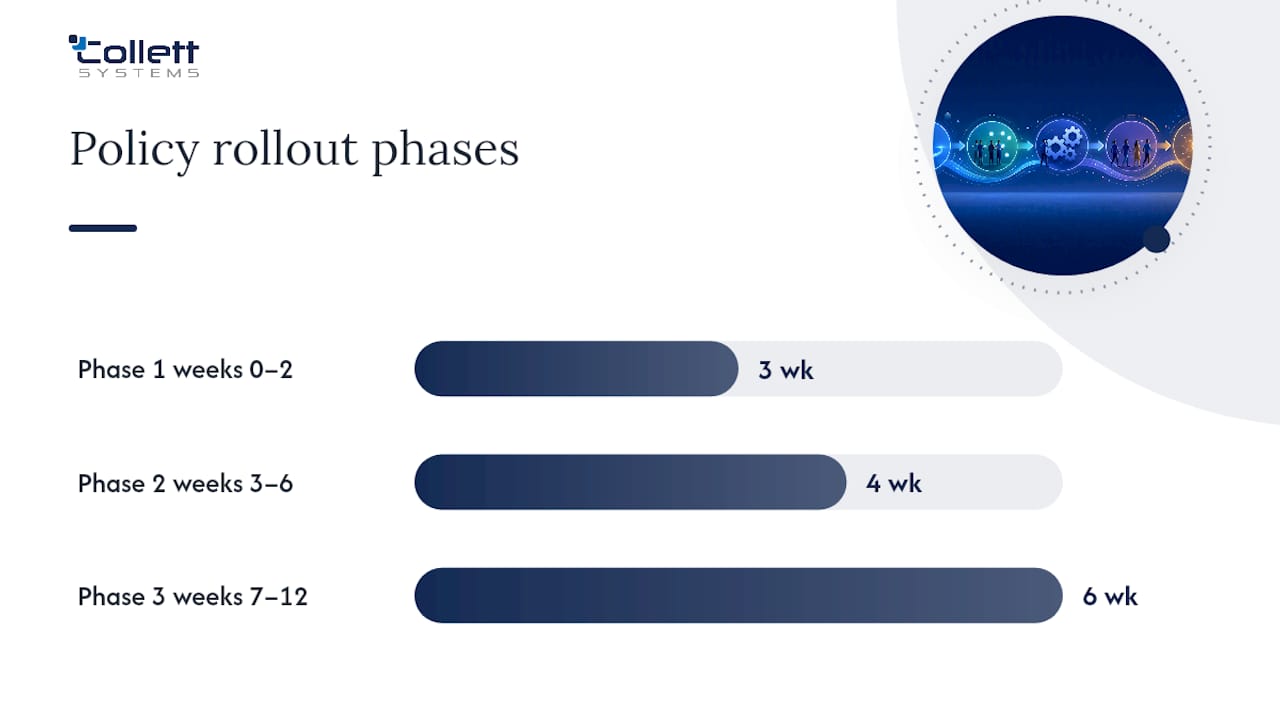
Phase 2 (weeks 3 to 6): Pilot with a single team. Configure your ticketing system's workflow fields, and automate approval for the standard changes that team runs most often.
Phase 3 (weeks 7 to 12): Expand to remaining teams, start tracking the five core KPIs, and run your first post-change review meeting to adjust thresholds based on real data.
- Assign a policy owner accountable for the rollout timeline.
- Pilot before you mandate; use pilot friction to fix the process, not to justify abandoning it.
- Set a 90-day checkpoint to formally review adoption and revise the approval matrix if it's creating bottlenecks.
Manufacturing environments, where scheduled downtime windows are non-negotiable, benefit from an even tighter Phase 2, since a botched change during a production run costs more than the process was ever meant to save.
What Rule of Thumb Works Best for Smaller Organizations?
For most mid-market IT teams, a two-step approval chain, team lead plus service owner, covers the majority of change scenarios while staying auditable. Reserve full CAB review for changes touching compliance-scoped systems or customer data.
Practitioner guidance on mid-market change management notes that a lean, two-step approval structure paired with standard-change automation handles most routine work without the delays a full committee process introduces.
Standard-change automation should absorb the bulk of your routine updates, freeing your approvers to focus on the changes that carry real risk. This structure also maps cleanly onto audit expectations from frameworks like SOC 2 and ISO 27001, which care more about consistent documentation than committee size.
How Collett Systems Helps You Operationalize a Change Policy
A written policy only works if someone configures the ticketing fields, automates the standard changes, and keeps the audit trail current when your team is busy running the business. Collett Systems LLC builds that operational layer for small and mid-sized organizations across Southeastern Wisconsin, standardizing the ticketing workflow, approval routing, and 24/7 monitoring that make a change policy actually stick instead of sitting in a shared drive nobody opens.
Our fixed per-user pricing model means the documentation, audit trail maintenance, and standard-change automation your policy calls for come built into the same monthly cost, not billed as separate project work every time you need an update. If you're a manufacturer or financial firm working toward SOC 2 or ISO 27001 readiness, our co-managed IT services integrate directly with your in-house team to run the policy day to day. Schedule an IT and security assessment with Collett Systems LLC to see exactly where your current change process has gaps before your next audit finds them for you.
Sources
Review Atlassian's ITIL change management guidance for classification models, The IIA's audit technology guide for control evidence, and Loyola University Chicago's published policy as a structural template.
- IT Change Management, Global Audit Technology Guide | The IIA (excerpt PDF)
- Change management best practices for ITSM - SolarWinds
FAQ
What Are the Five C's of Change Management?
Definitions vary across frameworks, but common versions cite communication, competency, clarity, capability, and coordination as core success factors in rolling out organizational change, distinct from the IT-specific change lifecycle this policy governs.
What Are the Seven Steps of the Change Management Process?
The standard IT change lifecycle runs through submit, review, approve, schedule, implement, validate, and close, with test evidence and a rollback plan attached at every stage.
What's the Difference Between a Standard, Normal, and Emergency Change?
Standard changes are low risk and pre-approved, normal changes go through a review or committee approval path, and emergency changes get expedited approval followed by mandatory retrospective review.
Do I Need a Change Advisory Board (CAB) for Every Change?
No. Route only normal and high-impact changes through a CAB; standard changes should auto-approve, and emergency changes follow their own expedited path.
How Do I Get Help Implementing a Change Management Policy?
A managed IT partner like Collett Systems LLC can configure your ticketing workflow, automate standard-change approvals, and maintain the audit trail your policy requires, typically starting with a co-managed IT engagement or an initial assessment.