Disaster recovery testing proves that your recovery procedures, tools, and teams can restore business services within your approved recovery time objectives (RTO) and recovery point objectives (RPO). A backup that has never been restored is not a recovery plan. The single next step: schedule a tabletop exercise this quarter, even if it only covers your two most critical systems.
- A DR test must prove operability, not just backup completion. That means restored services accept real user traffic, authentication works, integrations connect, and measured recovery times fall within approved targets.
- NIST SP 800-34 requires Testing, Training, and Exercises (TT&E) and expects tests to validate notification procedures, alternate-platform restores, connectivity, and performance, then produce a formal after-action report (AAR).
- Start with a tabletop soon, and plan to move to a functional or parallel test within the next several months for your most critical systems.
Pro Tip: Before any test, confirm that your runbook version matches your current infrastructure. Outdated runbooks are the single most common reason a test fails before execution even begins.
Key Takeaways
Disaster recovery testing proves that your recovery procedures, tools, and teams can restore business services within approved RTO and RPO targets, and the only way to know your plan works is to execute it against a real scenario.
| Point | Details |
|---|---|
| Test operability, not just backups | A DR test must prove that restored services accept traffic, authenticate users, and meet RTO/RPO targets. |
| Use the evidence ladder | Start with quarterly tabletops, add semiannual functional tests for critical systems, and run a full failover annually for tier-one systems. |
| Tie tests to change events | Infrastructure changes, vendor swaps, and key personnel departures should trigger an out-of-cycle test, not just the calendar. |
| Every test needs an AAR | Document findings, assign named owners to corrective actions, set due dates, and schedule retests before closing the report. |
| Collett Systems LLC manages the full cycle | From runbook development to test execution and AAR documentation, Collett Systems LLC delivers tested, audit-ready DR for SMBs in Southeastern Wisconsin. |
Table of Contents
- What does disaster recovery testing actually prove?
- What are the main types of DR tests?
- How often should you run DR tests?
- How do you plan a DR test properly?
- How do you run the test on execution day?
- What goes into an after-action report?
- Your DR test checklist and template
- What U.S. standards govern DR testing requirements?
- What we've learned running DR tests for SMBs in Wisconsin
- Collett Systems LLC can run your next DR test
- Sources
What does disaster recovery testing actually prove?
Disaster recovery testing is the operational process of executing your DR plan against a defined scenario to verify that your recovery chain works end-to-end. That chain includes people, procedures, tools, data, and integrations, not just the backup job status screen.
The goal is not to confirm that a backup file exists. The goal is to confirm that a business service is recoverable within the time and data-loss limits your organization has approved. Those limits are your RTO (the maximum tolerable downtime) and your RPO (the maximum tolerable data loss, measured in time). A test that does not measure both against a real scenario has not answered the question that matters.
Concrete goals a DR test must prove:
| Success Metric | What "Pass" Looks Like |
|---|---|
| RTO compliance | Measured recovery time is at or below the approved RTO for the system |
| RPO compliance | Restored data reflects a point in time at or within the approved RPO window |
| Recovery completeness | All in-scope services, dependencies, and integrations are restored and verified |
| User acceptance | A designated business owner confirms the restored service is usable |
| Secure reconstitution | Credentials are rotated, access controls verified, and no production data exposed |
Testing validates whether recovery procedures, tools, and teams can recover operations within defined RTOs and RPOs, and test methods range from tabletop discussion to full failover.
NIST SP 800-34 frames this clearly: a contingency plan only proves its worth when people actually use it. TT&E is not optional documentation hygiene. It is the mechanism that tells you whether your plan is real or theoretical.
What are the main types of DR tests?
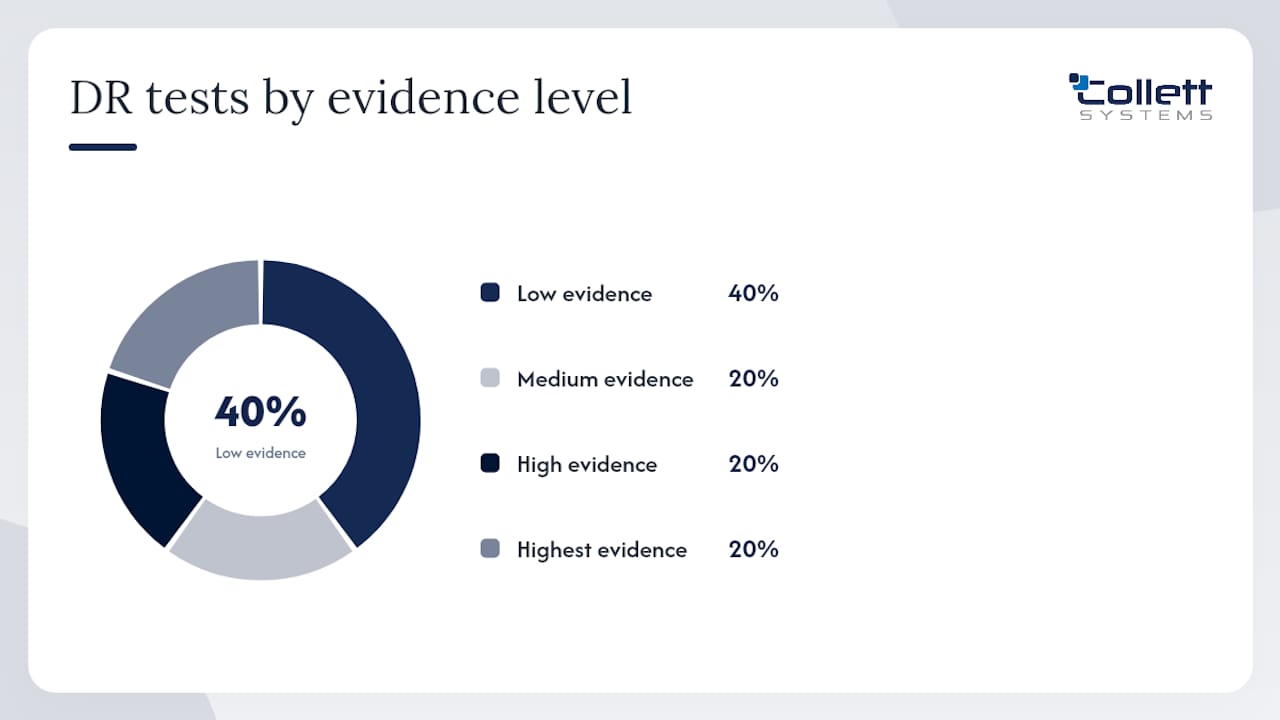
DR test types form an evidence ladder. Each rung delivers more proof than the one below it, but also carries more risk and cost. The right choice depends on system criticality, available change windows, and how much of the recovery chain you need to validate at once.
- Tabletop exercise: A structured discussion where key stakeholders walk through a scenario step-by-step without touching production systems. Low risk, low cost, high value for identifying process gaps, unclear ownership, and missing runbook steps. Run regularly throughout the year for all critical systems.
- Walkthrough (plan review): Participants read through the DR plan together and verbally confirm each step is current and executable. Useful after personnel changes or minor infrastructure updates.
- Simulation (functional test): Specific recovery procedures are executed in an isolated environment. Systems are actually restored, connectivity is tested, and metrics are captured. This is where you first measure actual RTO and RPO against targets.
- Parallel test (warm-standby): The recovery environment is brought fully online alongside production. Both run simultaneously. Traffic is not cut over, but the recovered environment is validated for performance and integration. Parallel tests should isolate restored environments to prevent accidental writes, real email sends, or payment processor hits. Scrub production credentials and point services at sandbox integrations before starting.
- Full-interruption test (full failover): Production is deliberately taken offline and operations shift entirely to the recovery environment. Maximum evidence, maximum risk. Reserve for tier-one systems with a tested rollback path.
| Test Type | Evidence Level | Disruption Risk | Key Participants | Typical Frequency |
|---|---|---|---|---|
| Tabletop | Low | None | IT, business owners, leadership | Regularly throughout the year |
| Walkthrough | Low | None | IT team, system owners | After personnel or plan changes |
| Simulation/Functional | Medium | Low | IT, system owners, vendors | Semiannual for critical systems |
| Parallel | High | Low, Medium | IT, business owners, vendors | Annual or after major changes |
| Full failover | Highest | High | All stakeholders | Annual for tier-one systems |
AWS documentation reinforces this for cloud workloads: regular failover validation is necessary to verify that DNS changes, replication lag, and RTO/RPO targets hold under real conditions, not just in theory.
How often should you run DR tests?
The honest answer: more often than most organizations do, and tied to change events rather than only the calendar.
A practical baseline cadence by impact tier:
| System Tier | Tabletop | Simulation/Parallel | Full Failover |
|---|---|---|---|
| Tier 1 (mission-critical) | Regularly throughout the year | Periodically | As appropriate |
| Tier 2 (important, not immediate) | Semiannual | Annual | Every 2 years |
| Tier 3 (low impact) | Annual | As needed | Not required |
Calendar cadence is a floor, not a ceiling. Practical guidance recommends starting with frequent tabletops and building toward full failover as confidence grows. More importantly, certain events should force an out-of-cycle test regardless of where you are in the schedule:
- Major infrastructure change (new firewall, storage migration, cloud platform move)
- Significant software upgrade affecting recovery-critical systems
- Vendor or service provider change for backup, hosting, or replication
- Key personnel departure or role change on the DR team
- A real incident or near-miss that exposed a gap
- New regulatory requirement or audit finding tied to recovery
A cadence tied to change management catches the most critical drift. When your architecture changes and your DR plan does not, you are testing a plan that no longer matches reality. Tying test triggers to change events rather than only the calendar is a more reliable way to keep your recovery posture current.
How do you plan a DR test properly?
Good planning is what separates a test that produces usable evidence from one that produces a report nobody reads. Every DR test needs a written test plan before execution begins.
- Define measurable objectives. State exactly what the test must prove. "Validate that the ERP system can be restored to a point within a four-hour RPO and brought online within an eight-hour RTO" is a testable objective. "Check that backups work" is not.
- Select scope. Identify which systems, data sets, dependencies, and integrations are in scope. Explicitly list what is out of scope and why. Ambiguous scope is the second most common reason tests produce inconclusive results.
- Assign roles. Every test needs an incident lead, system owners for each in-scope service, a business owner who accepts the restored service, a communications lead, and vendor contacts for any third-party dependencies.
- Plan logistics and safety. Define the maintenance window, isolation steps, credential access procedures, and rollback criteria. Document the conditions under which you will abort the test and restore production immediately.
- Specify evidence to collect. List the timestamps, logs, screenshots, and acceptance sign-offs required. If you cannot produce this evidence, the test result is not auditable.
A compact test-plan template covers these fields:
- Objective: What the test must prove, tied to specific RTO/RPO targets
- Scope: Systems, data sets, and interfaces included and excluded
- Participants: Names, roles, and contact information
- Success criteria: Pass/fail threshold for each metric
- Timeline: Start time, step milestones, and hard stop
- Rollback criteria: Conditions that trigger abort and the rollback procedure
- Evidence to collect: Timestamps, logs, screenshots, and sign-off forms
A well-structured test plan includes explicit objectives, success criteria, timeframes, and artifact collection requirements. Tying that plan to your Business Impact Analysis (BIA) ensures the test targets the systems your organization can least afford to lose. Tiering systems by criticality and integrating DR testing with the BIA turns testing from a periodic event into a continuous improvement loop.
How do you run the test on execution day?
Execution day has two phases: pre-checks and the test itself. Skipping pre-checks is how organizations discover mid-test that credentials have rotated or a dependency is missing.
Pre-checks and go/no-go decision points:
- Confirm the test plan is signed off and all participants are available
- Verify backup integrity and confirm the restore point meets RPO requirements
- Check that the isolated test environment is ready and production credentials have been scrubbed
- Confirm rollback procedures are staged and the abort criteria are understood by all participants
- Validate that monitoring and logging are active in the test environment
Execution checklist:
- Initiate failover or restore procedure per the runbook, noting the exact start timestamp
- Validate each dependency in order: storage, database, application layer, network connectivity, authentication
- Run business acceptance tests: can a designated user log in, execute a representative transaction, and confirm data integrity?
- Check integrations: are third-party connections pointing at sandbox endpoints, not production?
- Capture measured RTO (time from declared start to business acceptance sign-off) and measured RPO (age of the oldest unrecovered transaction)
- Document call-tree completion time: how long did it take to reach all required participants?
- Collect logs, screenshots, and timestamps at each step
Pro Tip: Treat the DR execution path as production. Pin signed artifacts, verify image provenance, and avoid floating "latest" tags in recovery automation. Recovering into a vulnerable or inconsistent state defeats the purpose of the test entirely.
Common failures found during execution include out-of-date runbooks, rotated credentials that were never updated in the recovery documentation, missing dependencies not captured in scope, and restore times that exceed RTO by a significant margin. These are not test failures in the negative sense. They are exactly what testing is designed to find.

What goes into an after-action report?
The after-action report (AAR) is the deliverable that makes a test worth running. Without it, findings stay in someone's memory and corrective actions never get tracked.
An effective AAR covers:
- Summary: Test date, scenario, scope, and overall pass/fail verdict
- Objectives vs. results: For each stated objective, what was the measured outcome?
- Metrics: Measured RTO, measured RPO, restore success rate, call-tree completion time
- Technical findings: What worked, what failed, and what was slower than expected
- Process gaps: Unclear ownership, missing runbook steps, communication breakdowns
- Untested areas: Scope items that could not be validated and why
- Evidence: Attached logs, screenshots, and timestamps
- Corrective actions: Each finding gets an owner, a due date, and a retest date
Score each objective as pass, fail, or partial. Record partial results honestly. An objective that passed under ideal conditions but would likely fail under a real incident timeline is worth flagging as a conditional pass with a note.
Pro Tip: Never close an AAR without assigning a named owner to every corrective action. A finding with no owner is a finding that will reappear in the next test.
Closing the loop means updating the runbook version, scheduling the retest, and confirming that corrective actions are tracked in your ticketing system. The AAR feeds directly back into the DR plan. NIST SP 800-34 expects tests to produce AARs with measurable results and corrective action tracking. That is not bureaucracy. It is how you prove improvement over time.
Your DR test checklist and template
Copy this into your ticketing system or runbook before your next test.
Planning phase:
- Written test plan with objectives, scope, participants, and success criteria
- RTO and RPO targets documented for each in-scope system
- Roles assigned: incident lead, system owners, business owner, communications lead, vendor contacts
- Rollback criteria and abort procedure documented
- Evidence collection plan: timestamps, logs, screenshots, acceptance sign-offs
Pre-test phase:
- Backup integrity verified; restore point confirmed within RPO window
- Test environment isolated; production credentials scrubbed
- Sandbox integrations confirmed (no live payment processors, no real email sends)
- Monitoring and logging active in test environment
- All participants confirmed available; go/no-go decision recorded
Execution phase:
- Start timestamp recorded
- Failover or restore steps executed per runbook
- Dependencies validated in sequence: storage, database, application, network, authentication
- Business acceptance test completed and signed off by business owner
- Measured RTO and RPO recorded against targets
Validation and closeout:
- Pass/fail verdict recorded for each success criterion
- Logs, screenshots, and timestamps collected and attached
- AAR drafted with findings, corrective actions, owners, and due dates
- Runbook version updated if changes are required
- Retest dates scheduled for failed or partial objectives
Success criteria template:
For tests that include site-level failure scenarios, such as generator or UPS failure, a data center emergency power checklist adds useful operational steps for validating power resilience alongside your recovery procedures.
What U.S. standards govern DR testing requirements?
Several U.S. frameworks directly shape what DR testing must cover, how often it must occur, and what evidence auditors expect to see.
NIST SP 800-34 is the primary federal guidance for IT contingency planning. Its TT&E requirements specify that tests must validate notification procedures, alternate-platform restores, connectivity, and performance. "Operability" in NIST's framing means the restored system can actually support business operations, not just that it powered on. Tests must produce AARs, and the standard recommends exercise types scaled to system impact level.
SOC 2 (Trust Services Criteria, Availability category) requires service organizations to demonstrate that recovery capabilities are tested and that test results drive remediation. Auditors typically want to see test plans, AARs, evidence of corrective action tracking, and proof that testing frequency matches the criticality of covered systems.
HIPAA (45 CFR §164.308(a)(7)) requires covered entities and business associates to implement and test contingency plans for systems that store or process protected health information. Testing frequency is not prescribed, but auditors expect documented evidence of periodic testing and remediation.
ISO 22301 (Business Continuity Management) is not a U.S. regulatory requirement, but many organizations use it as a framework alongside NIST. It requires documented exercises, AARs, and continuous improvement cycles.
Practical compliance notes:
- Keep every AAR for at least three years; some auditors ask for a multi-year history to demonstrate trend improvement
- Document not just what passed but what was out of scope and why, so auditors understand the test boundary
- For HIPAA-covered systems, ensure the test plan explicitly references the systems that store or process PHI and that the AAR records data integrity verification steps
- For SOC 2, corrective actions must be tracked to closure; an open finding with no owner and no due date is an audit finding in itself
What we've learned running DR tests for SMBs in Wisconsin
Most small and mid-sized businesses we work with at Collett Systems LLC come to us with one of two problems. Either they have a backup product and no tested recovery procedure, or they have a DR plan that was written two years ago and has never been touched since a major infrastructure change.
Our approach starts with mapping business services to recovery tiers based on a Business Impact Analysis. For a manufacturer in Washington County, that might mean the ERP and production scheduling system sit in tier one, email and file sharing in tier two, and the marketing website in tier three. Test type and frequency follow from that tiering, not from a generic annual schedule.
A recent example: a professional services firm had a cloud backup running for 18 months with no restore test. When we ran a functional simulation, the restore completed but the application database came up in read-only mode due to a licensing flag tied to the production server's hostname. Measured RTO was four hours against a two-hour target. The AAR identified three corrective actions: a runbook update for the hostname dependency, a licensing pre-check step, and a scheduled quarterly restore verification. The next test six weeks later hit the two-hour target.
That is what testing is for. Not to confirm that the backup job shows green, but to find the hostname dependency before a real incident does. Our managed backup and disaster recovery practice is built around scheduled restore verification, not just backup monitoring. We also connect DR testing to backup best practices that reduce the chance of a gap appearing between backup policy and recovery reality.
Collett Systems LLC can run your next DR test
Collett Systems LLC gives small and mid-sized businesses in Southeastern Wisconsin a fully managed path to tested, documented, and audit-ready disaster recovery, without the overhead of building an internal DR testing program from scratch.
We handle runbook development, scheduled restore verification, tabletop facilitation, functional test execution, and AAR documentation as part of our managed IT services engagement. Fixed per-user pricing means no surprise invoices when a test runs long or a corrective action requires follow-up work. For organizations that keep internal IT staff, our co-managed IT services model lets your team own the plan while we own the execution and evidence trail.
The concrete next step: book an IT & Security Assessment. We will map your systems to recovery tiers, identify gaps in your current DR plan, and give you a prioritized test schedule with defined RTO and RPO targets. Visit our backup and disaster recovery page or contact us directly to schedule your assessment.
Sources
Use these references when building your test plan, preparing audit evidence, or briefing leadership on DR testing requirements.