Ask any managed service provider these eight questions before you talk pricing: Which frameworks do you align to (NIST 800-171, CMMC, DFARS)? Where does our data live, and is it separated from other clients? What's your MFA policy for administrators? How fast do you respond to a security incident, and can you prove it? How often do you test backup restores? Do you use subcontractors, and who are they? Can you show a SOC 2 report or equivalent audit? What does offboarding look like if we leave? Before any demo or quote, insist on written evidence, an SSP/SPRS screenshot or a SOC 2 Type II report, not a verbal assurance.
- Security posture: which frameworks and audits back their claims
- Data location and separation from other tenants
- Admin access controls and MFA enforcement
- Incident response speed and documentation
- Backup restore testing frequency and logs
- Subcontractor use and disclosure
Key Takeaways
Vetting an MSP comes down to demanding written, verifiable evidence, SSP/SOC 2 documentation, tested restore logs, and named subcontractors, rather than accepting confident-sounding claims.
| Point | Details |
|---|---|
| Lead with evidence requests | Ask for SSP/SPRS, SOC 2, or ISO documentation before any pricing conversation begins. |
| Group interview questions | Organize by compliance, data location, access controls, incident response, and staffing. |
| Score answers consistently | Use a written scorecard weighting security evidence above price for every candidate. |
| Verify with references | Ask about the worst incident in the past year and how communication worked during it. |
| Collett Systems maps directly | Its standardized Microsoft 365 Business Premium stack, Passkeys, and Collett Verify process answer most checklist items by default. |
Table of Contents
- The Essential MSP Questions to Use in Vendor Interviews
- What Documents Should You Request From an MSP?
- Acceptable Answers vs. Red Flags When Vetting an MSP
- Contracts, Pricing, Onboarding, and Offboarding: What to Nail Down
- A Realistic 90-Day Plan for Switching MSPs
- How a Security-First MSP Maps to This Checklist
- Disaster Recovery Capabilities and Testing Frequency
- Patch Management Processes and Timelines
- Compliance With Industry-Specific Regulations
- Customization Options and Scalability of Services
- Interviewing MSPs the Way You'd Interview a Business Partner
- Get a Written Evidence Review, Not Just a Sales Call
- Sources
- FAQ
The Essential MSP Questions to Use in Vendor Interviews
Treat vendor interviews like a structured audit, not a sales call. The NDISAC MSP Shopping Questionnaire lays out 33 detailed questions covering compliance, risk, and business history, and it's the closest thing the industry has to a standardized script. Group your own questions the same way, and ask every candidate the identical set. Providers who answer with specifics instead of adjectives are the ones worth a second call, according to MyMSP Hub's buyer guide.
Basic introduction and compliance
- Which frameworks do you align to, and can you map that to NIST 800-171 or CMMC if we handle controlled unclassified information?
- Do you have current SSP or SPRS documentation you can show in redacted form?
- What industries make up most of your client base?
Data location, separation, and backups
- Where physically do our backups and production data reside?
- Is our environment logically separated from other clients, or shared infrastructure?
- How often do you test backup restores, and can we see a log?
Access controls and administration
- Is MFA enforced on every administrator account, no exceptions?
- Do you use Privileged Access Management to log admin activity?
- Do you maintain named accounts, or does staff share generic logins?
Security operations and incident response
- Do you run a SOC or SIEM platform, and what's the average detection-to-response time?
- Is there a written incident response plan, and when was it last tested in a tabletop exercise?
- What's the contractual SLA for critical incident response?
Staffing, subcontractors, and references
- Do you use subcontractors for any part of service delivery, and will you name them?
- Do employees pass background checks before touching client systems?
- Can you provide three references we can call directly?
For each answer, push for evidence: a sample SSP page, a screenshot of a restore log, the scope paragraph from a SOC 2 report, or the actual name of a subcontractor. RSM's advisory team recommends a similar approach when selecting a managed service provider, pairing technical questions with contract flexibility and scalability checks.
Pro Tip: Build a simple scorecard with one row per question and a 1 to 5 column for "evidence provided." Weight security and compliance questions twice as heavily as pricing. An MSP that scores high on price but low on evidence is the one that costs you later, usually during an incident.
What Documents Should You Request From an MSP?
Words are cheap. Documents force accountability. Request these before signing anything:
- SOC 2 Type II report (with scope statement, not just the cover page)
- ISO 27001 certificate, including the exact certified scope
- SSP or SPRS score if you handle DoD or federal contract data
- Sample SLA with actual response and resolution time commitments
- Incident response plan and tabletop exercise records
- Backup restore test logs, not just backup completion reports
- Shared Responsibility Matrix (SRM) defining who owns what
- Subcontractor list and any flow-down security agreements
- Cyber insurance declaration page
A SOC 2 report only matters if you read past the cover. Check whether it's Type I (a point-in-time snapshot) or Type II (tested over a period), the audit window, which trust categories are included, and any noted exceptions, guidance echoed by OutsourceIT's compliance vetting framework.
Pro Tip: Ask for the auditor's contact information or an SPRS/PIEE reference number you can independently verify. A legitimate provider will redact client names in a sample document but leave the audit period, scope, and findings intact.
Acceptable Answers vs. Red Flags When Vetting an MSP
Vague answers are a data point in themselves. Security exists only in documented, testable controls, not verbal reassurance, so measure every response against what can actually be verified.
| Topic | Acceptable Answer | Red Flag |
|---|---|---|
| Security & compliance | Names specific framework, shares audit scope and period | "We take security seriously" with no documentation |
| Data location | States exact region, confirms tenant separation | "It's in the cloud somewhere" |
| Access controls | MFA enforced for all admins, PAM logging active | MFA "recommended" but not required |
| Incident response | Written plan, tested within the last 12 months, defined SLA | "We handle it as it comes up" |
| Backups | Restores tested quarterly with documented logs | "We back up everything nightly" with no restore proof |
| Subcontractors | Names them, shares flow-down agreement terms | Refuses to disclose who touches your data |
When an answer stays vague, ask for a date, a screenshot, or a number. "When was your last restore test?" and "What's your median incident response time in minutes?" are hard to fake. Smaller MSPs may not have enterprise-grade SOC 2 reports, and that's often reasonable, but they should still produce restore logs, an incident response document, and named references. What's never acceptable at any size is refusing to put security claims in writing.
Contracts, Pricing, Onboarding, and Offboarding: What to Nail Down
Pricing models shape incentives more than most buyers realize. Per-user pricing keeps costs predictable as you scale; tiered pricing can hide gaps between what's "included" and what triggers an upcharge. A standardized, fully-loaded stack avoids the tiered surprise entirely.
Before signing, clarify these contract items:
- SLA response and resolution time metrics, with credits for missed targets
- Scope boundaries and what counts as an audit-support add-on
- Subcontractor disclosure requirements written into the contract, not just verbal
- Data ownership and handback terms if the relationship ends
- Termination notice period and post-termination support window
- Liability caps and how they align with the provider's own cyber insurance
Onboarding should include a defined discovery phase, a full asset inventory, and a documented Shared Responsibility Matrix specifying who patches what. Offboarding deserves equal attention: a clear timeline for data handback, credential revocation, and exported documentation so a new provider isn't starting from zero.
A Realistic 90-Day Plan for Switching MSPs
Switching providers doesn't have to mean downtime. A structured 90-day plan keeps both sides accountable.
- Days 1 to 15: Discovery and full asset inventory; client signs off on the Shared Responsibility Matrix.
- Days 16 to 30: Baseline security hardening, MFA rollout for all admins, and backup architecture review.
- Days 31 to 60: First backup restore test, documented and logged; staff security training scheduled.
- Days 61 to 75: SLA review meeting; incident response plan walkthrough with client stakeholders.
- Days 76 to 90: Final cutover, credential rotation on the old provider's access, and formal offboarding confirmation with the prior vendor.
Before your organization commits, document your current environment yourself, including user counts, device mix, and critical applications, so every candidate quotes against the same technical inventory. Client-side responsibilities at each milestone include providing system access promptly, signing off on the SRM, and personally verifying at least one restore test before cutover.
How a Security-First MSP Maps to This Checklist
Every question in this checklist should have a concrete answer, not a sales pitch. Collett Systems LLC standardizes on Microsoft 365 Business Premium as its baseline stack rather than selling tiered add-ons, which means the security features this checklist demands (conditional access, endpoint protection, mailbox threat policies) come included, not upsold later.
On access controls, Collett Systems LLC deploys Passkeys and phishing-resistant MFA as the default, not an option clients have to request. For ongoing verification, its Collett Verify process gives clients a way to confirm security controls are actually active rather than assumed. Ask any provider, including this one, for:
- The exact entity name and audit period on any certification or report
- Local client count and reference contacts you can call directly
- Sample restore test records and onboarding/offboarding documentation
A provider's local presence and engineering-led support model matter here too. Collett Systems LLC has built its reputation with over 150 local organizations in Southeastern Wisconsin, and that track record should be verifiable through direct references, not just marketing copy.
Disaster Recovery Capabilities and Testing Frequency
Backups without tested recovery are a false sense of security. Ask an MSP not just whether they back up your data, but how often they actually restore it in a test environment and confirm the restored data is usable.

Quarterly restore testing is a reasonable minimum for most SMBs; monthly is better for businesses running production systems that can't tolerate extended downtime, like manufacturers with active production lines. Ask for the recovery time objective (RTO) and recovery point objective (RPO) in writing, not as vague targets but as numbers tied to specific systems. A four-hour RTO for email is very different from a four-hour RTO for a manufacturing execution system.
Immutable backups matter more than most SMBs realize. Ransomware increasingly targets backup repositories first, so ask whether backups are stored in an immutable format that can't be altered or deleted, even by an attacker with admin credentials. Ask, too, whether disaster recovery testing includes a full tabletop exercise simulating a ransomware event, not just a file-level restore check. The difference shows up the day it actually matters: a provider that has rehearsed a full system failover responds in hours, while one that has only tested single-file restores can spend days rebuilding basic functionality.
Patch Management Processes and Timelines
Unpatched systems remain one of the most common entry points for attackers, and how an MSP handles patching says a lot about its operating discipline. Ask for the specific timeline: critical security patches should typically deploy within 24 to 72 hours of release, not on a monthly cycle that leaves known vulnerabilities open for weeks.
Ask whether patching is automated and monitored, or dependent on someone remembering to run it manually. A mature provider tracks patch compliance across every endpoint and can show you a dashboard or report proving coverage, not just a claim that "everything's patched." Ask what happens when a patch breaks something, because it occasionally does. Providers with a documented rollback process and a staging or testing step before wide deployment are managing risk correctly; those without one are gambling with your production systems every patch cycle.
Server patching and workstation patching often run on different schedules, and third-party software (browsers, PDF readers, business applications) frequently gets overlooked in favor of just the operating system. Ask specifically whether third-party application patching is included in the standard service or billed as an extra, since that gap is where a surprising number of breaches originate.
Compliance With Industry-Specific Regulations
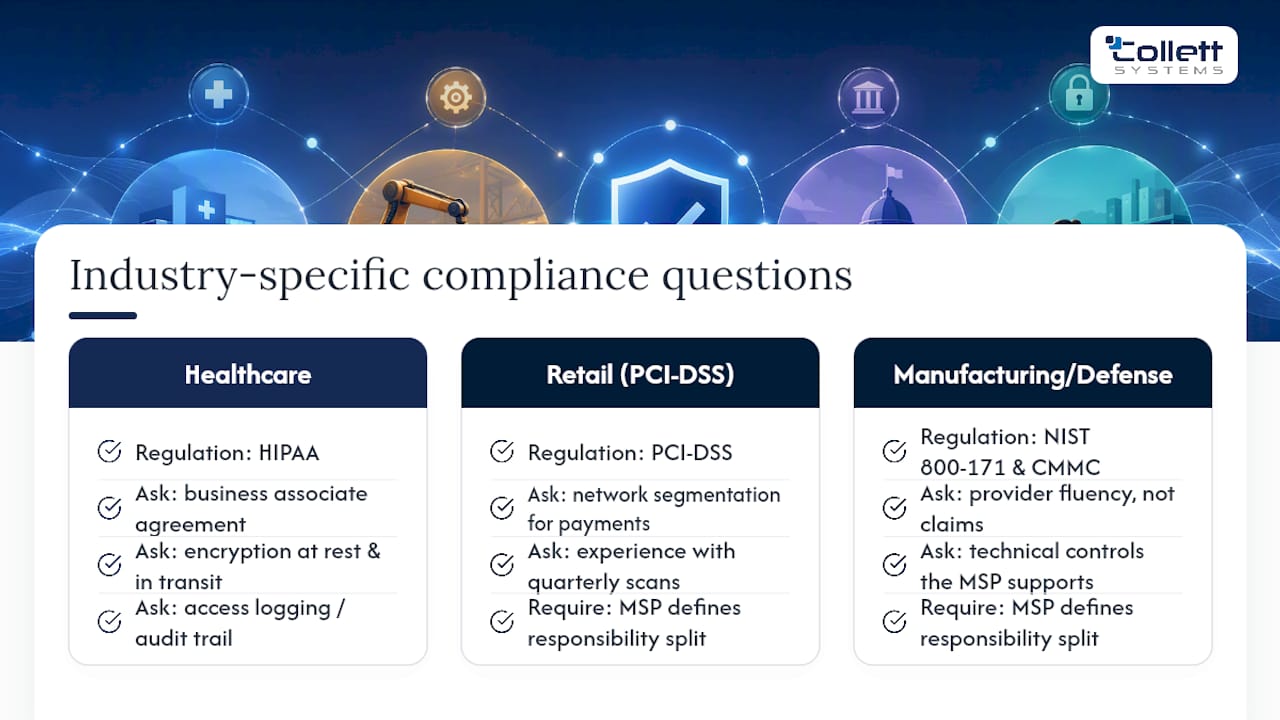
Generic IT competence doesn't automatically translate into regulatory compliance. If your business handles protected health information, ask specifically how the MSP supports HIPAA requirements: business associate agreements, encryption standards for data at rest and in transit, and access logging that can produce an audit trail if regulators ever ask for one.
Retailers and any business processing card payments should ask about PCI-DSS alignment, specifically network segmentation between payment systems and the rest of the environment, and whether the provider has experience with the quarterly vulnerability scans PCI compliance requires. Manufacturers and defense contractors handling controlled unclassified information need a provider that can speak fluently about NIST 800-171 and CMMC, not just claim familiarity.
The honest answer from a competent MSP sounds like: "We support the technical controls for HIPAA/PCI-DSS, and here's what falls under your responsibility versus ours." A provider that claims blanket compliance ownership without defining that split is either overselling or doesn't understand the shared nature of regulatory compliance. Every regulated business should walk away from a vendor conversation with a specific list of which controls the MSP manages directly and which remain the client's responsibility.
Customization Options and Scalability of Services
A fixed, standardized stack sounds inflexible until you compare it to the alternative: tiered service menus that nickel-and-dime you for security features that should be baseline. Ask any MSP candidate what happens when your headcount doubles, when you open a second location, or when you need a specific compliance framework layered onto standard service.
Scalability questions worth asking directly: Does pricing scale linearly per user, or are there hidden infrastructure thresholds that trigger a renegotiation? Can the provider support a hybrid or multi-site environment without a custom engineering project? What's the process for adding a new application or line-of-business tool to the managed environment?
Customization matters most at the edges, specialized compliance needs, unusual legacy systems, or industry-specific software. A provider that says "we can support that" without asking clarifying questions about your actual environment is telling you what you want to hear. The stronger answer names a specific process: an assessment, a defined onboarding step for new systems, and a clear cost structure for scope changes. Businesses growing quickly should weight this section heavily, since a provider that fits today but can't flex in twelve months just creates a second vendor transition down the road.
Interviewing MSPs the Way You'd Interview a Business Partner
Get every answer in writing, then score it the same way across every provider you talk to. Vague answers aren't just unhelpful, they're informative. A provider confident in its security posture puts it on paper without hesitation.
Get a Written Evidence Review, Not Just a Sales Call
Running this entire checklist yourself, chasing down SOC 2 scopes, verifying restore logs, comparing SLA language across three vendors, takes real time most business owners don't have. Collett Systems LLC's cybersecurity risk assessment does that legwork for you: a documented evidence review, a written Shared Responsibility Matrix, and a prioritized remediation list you can hand to any provider you're evaluating, including us.
You get a local engineering team that answers questions directly instead of routing you through a call center, and a security-first standard already built around the exact evidence this article tells you to demand. If you're ready to see where your current environment stands, book an assessment or explore Collett Systems LLC's managed IT services to see what a fully-loaded, fixed-price stack actually includes.
Sources
- NDISAC SMB WG MSP Shopping Questionnaire v7.1 (Final)
- 12 questions to ask when selecting a managed service provider | RSM US
- How to Evaluate an MSP: The Complete Business Owner's Guide | SerenIT
- What you need to know about running a successful MSP program | Yoh
FAQ
What Are the Most Important MSP Questions to Ask First?
Start with security posture, data location and separation, MFA enforcement for administrators, incident response speed, backup restore testing frequency, and subcontractor disclosure.
How Do I Verify an MSP's SOC 2 Claim?
Ask for the actual report, not a badge, and check whether it's Type I or Type II, the audit period, included trust categories, and any noted exceptions.
What Documents Should an MSP Provide Before Signing a Contract?
Request a SOC 2 or ISO 27001 report with scope, a sample SLA, an incident response plan, backup restore logs, a Shared Responsibility Matrix, and a subcontractor list.
How Often Should an MSP Test Backup Restores?
Quarterly is a reasonable minimum for most small businesses, though production-dependent operations like manufacturing often warrant monthly testing.
Does Collett Systems LLC Provide Written Evidence for These Questions?
Yes. Collett Systems LLC standardizes on Microsoft 365 Business Premium, enforces Passkeys and phishing-resistant MFA, and uses its Collett Verify process to document active security controls for clients to review.