For most companies under 50 employees, a managed service provider delivers 24/7 coverage and specialist depth for less than the loaded cost of one full-time IT hire. Larger or highly regulated organizations often need internal staff, or a co-managed mix of both. Cost, coverage, and specialization are the three axes that decide which model wins for your business, and the right answer often changes as you grow.
TL;DR:
- Small companies under 50 employees benefit most from MSPs due to their cost-effective coverage and specialist expertise, often costing less than a full-time hire.
- Internal IT offers tailored workflows and deep institutional knowledge but requires higher ongoing costs and scheduling limits for 24/7 coverage.
- Managed service provider pricing typically includes fixed monthly rates with onboarding fees, making expenses predictable and spreading tooling costs across many clients.
- Co-managed IT allows splitting responsibilities, with MSPs handling security and monitoring while internal teams manage day-to-day support and context-specific needs.
- Businesses should conduct structured assessments and revisit their decision as they grow or face compliance, avoiding early full internalization or exclusive reliance on MSPs.
Table of Contents
- MSP vs Internal IT: The Operational Differences That Matter
- What Does an MSP vs Internal IT Actually Cost?
- When Should You Build an Internal IT Team?
- When Does an MSP Make More Business Sense?
- How Does Co-Managed IT Work in Practice?
- What Questions Should You Ask Before Choosing?
- Why Collett Systems Built Its Model Around These Trade-Offs
- The Real Mistake Most SMBs Make in This Decision
- Get a Clear Answer With a Fixed Per-User Assessment
- Sources
- FAQ
MSP vs Internal IT: The Operational Differences That Matter
The real difference between a managed service provider and an internal IT department isn't just who signs the paycheck. It's how each model is built to operate. Internal IT is designed around one company's quirks, its legacy applications, its specific compliance obligations, and the personalities in the building. An MSP is built around scale: standardized tooling, ticketing systems, and service level agreements that have to work across dozens of clients at once.

That structural difference shows up in daily operations. Internal IT teams tend to optimize for alignment and customization, tailoring workflows to how your business actually runs. MSP service desks optimize for something different: PSA (professional services automation) integration, multi-tenant efficiency, and hitting the response times written into your contract. Neither approach is wrong. They're solving different problems.
Here's how the operational pieces typically split:
- Helpdesk and ticketing: MSPs run centralized ticketing platforms with tiered escalation; internal IT often handles requests informally, which is faster for small teams but harder to audit.
- 24/7 monitoring and SOC coverage: Most MSPs bundle security operations center monitoring into their base stack; building an internal SOC usually requires multiple hires and six figures in tooling.
- Tooling ownership: MSPs typically own and license the remote monitoring, backup, and security tools, spreading that cost across many clients; internal teams buy and manage every license themselves.
- Strategic guidance (vCIO): MSPs often include a virtual CIO for budget and roadmap planning; internal IT leadership does this natively, but only if you've hired for that seniority level.
- Institutional knowledge: Nobody outperforms a long-tenured internal employee who knows why the shipping software was configured a certain way in 2019. That context takes months for any outside team to rebuild.
Coverage and response time are where the trade-offs get concrete. A single internal IT person cannot be on call at 2 a.m. every night without burning out or costing overtime. An MSP's whole business model depends on having bench depth to cover nights, weekends, and vacations without gaps.
What Does an MSP vs Internal IT Actually Cost?
Cost comparisons between MSP and internal IT staffing usually get reduced to a single number, which is a mistake. The real comparison has to account for onboarding, tooling, turnover, and what happens when something breaks at 3 a.m.
Pro Tip: Don't just compare monthly invoices side by side. Build a two-year total cost of ownership model that includes hiring costs, tool licensing, and the cost of downtime during gaps in coverage.
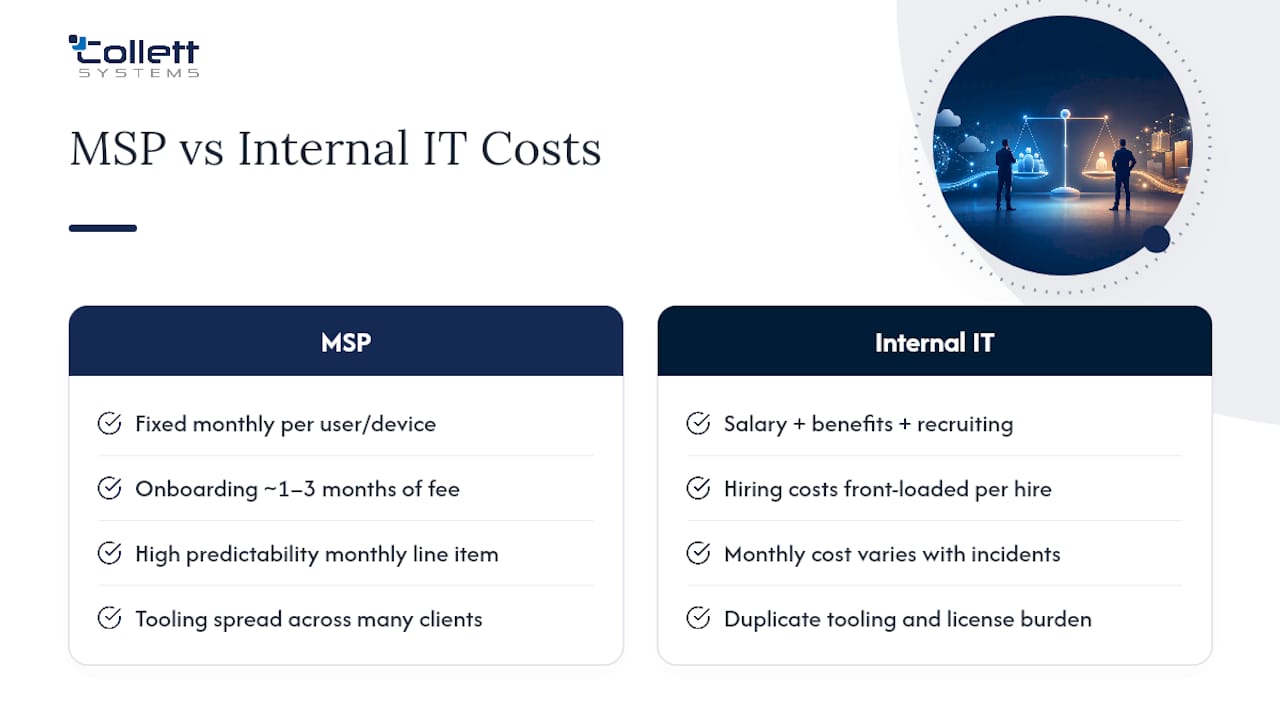
MSP pricing is usually structured as a fixed monthly rate per user or per device, with onboarding fees equal to roughly one to three months of ongoing service to cover initial setup and documentation. That predictability is the appeal: you know your IT line item every month, regardless of how many tickets get filed.
A full-time internal IT hire looks cheaper on a salary sheet until you load in benefits, training, laptops, software licenses, and recruiting costs. And hiring a managed service provider instead of building an internal team can cut IT-related personnel costs by up to 40%, largely because the MSP spreads its tooling and bench costs across many clients instead of one.
Internal IT tends to become cheaper only past a certain scale, or when your business needs deep, proprietary product knowledge that no outside vendor can reasonably develop. The hidden costs that flip this math are turnover (replacing one IT hire can take months), duplicate tooling nobody canceled, and the lost productivity every hour your systems are down without anyone qualified in the building.
When Should You Build an Internal IT Team?
Some businesses genuinely need people on payroll, even at a higher fixed cost. The trigger is usually depth, not size alone.
- Deep product or codebase knowledge: Software companies and businesses running custom applications need staff who live inside that system daily, not a rotating support desk.
- Physical or on-site hardware demands: Manufacturing floors, hospitals, and businesses with heavy on-premises equipment often need hands physically present, not just remote monitoring.
- DevOps and continuous deployment: Fast-moving engineering teams shipping code multiple times a day usually need embedded infrastructure staff, not a ticket queue.
- Heavy regulatory or floor-control needs: Businesses with strict manufacturing controls or highly specific compliance regimes sometimes need staff who understand both the equipment and the regulation simultaneously.
- Scale beyond roughly 100 employees: Past this point, the volume of routine tickets alone can justify a dedicated internal team, even alongside outside specialists.
If none of these apply to your business yet, building a full internal department before you need one is usually the more expensive mistake.
When Does an MSP Make More Business Sense?
For the majority of small and mid-sized companies, outsourcing to a managed service provider wins on cost, coverage, and capability at the same time, which is a rare combination.
For businesses under roughly 50 employees, an MSP typically delivers broader coverage and deeper specialist expertise for less than the loaded cost of a single internal hire. You get 24/7 monitoring, a bench of specialists across networking, security, and cloud infrastructure, and a predictable monthly bill instead of a payroll surprise.
- Steady, predictable spend: One fixed line item replaces the unpredictable cost of hiring, training, and replacing internal staff.
- Real 24/7 coverage: An MSP's bench covers nights and weekends without anyone burning out.
- Specialist bench depth: You get access to security, networking, and cloud specialists no single internal hire could match.
- Faster response to novel problems: MSPs see the same ransomware variant or misconfiguration across dozens of clients, so they often recognize it faster than an internal team seeing it for the first time.
Before signing, watch for red flags: vague SLA language, tiered pricing that nickel-and-dimes you for basic security features, and contracts with steep early termination penalties. A managed IT services agreement should spell out response times, coverage hours, and exactly what's included, not buried in an addendum.
How Does Co-Managed IT Work in Practice?
Co-managed IT isn't a compromise. For many mid-market companies, it's the actual right answer, not a stepping stone to something else. The model works by splitting responsibilities so each side does what it's structurally built to do best.
- The MSP typically owns security tooling and 24/7 monitoring. Patching, endpoint detection, and SOC alerting run through the MSP's stack, which is usually more mature than what a single company could justify building internally.
- Internal staff typically own day-to-day user support and institutional context. They know the CEO hates being locked out of email and why the accounting software still runs on a specific server configuration.
- Pricing usually lands lower than full outsourcing. Co-managed engagements commonly price the MSP layer at roughly 50 to 70% of a fully managed tier, since the MSP is filling gaps rather than replacing staff outright.
- A responsibility matrix prevents scope gaps before they happen. Document explicitly who owns incident escalation and who holds tooling admin credentials. Those two gaps cause most of the breakdowns during actual outages, when finger-pointing costs you the most time.
As companies scale, the common pattern is MSP-for-baseline plus internal specialists for domain-critical systems, which keeps cost efficient while removing single points of failure. Explore how co-managed IT services are typically structured before assuming full outsourcing or full staffing is your only choice.
What Questions Should You Ask Before Choosing?
Before signing anything, run your decision through a short checklist. Vague answers to any of these questions are a warning sign, whether you're evaluating an MSP or a candidate for an internal hire.
- How many employees, locations, and endpoints do you need supported today, and in 18 months?
- What's your actual tolerance for downtime, and does that match the SLA response time on the table?
- Do you operate under compliance frameworks (HIPAA, CJIS, CMMC) that require specific documentation or audit trails?
- For an MSP: what's the onboarding timeline, and what happens contractually if you want to leave?
- For an internal hire: what's your realistic time-to-hire, and who covers nights and weekends during ramp-up?
| Cost factor | Managed service provider | Internal hire |
|---|---|---|
| Monthly cost structure | Fixed per-user or per-device rate | Salary plus benefits, tools, training |
| Time to full coverage | Weeks (after onboarding) | Months (hiring plus ramp-up) |
| After-hours coverage | Included in most contracts | Requires overtime or additional hires |
| Specialist bench access | Broad, shared across clients | Limited to what you hire directly |
A buyer's guide built around these questions gives you documentation to compare vendors apples-to-apples instead of relying on sales pitches.
Why Collett Systems Built Its Model Around These Trade-Offs
Dustin Collett has spent his career watching businesses swing between two extremes: overpaying for tiered IT contracts full of surprise fees, or under-investing until a security incident forces a scramble. That pattern shaped how Collett Systems LLC built its own service stack.
We built a fixed per-user pricing model specifically because we watched too many businesses get quoted a "base" IT package, then get nickel-and-dimed for security features that should never have been optional in the first place.
Collett Systems LLC has worked with over 150 local organizations across Southeastern Wisconsin, delivering fixed per-user pricing with 24/7 monitoring instead of tiered add-ons. One manufacturing client moved from an aging VMware environment to Proxmox through a structured migration without unplanned downtime, a project that requires the same coordination between internal knowledge and outside specialization this whole comparison is built around.
The Real Mistake Most SMBs Make in This Decision
Most SMB leaders treat this as a binary choice: hire a person, or hire a company. That framing misses how the decision actually plays out over a company's life cycle. A ten-person company doesn't need the same model it will need at eighty employees, and locking into one structure too early is more expensive than the monthly invoice suggests.
Run a paid assessment before committing to either direction. Pilot a co-managed model if you already have internal staff stretched thin. Track your mean time to resolution and user satisfaction before and after any change, because that's the only honest signal of whether the new model actually improved anything. Revisit this decision every time headcount or compliance obligations shift meaningfully, not just when a contract renewal forces the conversation.
, Dustin Collett
Get a Clear Answer With a Fixed Per-User Assessment
Collett Systems LLC is the alternative to the guesswork most businesses face when comparing MSP and internal IT costs: instead of estimating, we run a structured IT & Security Assessment that maps your current environment against real coverage gaps and pricing, before you commit to either model.
That assessment covers your network, endpoint security, backup posture, and compliance documentation, then translates it into a fixed per-user monthly cost, not a tiered quote with hidden line items. If you're leaning toward a hybrid setup, our co-managed IT services are built to slot in around existing internal staff, handling 24/7 monitoring and security tooling while your team keeps ownership of day-to-day support. We've guided manufacturers and small businesses across Southeastern Wisconsin through exactly this transition, including complex infrastructure migrations. Schedule an assessment through our managed IT services page to see where your current setup stands and what a fixed monthly number would actually look like.
Sources
Background for this comparison came from industry cost analyses on in-house versus managed IT staffing, operational breakdowns of internal IT versus MSP service desks, headcount-based guidance from ITreviews, and hybrid-model patterns from Level. Partner insight on managed support models came from Goodson Tech.
- When to hire an in-house IT vs. managed service provider | Clutch
- Internal IT vs. MSP service desk: Which one should you choose? | ManageEngine
FAQ
What Is an MSP in the IT Industry?
An MSP, or managed service provider, is a company that remotely manages a business's IT infrastructure, security, and support under a contract, typically billed at a fixed monthly rate per user or device.
Is an MSP Worth It Compared to Internal IT?
For most businesses under roughly 50 employees, yes: an MSP typically costs less than the loaded expense of a full-time internal hire while providing broader coverage and specialist depth.
What Is the Difference Between an MSP and an MSSP?
An MSP handles general IT infrastructure, from helpdesk to monitoring to backups, while an MSSP (managed security service provider) focuses specifically on security operations, threat detection, and incident response; many MSPs, including co-managed providers, bundle both functions into one contract.
What Are Examples of MSP Tools?
Common MSP tooling includes remote monitoring and management (RMM) platforms, professional services automation (PSA) software for ticketing and billing, endpoint detection and response tools, and backup/disaster recovery systems, all typically owned and licensed by the provider rather than the client.