
Per-user IT pricing charges a flat monthly fee per employee that covers that person's devices, software, and support under one predictable line item. Full-service managed IT agreements typically run $100 to $250 per user per month, though quotes at either end can look identical on paper while covering wildly different work. The number itself tells you almost nothing until you know what's inside it.
TL;DR:
- Per-user IT pricing ranges from $50 to $250 per month, with higher costs typically including advanced security, compliance, and dedicated support.
- Pricing often varies based on geography, compliance needs, device diversity, and contract scope, making it essential to clarify what services are included in each quote.
- Most standard agreements cover help desk support, 24/7 endpoint monitoring, patch management, security tools, data backup with testing, and basic account administration, but exclude hardware, special security services, and network infrastructure.
- Comparing quotes requires normalizing scope and asking vendors detailed questions about coverage, billing definitions, and additional fees to avoid underestimating total costs.
- Fixed, fully-loaded per-user models, like those offered by some providers, aim to deliver predictable costs with transparent scope, suitable for businesses with diverse device and compliance requirements.
Table of Contents
- What Do Per-User IT Pricing Ranges Actually Look Like?
- What's Usually Included in a Per-User IT Plan?
- Per-User vs. Per-Device vs. Hybrid: Which Model Fits?
- What Pushes Your Per-User Price Higher or Lower?
- How Do You Compare Per-User Quotes Fairly?
- What Does a Transparent Per-User Offering Look Like?
- What Buyers Get Wrong About Per-User Pricing
- Get a Fixed Per-User Quote Built for Your Business
- Sources
- FAQ
What Do Per-User IT Pricing Ranges Actually Look Like?
Ask five managed service providers for a quote and you'll get five different numbers, all claiming to be "per user." That's not dishonesty. It's scope variance, and it's the single biggest reason SMB owners feel burned after signing a contract.
Industry pricing guides consistently place the market in three tiers. On the low end, some providers charge $50 to $100 per user per month, usually for basic help desk support with limited security tooling. The middle of the market, where most full-service agreements land, runs $100 to $175 per user. At the top, providers bundling advanced security, compliance reporting, and dedicated account management often charge $150 to $200 or more per user per month.
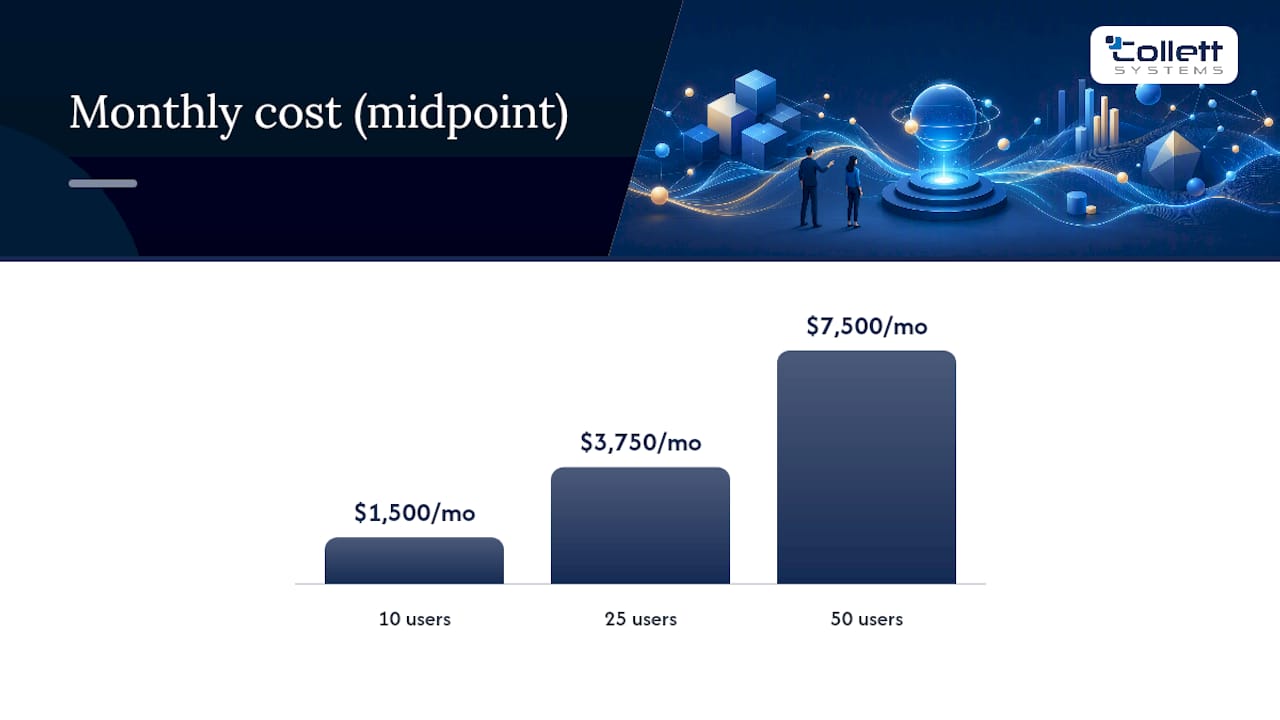
Here's what those ranges mean in real dollars for a typical small business:
- 10 users: $1,500/month at a $150 midpoint; $2,500/month at a $250 high-end scope
- 25 users: $3,750/month at midpoint; $6,250/month at the high end
- 50 users: $7,500/month at midpoint; $12,500/month at the high end
A lower per-user quote may reflect less coverage, not a better deal. Confirm whether emergency work is included or billed separately before comparing proposals.
Three variables drive most of the spread you'll see between quotes. Geography matters. Labor costs in a major metro area push provider overhead higher than in a smaller regional market. Compliance requirements matter even more. A healthcare practice or a firm handling cardholder data needs documentation, auditing, and monitoring that a retail shop simply doesn't, and providers price that work into the per-user rate rather than billing it separately. Device age and diversity round out the list. A workforce running five-year-old laptops on three different operating systems costs more to patch and support than a fleet of standardized machines rolled out eighteen months ago.
None of this means the higher number is automatically the better deal. It means you can't compare two per-user quotes side by side until you've confirmed they're actually pricing the same scope of work. That's the normalization problem the rest of this guide is built to solve.
What's Usually Included in a Per-User IT Plan?
Most SMB owners assume "managed IT" means everything IT-related gets handled for one flat fee. That assumption costs real money. Per-user pricing is a defined bundle of services, not a blank check, and the definition varies enough between providers that you need to read every proposal like a contract, because it is one.
Here's what a standard per-user agreement typically covers:
- Help desk support for the covered employee's day-to-day issues, usually with a defined response time window.
- 24/7 monitoring of endpoints, meaning the provider's tools watch for failures, unusual activity, and performance degradation around the clock.
- Patch management so operating systems and common applications stay updated without manual intervention.
- Endpoint detection and response (EDR) or comparable security software licensed and managed on each device.
- Backup with tested restores for the user's data, not just a backup job that runs and is never verified.
- Basic identity and Microsoft 365 administration, when the provider includes account management as part of the base package.
- Basic firewall monitoring, though not always full firewall management or hardware.
What typically sits outside the per-user number matters just as much. Two providers quoting numbers $50 apart per user can differ by hundreds or thousands of dollars once you account for what each one excludes. Common carve-outs include servers and network infrastructure, which are frequently billed as a separate per-device or flat fee. Advanced security services like penetration testing, dark web monitoring, or security awareness training often cost extra. VoIP and phone system licensing rarely falls under a per-user IT rate. Hardware replacement, project work such as office moves or migrations, and onboarding or setup fees almost never do either.
Pro Tip: Read the contract's definition of "user" before you sign anything. Some providers count every named account, including shared service accounts and departed employees who haven't been removed from the system, which quietly inflates your monthly bill.
Billing rules buried in the contract language change what you actually pay. Some agreements bill for every active account regardless of whether that person still works there. Others prorate new hires mid-month but charge a full month for departures. A few lock in annual increases tied to an index you won't notice until renewal. Ask for the exact billing trigger in writing, not a verbal assurance.
Per-User vs. Per-Device vs. Hybrid: Which Model Fits?
Per-user pricing charges a flat rate per employee no matter how many devices that person touches. Per-device pricing flips the math: you pay for every laptop, desktop, tablet, and server regardless of how many employees share them. Hybrid models blend the two, typically charging a per-user base rate for standard office staff and layering per-device charges on top for servers, shared terminals, or specialized equipment.
The right model depends less on price and more on how your workforce actually uses technology.
- Per-user tends to win when most employees use two or three personal devices each: a laptop, a phone, maybe a tablet.
- Per-device tends to win in environments built around shared or fixed equipment, like warehouses, retail counters, or manufacturing floors, where per-user pricing charges you for staff who rarely touch a computer while under-pricing the actual device load.
- Hybrid tends to win for multi-site firms and businesses running a mix of office staff and floor equipment, since pairing a per-user base with per-device add-ons usually tracks real usage better than forcing one model to cover everything.
A few rules of thumb help narrow the decision faster than a vendor sales call will. If your device-to-user ratio sits close to one-to-one, per-user pricing is straightforward and easy to budget. If it climbs past two or three devices per user, or if you're running shared terminals that multiple shifts touch, per-device or hybrid pricing usually reflects your actual costs more fairly. BYOD environments complicate per-device math because personal phones and laptops aren't always covered, so per-user pricing (with clear BYOD terms spelled out) tends to be cleaner. Compliance-heavy businesses, meanwhile, often need hybrid arrangements regardless of headcount, because servers and specialized systems carry documentation requirements that a flat per-user rate wasn't built to price.
Neither model is inherently cheaper. Each one is more accurate for a different kind of business, and picking the wrong one means either overpaying for coverage you don't need or underpaying for infrastructure that isn't actually protected.
What Pushes Your Per-User Price Higher or Lower?
Six factors move the needle more than any others, and most of them show up in the fine print rather than the headline number.
Headcount changes and contractor billing catch a lot of businesses off guard. Seasonal staff, 1099 contractors, and part-time employees often get billed at the same per-user rate as full-time staff unless your contract specifies otherwise. Ask how the provider handles a mid-month hire versus a mid-month departure, because billing rules here vary widely and rarely favor the client by default.
Servers and infrastructure are the single biggest swing factor in a total IT bill. On-premises servers require patching, backup verification, and hardware lifecycle planning that a pure per-user rate almost never covers. Servers, compliance needs, and device diversity rank among the primary drivers that separate a lean quote from a fully loaded one. A business migrating from on-prem servers to cloud infrastructure should expect a project fee on top of the ongoing per-user rate, at least during transition.
Compliance and regulatory requirements raise costs directly. HIPAA and PCI DSS both require documentation, audit trails, and monitoring that go well beyond standard endpoint management, and providers build that overhead into the price for regulated clients specifically.
Service-level commitments are the quiet cost driver most owners underweight during negotiations:
- Guaranteed after-hours or weekend support typically adds a premium over standard business-hours coverage.
- On-site response commitments (as opposed to remote-only support) cost more, especially outside a provider's core service area.
- Multi-site or geographically spread operations increase travel time and staffing complexity, which shows up in the quote.
None of these factors are hidden by design. They're just easy to overlook when you're comparing a bottom-line number instead of the assumptions built underneath it.
How Do You Compare Per-User Quotes Fairly?
Two quotes with different per-user numbers can represent the exact same total cost, or wildly different ones. The only way to know is to normalize both proposals into a single all-in monthly figure before you decide anything.
Start with an honest inventory. Count your actual users, not your total headcount. Note every device, server, and specialized system that isn't a standard laptop. List the cloud applications and licenses you currently pay for separately, since some providers fold license management into the per-user rate and others don't touch it at all.
Then ask every provider the same set of questions, in writing:
- What exactly counts as a "user" for billing purposes?
- Which services are included in the base rate, and which are billed separately?
- Is there a setup, onboarding, or migration fee, and how is it calculated?
- How are annual price increases determined, and is there a cap?
- What's the guaranteed response time, and does it change after hours?
Here's an illustrative comparison for a 20-person company. These hypothetical figures are not Collett Systems prices or actual client quotes; assume both proposals cover the same licenses and service commitments except for the listed add-ons.
| Monthly cost component | Quote A | Quote B |
|---|---|---|
| Base support for 20 users | 20 × $120 = $2,400 | 20 × $165 = $3,300 |
| Endpoint security | $300 extra | Included |
| Backup and restore testing | $350 extra | Included |
| Normalized recurring monthly total | $3,050 | $3,300 |
| One-time fees and excluded work | Confirm separately | Confirm separately |
The cheaper quote on paper ends up nearly as expensive once you add back what it excludes, and it may still lack the security coverage bundled into the higher quote from the start. Watch for red flags while you compare: vague language around "standard support hours," no written definition of a billable user, and contracts that lock in multi-year terms without a clear exit clause for underperformance. Reviewing the questions every SMB should ask before signing before you sit down with a provider puts you in a stronger negotiating position from the first call.
What Does a Transparent Per-User Offering Look Like?
Market data backs up what we see across Southeastern Wisconsin every day: the per-user number means little without a defined scope behind it. Multiple 2026 pricing guides converge on that same $100 to $250 per user range we outlined earlier, and the spread within that range almost always traces back to what's included, not regional cost differences alone.
Collett Systems LLC built its managed IT model around a single standardized, fully-loaded stack for every client at a fixed per-user rate. That means every business we support gets the same 24/7 monitoring, security management, backup and disaster recovery, and unlimited help desk access, whether they're a five-person office or a 50-person manufacturer. No tiered bundles, no upsells for basics.
Before signing with any provider, verify three things in writing:
- Whether EDR, backup testing, and patching are included or billed as add-ons
- Whether the quoted rate covers after-hours and on-site response, or only remote business-hours support
- Whether compliance documentation is part of the base service or a separate engagement
Pro Tip: Ask a prospective provider to show you a sample monthly report. If they can't produce one on the spot, they're probably not generating one for existing clients either.
What Buyers Get Wrong About Per-User Pricing
Most advice on IT pricing stops at "get three quotes and compare." That's incomplete guidance, and it sends business owners into vendor conversations with a false sense of what they're comparing. The market range itself, $100 to $250 per user, is real and worth knowing. But treating that range as a shopping benchmark, rather than a starting point for scope questions, is where most SMBs get burned.
The bigger failure I see is owners anchoring to the lowest number on a page instead of the total cost of ownership once onboarding fees, security add-ons, and after-hours premiums get layered back in. A $120 quote and a $165 quote can land within $250 of each other once normalized, and the higher one might include coverage the lower one never mentioned.
My advice: build your device and compliance inventory before you talk to a single provider, not after. Ask every vendor the same five questions in writing. Then do the math yourself rather than trusting a sales deck's version of "all-inclusive." Pricing transparency isn't a feature some providers offer and others don't. It's a discipline you have to demand, because the market won't hand it to you by default.
Get a Fixed Per-User Quote Built for Your Business
Collett Systems LLC is the alternative to the tiered-bundle model most SMBs run into when they shop for managed IT: one standardized, fully-loaded stack per user, priced flat, with nothing carved out for a later upsell. Every client gets the same 24/7 monitoring, proactive support, security management, and unlimited help desk access baked into a single predictable monthly rate. Many local organizations in the region use this model, which aims to deliver documented security and operational results.
If you're ready to see how your current environment stacks up against a fully-loaded per-user standard, start with the IT & Security Assessment. We'll walk through your device inventory, security posture, and existing contracts, then show you exactly where a standardized managed IT services plan would land on cost and coverage compared to what you're paying now. No pressure to sign anything on the spot. Just a clear, written picture of what fixed per-user pricing actually looks like for your team.
Sources
FAQ
How Much Do Managed IT Services Typically Cost Per User?
Full-service managed IT typically costs $100 to $250 per user per month, with the midpoint of that range covering monitoring, help desk support, patching, and basic security. Some providers charge as low as $50 to $100 per user for stripped-down plans that exclude advanced security and compliance work. Collett Systems LLC uses a fixed per-user rate with a standardized stack across every client; current pricing details are available through the Managed IT Services page.
What Is the Average IT Spend Per Employee?
Average IT spend per employee varies by industry and compliance needs, but most SMBs land within the same $100 to $250 per user monthly range used across full-service managed IT agreements. Businesses with regulatory requirements like HIPAA or PCI DSS typically sit toward the higher end because compliance reporting and documentation add cost that basic plans don't cover.
What Is the Going Rate for IT Support Per Hour?
Hourly break-fix IT support rates vary widely by region and provider, and most SMB decision-makers find hourly billing harder to budget than a flat per-user rate. Per-user pricing eliminates the hourly guessing game by bundling support into one predictable monthly fee instead of billing time and materials for every ticket.
How Much Should I Pay an IT Guy?
Paying a single IT generalist by the hour or on retainer usually costs less upfront than a managed services contract, but it typically doesn't include 24/7 monitoring, tested backups, or documented security management. A per-user managed IT plan, by contrast, bundles those protections into a fixed monthly rate so you're not exposed between one person's working hours and the next emergency.
Is Per-User Pricing Better Than Per-Device Pricing?
Neither model is universally better. Per-user pricing fits offices where employees use multiple personal devices, while per-device pricing fits environments with shared or fixed equipment like warehouses and retail counters. Hybrid models that combine both often work best for multi-site businesses with mixed device usage.