Yes: proactive IT support prevents most of the outages that hurt small and mid-sized businesses, and it starts with a full assessment and asset inventory, not new software. Run that assessment first to find blind spots before you buy anything. Expect the payoff in stages: fewer surprise outages within the first quarter, predictable monthly costs within two, and a measurably stronger security posture by the time you hit your first full patch cycle.
TL;DR:
- A full asset inventory and baseline performance metrics are essential before deploying monitoring agents to identify blind spots and immediate risks.
- Automating remediation for issues recurring three or more times optimizes efficiency and reduces manual intervention over time.
- Regular backup testing, capacity reviews, and security gap assessments are critical components to verify recovery plans and avoid false security comfort.
- Consolidating monitoring, patch management, and security tools into a unified system prevents data silos and enhances automation.
- A phased rollout over 60 to 90 days, emphasizing alert tuning and policy enforcement, ensures successful adoption and sustained proactive support.
Table of Contents
- What Is Proactive IT Support, Exactly?
- Why Proactive IT Support Matters for SMB Growth
- The Core Components of a Proactive IT Program
- How to Move From Reactive to Proactive Step by Step
- Which Tools and Technology Categories Actually Matter?
- What Metrics Actually Prove Proactive IT Is Working?
- What Mistakes Derail a Proactive IT Rollout?
- How Collett Systems Builds Proactive IT Programs
- How to Choose a Proactive IT Support Provider
- Should You Build an Internal Team or Outsource?
- Managing the Change: Staff Training and Adoption
- Budgeting for Proactive IT Support
- Ready to See Where Your IT Stands Right Now?
- Where These Numbers and Claims Come From
- A Closing Note From Dustin Collett
- Sources
- FAQ
What Is Proactive IT Support, Exactly?
Proactive IT support is a service model built on four repeating actions: monitor systems continuously, act on warning signs before they become failures, automate the fixes that keep recurring, and plan capacity and security improvements ahead of need. Freshworks frames this as four pillars: continuous monitoring, automation and patching, predictive analysis, and ongoing staff education. Compare that to the break-fix model most small businesses default to, where nothing happens until a server locks up or a laptop won't boot.
Monitoring alone doesn't earn the "proactive" label. A dashboard that lights up red after a drive fails is still reactive. What separates real proactive IT support from a glorified alert feed is what happens next. A provider or team that qualifies as proactive will typically:
- Deploy monitoring agents on every endpoint and server, not a sample.
- Patch operating systems and applications on a defined schedule, not "when someone remembers."
- Test backups by restoring them, not just confirming a job "completed."
- Automate remediation for issues that repeat instead of manually fixing the same ticket every month.
- Review capacity, security gaps, and upgrade needs on a recurring planning cycle.
Why Proactive IT Support Matters for SMB Growth
The business case comes down to three numbers: downtime, cost variance, and risk exposure. A single afternoon of email or server downtime can cost a 25-person firm thousands in lost billable hours, missed orders, and rushed emergency vendor calls. Proactive monitoring catches failing drives, expiring certificates, and capacity ceilings before they cause an outage, which is the entire economic argument behind a 2006 academic model of proactive versus reactive maintenance: planned intervention costs less than failure recovery, almost every time.
Cost predictability matters just as much as prevention. Reactive IT spending spikes unpredictably, an after hours emergency call runs far more than a scheduled maintenance window. A fixed monthly managed services fee turns that volatility into a line item you can actually budget against.
Security and productivity benefits stack on top:
- Faster, scheduled patching closes vulnerability windows that attackers actively scan for.
- Verified backups mean ransomware or hardware failure becomes an inconvenience, not a crisis.
- Fewer emergencies mean fewer help desk tickets. LogMeIn notes that organizations shifting to proactive models see lower ticket volume and less overnight firefighting, which frees staff to actually use their workday productively instead of waiting on IT.
As you add employees or open a location, a proactive foundation scales. A reactive one just breaks more often.
The Core Components of a Proactive IT Program
A working proactive program is built from six interlocking pieces. Skip one and the whole thing gets shakier.
- Remote monitoring and management (RMM) coverage. Every endpoint and server runs an agent reporting health data back to a central console. Alert tuning matters here: an untuned RMM buries your team in noise within a week.
- Patch management with a real workflow. Critical security patches get tested on a small group of machines, typically 5 to 10 devices, before wider rollout. Routine patches follow a scheduled monthly cadence; critical vulnerabilities get pushed faster once tested.
- Scripted remediation for repeat issues. A practical rule from managed services practice: if the same problem occurs three or more times, script the fix instead of manually repeating it. Don't automate one-off issues. Save automation for patterns.
- Backup verification and disaster recovery testing. A completed backup job means nothing if nobody has tried restoring from it. Recovery testing on a regular cadence, not just after a scare, is what separates a real DR plan from a false sense of security.
- Security stack coordination. Endpoint detection and response (EDR), vulnerability scanning, and phishing simulation training work together, not as separate purchases layered on top of each other.
- Configuration and asset data (CMDB). Knowing what's connected to what lets your team predict the blast radius of a change before making it, instead of finding out the hard way.
Pro Tip: Before adding a new monitoring tool, ask what happens to an alert after it fires. If the answer is "someone checks it eventually," you don't have proactive support yet. You have a dashboard.
How to Move From Reactive to Proactive Step by Step
Rolling this out works best as a phased sequence rather than a single flip of a switch, and the timeline below runs roughly 60 to 90 days for a typical SMB with 20 to 100 devices.
- Phase 0, Preparation. Get leadership aligned on why this matters, name a single internal owner for the transition, and define what success looks like in numbers, not feelings.
- Phase 1, Assessment and inventory. Build a full asset list, capture baseline performance metrics, and flag the risks that need attention immediately, not eventually.
- Phase 2, Deployment. Pilot monitoring agents on a small group of devices, verify that health data reaches the console, and then expand coverage to the inventoried endpoints and servers. Document exceptions, connect alerts to the ticketing system, and assign response owners before relying on the new tools.
- Phase 3, Alert-tuning sprint. Reserve weeks two through four for reviewing alerts against real device behavior. Adjust thresholds, suppress duplicate notifications, separate urgent failures from routine warnings, and test escalation paths. Confirm that actionable alerts reach the right person before automating fixes.
- Phase 4, Automation and policy enforcement. Script fixes for recurring issues, lock in patch policies with defined test and deployment windows, and put backup verification on a fixed schedule.
- Phase 5, Reporting and governance. Move to monthly business reviews and quarterly roadmap planning so proactive IT becomes a standing conversation, not a one-time project.
Skipping the tuning sprint is the single most common mistake in this sequence. Teams that jump straight from deployment to automation end up automating around bad alert data, which just moves the chaos instead of fixing it.
Which Tools and Technology Categories Actually Matter?
Buying decisions in this space go wrong when businesses shop for a brand name instead of a category of function. Six tool categories cover the ground: RMM handles monitoring and remote access; ITSM manages ticketing and workflow; patch management tools handle testing and deployment; backup and disaster recovery platforms protect data continuity; SIEM and endpoint protection (EPP) cover threat detection; and a CMDB tracks what's actually in your environment.
What matters more than any single tool is whether they talk to each other. A unified data layer is what makes proactive practices sustainable for a small team; without it, someone has to manually cross-reference five different consoles every time something breaks, which defeats the entire point of automation.
Before signing with any vendor, ask these questions directly:
- Can your platform script remediation for recurring issues, or is every fix still manual?
- What reporting comes standard, and can it show patch compliance and response times without a custom build?
- What service level agreement backs your response times, in writing?
- Do your backup, monitoring, and ticketing tools share data, or do they operate in isolation?
If you're evaluating backup tooling specifically as part of this stack, resources like this comparison of backup plugin options are worth a look for understanding how verification and restore testing get handled across different platforms.
What Metrics Actually Prove Proactive IT Is Working?
Numbers convince leadership faster than adjectives do. Freshworks identifies incident prevention rate, mean time between failures (MTBF), patch coverage, and downtime reduction as the core metrics that validate a proactive program. Calculate incident prevention rate by tracking issues caught and resolved before they caused an outage against total issues detected. MTBF and MTTR (mean time to resolution) tell you two different things: how often things break, and how fast you fix them once they do.
| Metric | What it measures | Target range |
|---|---|---|
| Patch compliance | Percentage of devices on current patches | 95%+ |
| Alert-to-ticket automation | Alerts resolved without manual triage | Above 40% |
| MTTR, routine tickets | Time to resolve non-critical issues | Under 8 hours |
| MTTR, critical incidents | Time to resolve business-halting issues | Under 1 hour |
A monthly dashboard for leadership should show these four numbers alongside a plain-language summary of what changed and why. Skip the raw log dumps. Executives want trend lines, not console screenshots.
What Mistakes Derail a Proactive IT Rollout?
Most failed rollouts trace back to one of four habits. Fragmented tooling is the most common: five different consoles that don't share data, which turns "proactive" into a part-time data entry job. Consolidate or integrate before adding another point solution.
Alert fatigue kills momentum fast. A dedicated tuning sprint with clear threshold rules fixes this early, before your team starts ignoring alerts altogether.
Patching without a test group is how one bad update takes down half your fleet at once. Keep critical and routine patches on separate approval tracks.
- Skipping user training leaves your strongest technical controls undermined by one careless click.
- Never testing backups means you find out they're broken during the exact moment you needed them.
Pro Tip: Schedule a quarterly "fire drill" restore test on a random backup file. If your team can't recover it in under 30 minutes, that's a problem to fix now, not during an actual ransomware event.
How Collett Systems Builds Proactive IT Programs
Collett Systems LLC runs one standardized, fully-loaded IT stack for every client at a fixed per-user monthly price, backed by 24/7 monitoring and no tiered upsells for the features that matter most. An IT & Security Assessment delivers a full asset inventory, a documented risk score, and a prioritized roadmap, the same Phase 1 groundwork every proactive rollout depends on.
How to Choose a Proactive IT Support Provider
Start with pricing structure, because it reveals more about a provider's incentives than any sales pitch will. A fixed per-user monthly rate means the provider is financially motivated to prevent problems, since every ticket costs them time they didn't bill for separately. Hourly or tiered pricing can quietly reward the opposite: more incidents mean more billable hours.
Ask for the specifics behind the marketing. What's the guaranteed response time for a critical outage versus a routine request, in writing? Does 24/7 monitoring mean an actual person reviews alerts overnight, or does it mean a dashboard nobody watches until morning? How often are backups tested with a real restore, not just confirmed as "completed"?
Local presence matters more than most SMBs realize until they need someone on-site fast. A provider with real client references in your region can usually get physical access to a server room in an hour, not a day.
Push for specifics on what's included versus what's an add-on. Some providers advertise "proactive support" but charge extra for the patching, backup testing, or strategic planning that actually make it proactive. That's a tiered bundle wearing proactive language, not the real thing.
Finally, ask what happens during a genuine emergency, outside business hours, on a holiday weekend. A provider's real value shows up in exactly that moment, not in the sales deck.
Should You Build an Internal Team or Outsource?
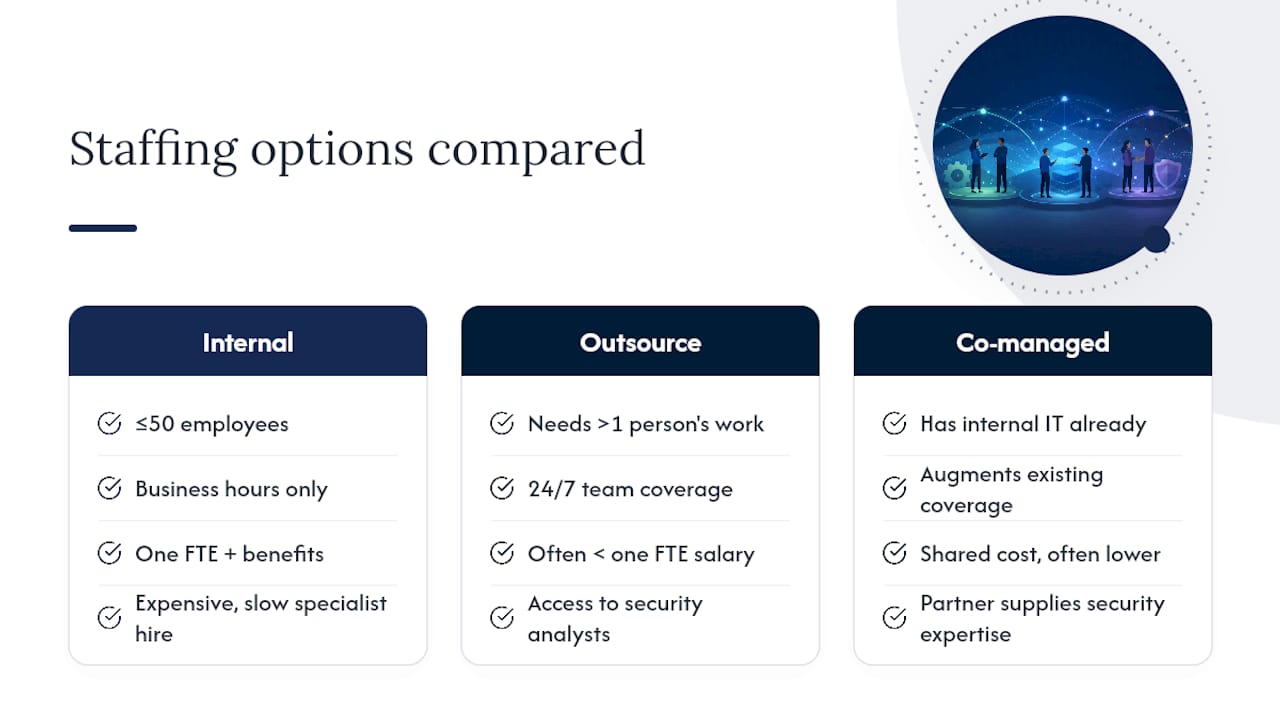
The honest answer depends on headcount and how specialized your IT needs are, not on which option sounds more impressive. A business with 50 or fewer employees rarely generates enough daily IT work to justify a full-time hire covering monitoring, security, help desk, and strategic planning simultaneously. That one person becomes a single point of failure the moment they take vacation or leave.
Outsourcing to a managed IT provider gives you an entire team, monitoring specialists, security analysts, and help desk staff, for often less than one full-time salary with benefits. The 2025 ISC2 Cybersecurity Workforce Study points to persistent cybersecurity skills shortages, which makes hiring a dedicated in-house security specialist expensive and slow even for businesses that want to go that route.
Co-managed IT services split the difference for businesses that already employ IT staff but need extra coverage, after-hours monitoring, or specialized security expertise their internal team doesn't have time to build. This model lets an existing internal hire focus on the work only they can do, day-to-day user support, vendor relationships, projects, while a managed partner handles monitoring, patching, and the 24/7 coverage no single employee can realistically provide alone.
The decision point is simple: if your IT needs fit comfortably into one person's 40-hour week with room to spare, an internal hire can work. If they don't, outsourcing or co-managing closes the gap without the overhead of building a full department.
Managing the Change: Staff Training and Adoption
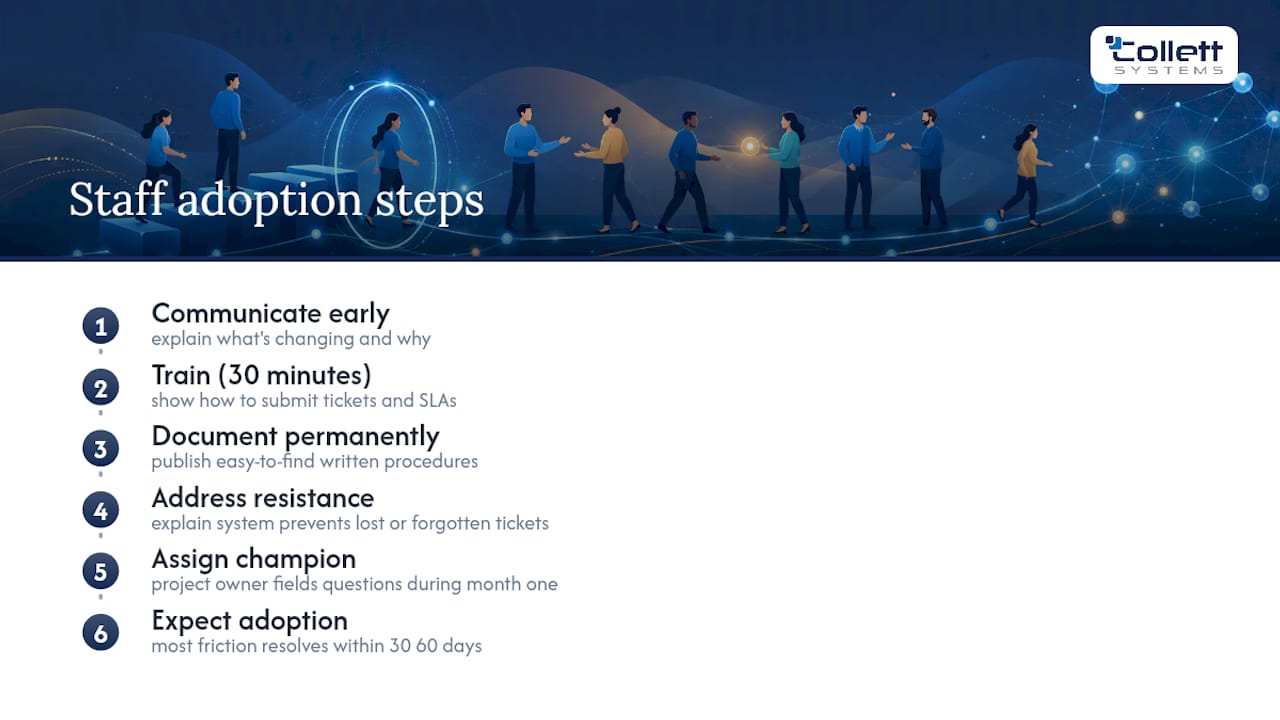
The technology rollout is the easy part. Getting your staff to actually change how they report problems and interact with new systems is where most transitions stall. Employees who spent years just calling "the IT guy" when something broke now need to submit tickets through a new system, and that habit change takes deliberate reinforcement, not a single email announcement.
Start communication early, before agents get deployed on anyone's laptop. Explain plainly what's changing and why, framed around what it means for them: fewer frozen screens, faster help, less waiting on hold. Nobody objects to that pitch.
Run a short training session, 30 minutes is usually enough, covering exactly how to submit a ticket, what response times to expect, and who to contact for a genuine emergency versus a routine request. Put this in writing somewhere permanent, not just in a meeting nobody remembers.
Expect resistance from at least a few long-tenured employees who liked the old informal system. Address it directly rather than ignoring it: the new system exists specifically so their tickets don't get lost or forgotten, which was the actual weakness of the informal approach.
Assign an internal champion, ideally the same person designated as the project owner in Phase 0, to field questions during the first month. Most adoption friction resolves itself within 30 to 60 days once staff see faster response times firsthand.
Budgeting for Proactive IT Support
Budgeting for this shift means comparing a predictable monthly line item against the hidden, spiky cost of reactive firefighting you're probably underestimating right now. Emergency after-hours service calls, rush hardware replacements, and the labor cost of employees sitting idle during an outage add up fast, and most businesses never total that number until they're forced to.
Managed IT services are typically billed per user or per device monthly, which is precisely what makes the model budgetable a year out instead of a surprise line item every quarter. Get quotes based on your actual current headcount and device count, not a rough guess, since per-user pricing scales directly with both.
Factor in a few line items beyond the base monthly fee: an initial assessment or onboarding cost if the provider charges one separately, any hardware refresh needed to support modern monitoring agents, and training time for staff during the transition month.
Compare quotes on what's actually included, not just the sticker price. A lower monthly rate that excludes patch management, backup testing, or after-hours support isn't actually cheaper, it just shifts the cost to whenever something breaks. Ask every provider you're evaluating for a full breakdown of what's bundled versus billed separately before comparing numbers side by side.
Ready to See Where Your IT Stands Right Now?
Collett Systems LLC is built for exactly the SMB situation this article describes: a business that wants proactive infrastructure ownership, not a tiered menu of add-ons priced to upsell you later. Every client gets the same fully-loaded stack, 24/7 monitoring, defined response times, and fixed per-user pricing with no surprise invoice after a bad month.
The place to start is the same one this entire article recommends: an assessment. The IT & Security Assessment documents your current asset inventory, scores your risk exposure, and produces a prioritized roadmap you can act on immediately, whether or not you move forward with Collett Systems LLC afterward. If you want a faster, lower-commitment starting point, the free IT risk score takes about 60 seconds and flags the most urgent gaps first.
Request the assessment through the Collett Systems LLC site, and expect initial findings within days, not weeks, so you can start acting on your roadmap while the details are still fresh.
Where These Numbers and Claims Come From
- Freshworks defines the four pillars of proactive IT and the KPIs used throughout this guide.
- LogMeIn documents the ticket-volume and staffing benefits of shifting away from break-fix support.
- ISC2's 2025 workforce study explains why managed security appeals to talent-constrained SMBs.
- The 2006 academic maintenance model grounds the economic case for proactive over reactive investment.
A Closing Note From Dustin Collett
SMBs that wait for a crisis to justify proactive IT usually pay for that decision twice, once in the outage itself, and again in the rushed, overpriced fix that follows it. The businesses that get ahead of this treat an assessment as step one, not a final step after something already broke. If you're ready to see exactly where your infrastructure stands, request an assessment and let the roadmap tell you what's next.
Sources
- Proactive IT support (Freshworks)
- How to Implement Proactive IT Support (LogMeIn)
- 2025 ISC2 Cybersecurity Workforce Study
- Proactive and reactive computer network maintenance policies (2006)
FAQ
What Is Proactive IT Support?
Proactive IT support is a service model that monitors systems continuously, patches and automates fixes before failures happen, and plans capacity and security improvements ahead of need. It stands opposite the reactive break-fix model, where nothing happens until something already broke, as Freshworks outlines.
What Is Proactive Customer Service in an IT Context?
In IT support specifically, proactive customer service means a provider reaches out about a problem, a failing hard drive, an expiring certificate, before the client even notices it. This typically comes from continuous monitoring paired with a team that actually acts on the alerts it receives, rather than a dashboard nobody checks.
What Is Proactive Cybersecurity?
Proactive cybersecurity means finding and closing vulnerabilities before an attacker exploits them, through scheduled patching, vulnerability scanning, and phishing simulation training, instead of responding only after a breach occurs. Given the ongoing cybersecurity skills shortages many SMBs face internally, a managed proactive security approach often fills a gap smaller businesses can't staff on their own.
How Much Does Proactive IT Support Cost?
Pricing varies by provider and by how many users or devices you have, since most managed IT services bill per user or per device monthly. Collett Systems LLC prices its Managed IT Services on a fixed per-user basis with current details available directly on its site.
How Long Does It Take to Move From Reactive to Proactive IT?
A typical SMB with 20 to 100 devices can complete the core rollout, assessment, agent deployment, alert tuning, and automation, in roughly 60 to 90 days. Syncro's phased framework places the alert-tuning sprint specifically in weeks two through four of that timeline.