For most small and mid-sized businesses, a server should be planned for replacement every four to five years, and reviewed every year from year three. Research puts the commonly cited refresh cycle at three to five years. Past year five, repair, downtime and security costs climb faster than the hardware's remaining value. The businesses that avoid emergencies treat the cycle as a budgeted schedule with a fixed owner, not as a decision made the day a server fails. That is how we run it for the manufacturers, law firms, dental practices and financial firms we support across Southeastern Wisconsin.
TL;DR
- Plan on a three to five year replacement cycle for physical servers, with a formal review at year three and a firm decision by year five.
- The date on the calendar is not the only trigger. Vendor end of support, unpatchable security flaws, rising repair calls and failing backups all move the date forward.
- Waiting costs real money: IDC found annual per-server operating costs rising from $7,541 in years one to three to $22,511 in years four to six.
- Stagger replacements so you spend a similar amount each year instead of absorbing one large bill and one long weekend of migration.
- Windows Server 2016 reaches the end of extended support on January 12, 2027, so any business still running it needs a plan now.
Table of Contents
- What a server replacement cycle is
- How long a server should stay in service
- What delay actually costs
- The triggers that move the date forward
- Physical, virtual or cloud: what to put on the new hardware
- A replacement plan that does not interrupt work
- Why a managed approach beats a reminder in a spreadsheet
- Our perspective
- Start with an assessment of what you have
- FAQ
- Sources
What a server replacement cycle is
A server replacement cycle (also called a refresh cycle) is the planned number of years a server stays in production before you replace it with new or newer hardware. It is the core of server lifecycle management: the practice of tracking a server from purchase through deployment, support and retirement, so the end of its life is a scheduled event.
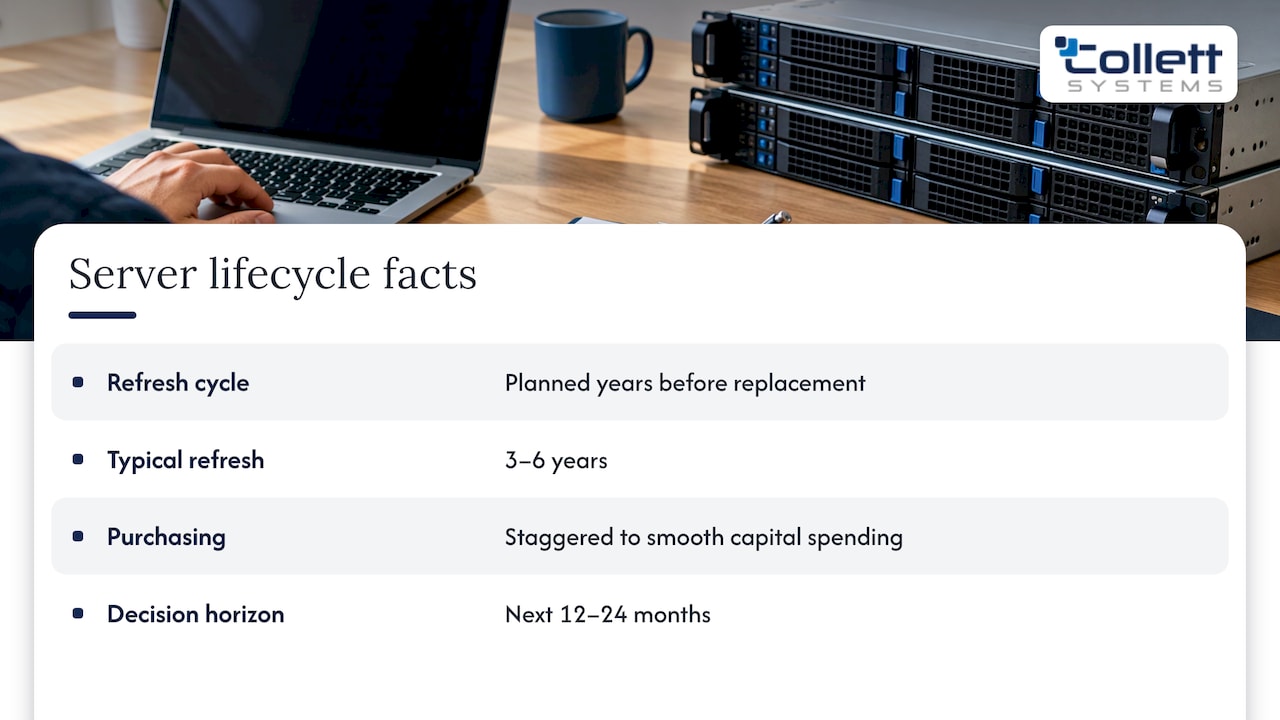
The U.S. General Services Administration describes the technology lifecycle as a loop of evaluating needs, buying, integrating, implementing, supporting, retiring and refreshing. Its report puts the typical refresh point at three to six years and recommends staggered purchasing to smooth out capital spending. For a small business, that loop shrinks to a simple question: which of our servers hit their decision date in the next 12 to 24 months, and what is the plan for each?
How long a server should stay in service
The honest range is wide, so here is how the published numbers line up.
| Source | What it found |
|---|---|
| IDC, April 2025 | Average refresh cycle is three to five years; 44% of organizations refresh every three years or less |
| IDC Survey Spotlight, August 2025 | Almost 32% refresh rack servers less often than every five years; a further 51% refresh every four to five years |
| GSA IT Vendor Management Office | Refresh typically at three to six years, with staggered purchasing |
| TechTarget, 2023 | Servers can last three to 10 years; virtualization and clustering have extended production lifespans |
Read those together and the pattern is clear. Large organizations with spare capacity and in-house staff refresh sooner. Smaller businesses tend to run hardware longer, which is understandable, but it is also where the risk concentrates. A single file or application server at a 40-person machine shop or a six-attorney firm is rarely backed by a spare.
Our recommendation for a business with one to three physical servers:
- Years 1 to 3: full warranty and vendor support. Keep firmware and patches current.
- Year 3: first formal review. Check capacity, warranty status, backup health and vendor end-of-support dates.
- Years 4 to 5: replace, ideally in a planned window. Extend only with a documented reason, a current support contract and a tested recovery plan.
- Year 6 and beyond: treat as an exception that needs a written plan, not a default.
What delay actually costs
The argument for a disciplined cycle is not that new hardware is exciting. It is that old hardware is expensive in ways that rarely show up on a purchase order.
Operating cost. An IDC study of 425 enterprises found average annual operating cost of $7,541 per server in years one to three, rising to $22,511 in years four to six. The same study reports that IT staff time per server per week rises as the hardware ages. The study covered enterprises, so a small business will see smaller absolute numbers, but the direction is the same: repair time, support premiums and workarounds grow with age.
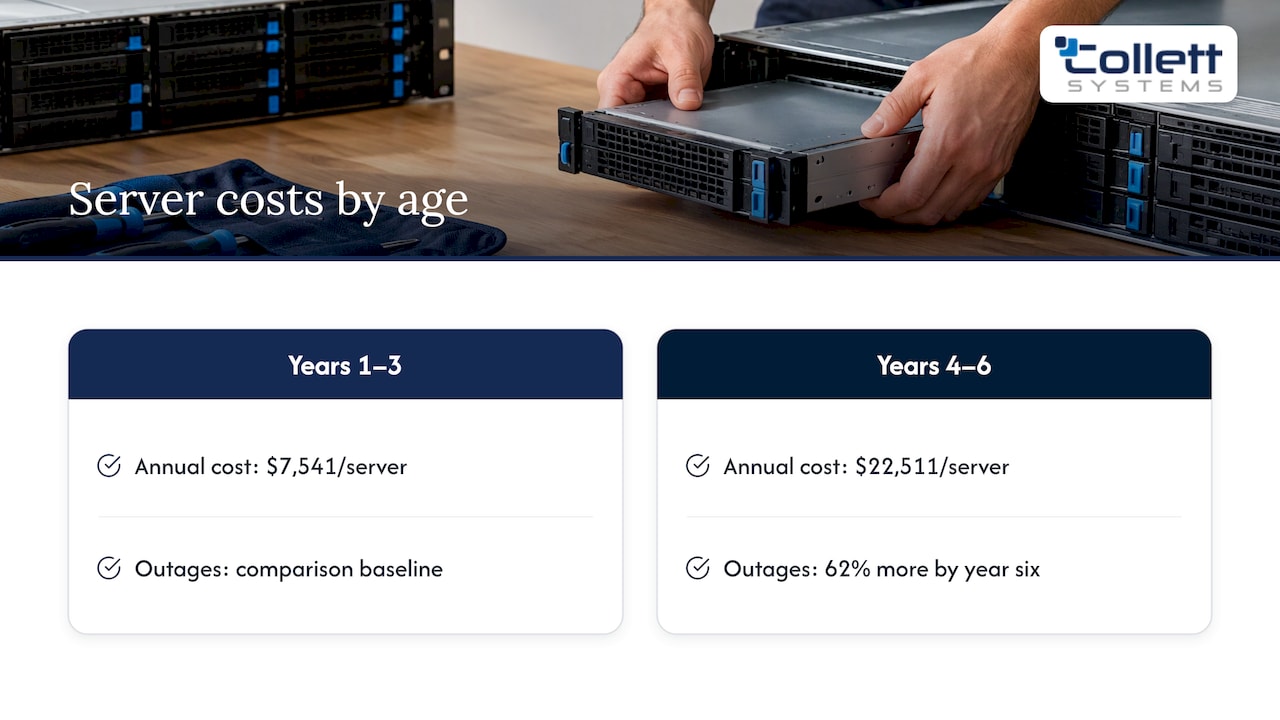
Unplanned outages. A Dell-commissioned IDC business-value study found servers averaged 62% more unplanned outages by year six than in years one to three. Failures also tend to arrive at the worst time, under load, during month-end or a production run.
Support pricing. The GSA advises aligning maintenance agreement terms with the asset's expected lifespan, so a vendor cannot raise pricing late in the product's life. Renewing coverage on a six-year-old box is often the first sign that replacement is cheaper.
For a manufacturer, the cost of a stopped server is a stopped line. If you want to put a number on your own plant, our guide to calculating manufacturing downtime cost walks through it. For a law firm or dental practice, the cost is billable hours, canceled appointments and the exposure of client or patient data.
The triggers that move the date forward
The calendar sets your default. These events override it.
Vendor end of life and end of support
End of life (EOL) means the manufacturer stops selling a product. End of support (EOSL) means it stops guaranteeing firmware updates, parts and security patches. Hardware makers publish several milestones per model, and the earliest important one is usually the right trigger to plan around.
Operating systems have their own clock. Microsoft states that extended support for Windows Server 2016 ends on January 12, 2027, and its lifecycle page lists paid Extended Security Updates available in annual increments after that. A server bought in 2016 or 2017 is likely to hit hardware age and operating system end of support in the same season. That is the best moment to replace it, because you migrate once instead of twice.
Security you can no longer patch
IDC's 2025 survey of on-premises server users lists enhanced security as the most common reason to refresh, cited by 48% of respondents, ahead of performance and scalability at 47% each. It also names unpatchable security flaws as an accelerator. For firms that owe auditors or clients documentation of how data is protected, an unsupported server is a finding waiting to happen. Pair the replacement plan with modern endpoint detection and response on the machines that connect to it.
Rising repair and downtime
The GSA notes that increasing downtime, repair cost or defect counts can be a trigger to act before expected end of life. Practical signs for a small business:
- The same server needs a reboot or a parts swap more than once a quarter.
- Backups run past their window or fail intermittently.
- Disk or memory replacement parts are hard to source.
- Staff have started working around slow file opens or application hangs.
- The server can no longer run the version of line-of-business software your vendor supports.
Any two of those at once is a replace decision, not a repair decision.
Capacity and workload changes
Growth, new software, and more demanding workloads such as ERP, CAD or imaging all consume headroom. IDC lists improved performance and scalability as top reasons to refresh, each at 47%. If your server is routinely above its comfortable load, you are paying for the old box with staff patience.
Physical, virtual or cloud: what to put on the new hardware
Virtualization lets several workloads share one host, and clustering and live migration allow work to move between hosts. TechTarget notes these technologies have extended production lifespans for well-maintained environments. In practice, the replacement cycle is the best time to consolidate: fewer, better-sized hosts, with workloads that can move between them.
That is also where migration planning matters. Data you do not need should not travel to the new platform, and cleaning up data well before a migration shortens the cutover and reduces what you have to protect and back up afterward.
If you run VMware today and licensing or hardware is forcing a decision, our VMware to Hyper-V migration page explains that path. If part of the answer is moving some workloads off site, the cloud migration checklist covers what has to be settled first.
A replacement plan that does not interrupt work
A good migration is boring. Here is the sequence we would follow.
- Inventory everything. List each server, its age, warranty end date, operating system, role and the applications that depend on it. Include the forgotten ones: the old box under a desk that still runs a license server or a door-access database.
- Rank by business impact. A short business impact analysis tells you what each system costs per hour when it is down and how fast it has to come back. That ranking sets the order of replacement and the recovery targets.
- Set decision dates. Give every server a review date and a replace-by date, and put the costs into next year's budget. The GSA's staggered purchasing advice applies here: replace one server a year rather than all at once.
- Size for three to five years of growth. Choose capacity for where you will be at the end of the cycle, not for today.
- Build and test beside the old server. Stand up the new environment, move a copy of the workload, and test with the people who use it.
- Verify backups and recovery before cutover. Restore a real file and a real system from backup onto the new environment. A migration without a proven rollback path is a gamble.
- Cut over in a planned window. Pick a low-activity period, such as a weekend outside a production push or a tax deadline, and keep the old server intact until everything checks out.
- Retire the old hardware securely. Wipe or destroy drives so that no client, patient or employee data leaves with the equipment, and keep a record of what was done. Regulated firms should keep that documentation with their compliance files.
Why a managed approach beats a reminder in a spreadsheet
Most replacement cycles fail for a dull reason: nobody owns the date. The server works, the budget is tight, and the review slips another year. Then the warranty lapses, the operating system loses support and a failure forces a rushed purchase at whatever lead time the market offers.
Owning the cycle means monitoring hardware health around the clock, tracking warranty and vendor support dates, keeping an accurate inventory and putting a replacement into the budget before it is urgent. Our managed IT services cover infrastructure management with 24/7 monitoring and proactive support, and strategic IT planning is part of the service rather than an add-on. Because we bill a fixed cost per user, a planned refresh becomes a line you can forecast, not a surprise. If you are weighing whether to hand this over, what to expect from IT support services sets out what good coverage looks like, and the cost of buying on price alone is covered in why cheap business computers cost more over time.
Our perspective
The question we hear most is "can we get one more year out of this server?" Sometimes the answer is yes. But it should be a decision made with a date, a support contract and a tested recovery plan, not a default reached because nobody looked.
We think of IT as infrastructure, like the electrical service in your building, not as an expense you tolerate. Infrastructure gets a lifecycle, an owner and a budget. That is why every client gets the same fully loaded stack, with monitoring, security, backup and recovery, and planning included, at a fixed cost per user. There is no tier where lifecycle planning costs extra.
For manufacturers, a failed server is a stopped line. For law firms and dental practices, it is client and patient data and a regulator's questions. For financial firms, it is documentation you have to produce. In each case the cheapest server replacement is the one scheduled 12 months ahead, and our job is to make sure that date is on the calendar and the migration is uneventful.
Dustin Collett
Start with an assessment of what you have
The fastest way to build a replacement cycle is to see your whole environment on one page: every server, its age, its support status and its risk. Our IT & Security Assessment is the starting point, and the result is a documented picture you can plan a budget around. If you would rather start with a quick check, the free IT risk score takes about 60 seconds. When you are ready for someone to own the cycle for you, see our Managed IT Services.
If you already have an internal IT person, co-managed IT services let us share the lifecycle work with your team. And if you are considering a change of provider mid-cycle, here is how switching IT providers in Wisconsin works.
FAQ
How often should you replace your server?
Plan for every three to five years, which matches the average refresh cycle IDC reports. Review at year three, and decide by year five. Replace sooner if the vendor ends support, backups become unreliable or repair calls increase.
Can a server run safely for seven or eight years?
Some do run that long, and some organizations stretch to six to eight years. Safe operation takes a current support contract, an operating system still receiving security updates, monitored hardware health and a recovery plan you have tested. Without those, the risk of an outage and the operating costs rise sharply after year five.
What is the difference between server lifecycle management and a replacement cycle?
The replacement cycle is one piece: the schedule for swapping hardware. Lifecycle management covers the whole path, from assessing needs and buying, through deployment, monitoring and patching, to secure retirement. The GSA describes it as a continuing loop from evaluation through refresh.
Does moving to the cloud remove the need for a replacement cycle?
It removes the hardware you own for those workloads, but not the planning. You still need to decide which systems move, which stay on site, and when. Many businesses keep a mix, and the on-site servers still need a schedule.
When is Windows Server 2016 no longer supported?
Microsoft says extended support ends January 12, 2027. After that, security updates are available only through paid Extended Security Updates, so most businesses should plan a migration to a current version.
Sources
- IDC white paper on server refresh, April 2025
- IDC Survey Spotlight on server refresh strategies, August 2025
- GSA technology lifecycle management report
- IDC study on frequent server replacement
- IDC business value study on technology rotation
- TechTarget on server hardware degradation
- Microsoft: planning for Windows Server 2016 end of support
- Microsoft lifecycle page for Windows Server 2016