Three defenses stop most attacks before they start: phishing-resistant multi-factor authentication (MFA), patching prioritized against CISA's Known Exploited Vulnerabilities catalog, and 3-2-1 backups you've actually tested. Small business cybersecurity comes down to fixing those three things first, then layering in the rest.
Beyond that trio, here's what to knock out this week:
- Change every default password on routers, firewalls, and admin accounts.
- Deploy endpoint detection and response (EDR) instead of relying on legacy antivirus.
- Enforce least privilege, so staff only have access to what their job requires.
- Require a password manager companywide, no exceptions.
- Turn on email authentication (SPF, DKIM, and DMARC) to stop spoofed messages.
- Remove local admin rights from everyday user accounts.
- Enable full-disk encryption on laptops and mobile devices.
- Build a basic inventory of every device and account connected to your network.
Pro Tip: Don't assume MFA enrollment is complete just because you rolled it out. CISA recommends auditing enrollment periodically since employee turnover and device swaps quietly create gaps.
Key Takeaways
Small business cybersecurity works best as a prioritized sequence, phishing-resistant MFA, KEV-based patching, and tested backups first, then layered controls mapped to NIST CSF 2.0.
| Point | Details |
|---|---|
| Start with the big three | Phishing-resistant MFA, CISA KEV patching, and tested 3-2-1 backups stop most attacks. |
| Follow the 10-step checklist | Work through EDR, least privilege, email authentication, and encryption in priority order. |
| Map controls to NIST CSF | Use Govern, Identify, Protect, Detect, Respond, and Recover to hold vendors accountable. |
| Budget realistically | Costs scale from a foundation tier to an audit-ready tier, and labor often outweighs tool spend. |
| Get managed support when needed | Collett Systems LLC offers fixed per-user pricing, 24/7 monitoring, and tested backups through its assessment and managed IT services. |
Table of Contents
- Why Small Business Cybersecurity Matters Right Now
- What Is the 10-Step Cybersecurity Checklist for Small Businesses?
- How Does This Checklist Map to the NIST Cybersecurity Framework?
- How Much Does Small Business Cybersecurity Cost?
- When Should You Hire a Managed Security Provider?
- What Free Resources Help Small Businesses Get Started?
- Should Small Businesses Buy Cybersecurity Insurance?
- What Data Privacy Laws Apply to Small Businesses?
- What Should You Monitor for Early Threat Detection?
- Sources
- FAQ
Why Small Business Cybersecurity Matters Right Now
Cybersecurity isn't a one-time purchase you check off a list. NIST frames it as ongoing risk management tied directly to whether your business stays open, keeps customer trust, and competes for contracts that now require documented security practices, a view made explicit by NIST's Small Business Corner.
The uncomfortable reality: most attacks aren't personal. Automated scanners crawl the internet looking for exposed ports, unpatched software, and missing MFA, then strike whoever's easiest, according to research on small business cyber threats. You're not being targeted. You're being found. Closing those exposed doors removes you from the easy-target list entirely.
What Is the 10-Step Cybersecurity Checklist for Small Businesses?
This sequence follows the priority order CISA, NIST, and the FCC's Small Business Cyber Planner all converge on. Work top to bottom.
- Mandate phishing-resistant MFA everywhere. Start with email, banking, and admin accounts today. Owner or IT lead owns this; expect one to two days for core systems.
- Patch against CISA's KEV catalog first. Don't chase every vulnerability. Fix what's actively being exploited in the wild before anything else. IT or your managed provider owns this; ongoing, weekly cadence.
- Train staff on social engineering, not just phishing emails. Cover phone-based pretexting and fake invoice scams too. HR or ownership runs quarterly sessions; half a day to build the first one.
- Deploy EDR on every endpoint. Legacy antivirus misses what modern EDR catches. IT/MSSP owns rollout; typically one to two weeks for a small fleet.
- Enforce least privilege and strip unnecessary admin rights. Audit who has access to what, then cut it back. IT owns this; a few days for a small team.
- Lock down email authentication and require password managers. Set up SPF, DKIM, and DMARC per FTC guidance, and mandate a password manager for every employee. IT owns setup; one week.
- Build 3-2-1 backups and actually test the restore. Three copies, two media types, one offsite. Test a full restore quarterly. IT or MSSP owns this; initial setup takes one to two weeks.
- Enable disk encryption on every laptop and mobile device. Built into most modern operating systems already. IT owns rollout; a day or two.
- Secure remote access with VPN and conditional access rules. Block logins from unexpected countries or unmanaged devices. IT/MSSP owns this; one week.
- Maintain a living asset inventory. You can't protect what you don't know you have. Ownership or IT updates it monthly; ongoing.
Pro Tip: For your most sensitive accounts, skip app-based MFA codes entirely and move to FIDO passkeys or hardware security keys like a YubiKey. They can't be phished the way a six-digit code can.
How Does This Checklist Map to the NIST Cybersecurity Framework?
NIST CSF 2.0 organizes everything into six functions, and every item on the checklist above fits neatly into one.
- Govern: leadership sets policy and owns the risk decisions. For an SMB, "good enough" means the owner signs off on a one-page security policy, not a 40-page compliance binder.
- Identify: know your assets and risks. Your asset inventory and vendor list live here.
- Protect: MFA, encryption, least privilege, and staff training. This is where most of your checklist effort goes.
- Detect: EDR and log monitoring catch problems early.
- Respond: a written incident response plan, even a one-page version, so nobody's improvising during a breach.
- Recover: tested backups and a documented restore process.
The framework is voluntary, not a mandate. Its real value is as a shared vocabulary. When you're comparing vendor proposals or briefing an outsourced IT provider, mapping their coverage against Govern, Identify, Protect, Detect, Respond, and Recover exposes gaps a sales pitch would otherwise hide.
Pro Tip: Ask any prospective IT vendor to show you exactly which CSF function each of their services supports. If they can't answer clearly, that's a signal.
How Much Does Small Business Cybersecurity Cost?
Budget depends on how mature your program needs to be, and cost estimates from 2026 put the realistic floor well above older rules of thumb.
- Foundation tier: MFA, a password manager, basic backups, and staff training. Covers the fastest wins from the checklist above.
- Operating baseline: adds EDR, managed patching, and email authentication, running as an ongoing annual commitment rather than a one-time purchase.
- Audit-ready tier: layers in documented policies, logging, incident response plans, and vendor risk management for businesses facing customer or regulatory audits.
Timeline-wise, MFA and initial patching can go live in days. EDR rollout and backup testing take a few weeks. Governance documentation and vendor audits stretch into months. Tools are only part of the bill. Internal labor hours and advisory time from whoever manages the rollout often cost more than the software itself.
When Should You Hire a Managed Security Provider?
Three signals usually mean it's time to bring in outside help: a customer or regulator is asking for documented security controls, you have no dedicated internal IT staff, or you've already had more than one incident.
Before signing anything, ask a prospective provider:
- What's your patching SLA, and how do you handle CISA KEV alerts specifically?
- How do you enforce and audit MFA across every account, not just monitor it?
- How often do you test backup restores, and can you show documentation?
- Who owns EDR and managed detection and response (MDR), and what's the escalation path during an active incident?
- What's included in your incident response playbook, and is it written down?
- Is pricing fixed per user, or will I get surprise line items later?
Watch for red flags: no proof of restore testing, a gap between what the sales deck promises and what's actually documented, or a provider that just wants to sell you tools without ongoing operational support behind them.
- Confirm the provider maps their services to NIST CSF functions.
- Request references from businesses your size, in your industry.
- Get the SLA and pricing model in writing before signing.
Pro Tip: A provider that can't produce a written record of a completed restore test hasn't actually tested anything. Ask to see it, not just hear about it.
What Free Resources Help Small Businesses Get Started?
You don't need a big budget for your first steps. CISA's Cyber Essentials toolkit breaks the basics into bite-sized actions built around leadership-driven "Culture of Cyber Readiness." NIST's Small Business Quick-Start Guide, the FCC's Cyber Planner, and the SBA's cybersecurity guidance all offer free checklists and templates for incident response plans and asset inventories.
- CISA offers free external vulnerability scanning for eligible organizations.
- Password managers, SMB-focused EDR, and cloud email platforms with built-in authentication features cost little relative to the risk they cut.
- Templates for incident response and asset inventory are available directly from SBA and FCC resources.
Pro Tip: Bookmark the CISA KEV catalog and check it monthly. It's the single fastest way to know what to patch first.
| Point | Details |
|---|---|
| Start with CISA Cyber Essentials | Use the free toolkit to structure your initial days of action. |
| NIST guide maps to action | The Quick-Start Guide translates the six CSF functions into SMB tasks. |
| Templates exist already | SBA and FCC both publish free incident response and inventory templates. |
Should Small Businesses Buy Cybersecurity Insurance?
Cyber insurance is worth carrying, but insurers now demand proof of the same fundamentals covered in this checklist before they'll write a policy or pay a claim. Expect your carrier to ask whether MFA is enforced company-wide, whether backups are tested, and whether you have a documented incident response plan. Skip any of those, and you risk a denied claim right when you need the payout most.
Coverage typically falls into two categories: first-party costs (data recovery, business interruption, forensic investigation, ransom negotiation) and third-party liability (customer notification, legal defense, regulatory fines). Small businesses handling customer payment data or health records usually need both.
Premiums vary widely based on industry, revenue, and existing controls, so a firm quote depends on your specific risk profile rather than a flat rate. What's consistent across carriers is the underwriting questionnaire: it mirrors the checklist above almost line for line. Businesses that can already answer "yes" to MFA, EDR, tested backups, and least privilege access typically qualify for better terms and lower premiums.
Read the exclusions carefully. Some policies exclude losses from unpatched known vulnerabilities, which ties directly back to why prioritizing the CISA KEV catalog matters beyond just good practice. Treat the insurance application itself as a free security audit. If a question stumps you, that's a gap to close before you ever file a claim.
What Data Privacy Laws Apply to Small Businesses?
If you collect customer or employee data, some privacy law almost certainly applies to you, even without a dedicated compliance team. The scope depends on where your customers live, not just where your business is based.
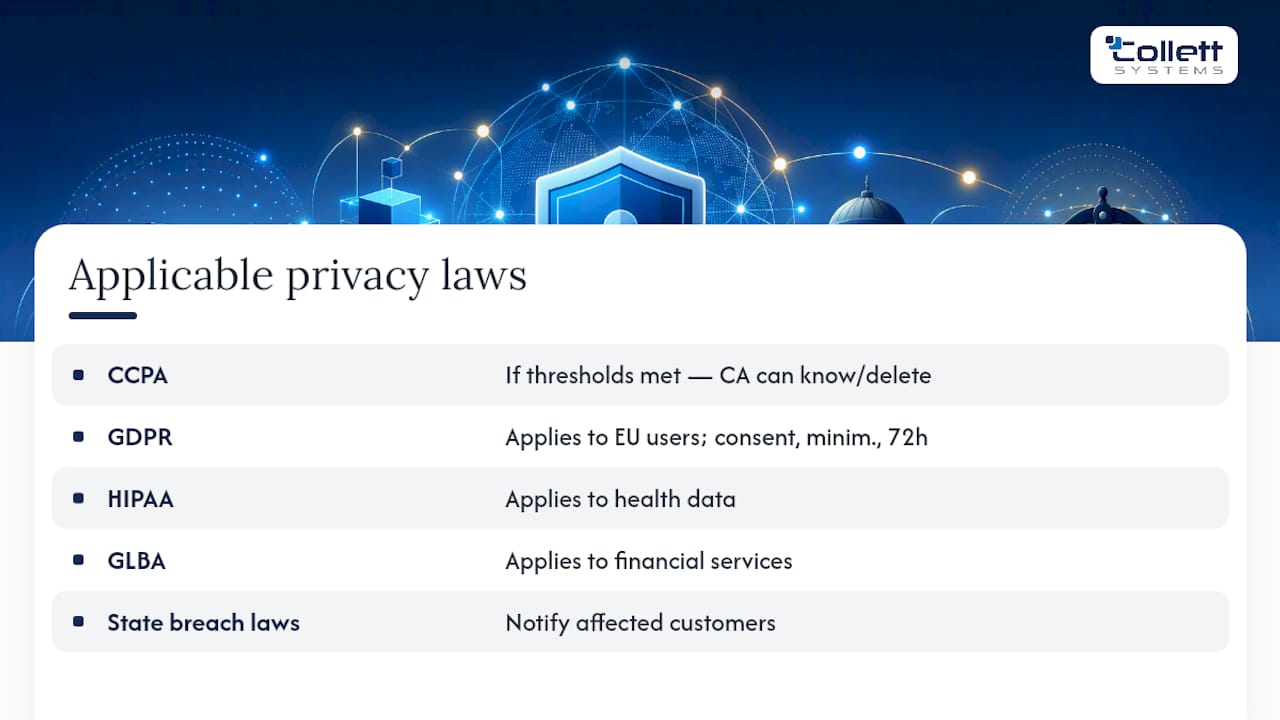
The California Consumer Privacy Act (CCPA) applies to businesses meeting revenue or data-volume thresholds that do business with California residents, granting those residents rights to know what data is collected and to request deletion. If you have any customers or website visitors in the European Union, the General Data Protection Regulation (GDPR) can apply regardless of where your business sits, with strict rules on consent, data minimization, and breach notification within 72 hours.
Beyond CCPA and GDPR, industry-specific rules often layer on top: HIPAA for health data, GLBA for financial services, and various state breach-notification laws that require you to inform affected customers within a specific window after a breach is discovered.
The good news: most of the operational work in this article, encryption, access control, tested backups, and documented incident response, doubles as compliance evidence. Regulators and auditors want to see that you took reasonable, documented steps. A written policy showing you follow CISA and NIST guidance goes a long way in demonstrating good faith, even if you're not a lawyer parsing statutory language. When your data footprint crosses state or international lines, a quick consultation with a privacy attorney is worth the cost before, not after, an incident.
What Should You Monitor for Early Threat Detection?
Detection is where most small businesses fall short, not because monitoring is expensive, but because nobody's watching. EDR tools generate alerts, but alerts sitting unread in a dashboard don't stop anything.

At minimum, monitor login activity for anomalies: logins from unexpected countries, repeated failed attempts, or access at unusual hours. Centralize logs from your firewall, email system, and endpoints somewhere a human or automated system actually reviews them, rather than scattered across five different consoles nobody checks.
Set alert thresholds that match your business size. A five-person office doesn't need enterprise-grade security information and event management (SIEM) tooling, but it does need someone reviewing weekly summaries of failed logins, new device enrollments, and unusual data transfers. Most modern EDR platforms and cloud email providers now bundle basic anomaly detection into their existing plans, so you may already own the capability and just haven't turned it on.
The goal isn't catching every anomaly in real time. It's catching a breach in hours or days instead of the months it often takes when nobody's watching at all.
Pragmatic security beats tool fetishism
Too many small businesses buy a stack of security tools and call it done, when identity controls and tested backups matter more than any single product on the shelf. Collett Systems LLC has spent years helping Southeastern Wisconsin businesses fix the fundamentals first, and that's the lens worth applying before your next tool purchase.
A Managed Path to Baseline Protection
Building every item on this checklist alone, patching schedules, MFA audits, backup testing, EDR monitoring, takes real hours most owners don't have. Collett Systems LLC runs all of it under one fixed per-user price, with 24/7 monitoring and quarterly backup restore tests already built into the standard stack, so nothing on this list gets skipped when the business gets busy.
If you're not sure where your business actually stands, our Cybersecurity Risk Assessment delivers a prioritized remediation plan mapped to the exact gaps we find, not a generic report. Solo operators and very small teams can also look at Total Secure, a lighter managed security option built for smaller footprints. For businesses ready for full managed IT services, book the assessment and get a clear next step instead of another tool to configure yourself.
Sources
- Cyber Guidance for Small Businesses - CISA
- NIST Cybersecurity Framework 2.0: Small Business Quick-Start Guide
- Strengthen your cybersecurity - U.S. Small Business Administration
- Cybersecurity for Small Businesses | Federal Communications Commission
- Cybersecurity for small businesses - FTC
FAQ
Does a Small Business Need Cybersecurity?
Yes. Attackers largely rely on automated scanners that target exposed systems and missing MFA regardless of company size, which puts every small business in scope by default.
Is it true that many small businesses fail after a cyber attack?
That specific figure is widely repeated but this article's sources do not confirm it directly. What's well documented is that untested backups often fail during real recovery attempts, which is why tested restores matter as much as having backups at all.
How Much Does Cybersecurity Cost for a Small Business?
Costs scale by maturity tier, from a foundation package covering MFA and backups to an audit-ready program with full documentation and monitoring, with labor hours often costing more than the tools themselves.
What Is the Most Common Cyber Attack on Small Businesses?
Phishing and social engineering remain the most common entry points, often combined with exploiting unpatched software or missing MFA on exposed accounts.
When Should a Small Business Hire a Managed Security Provider?
Consider outsourcing when you face customer or regulatory pressure for documented controls, lack dedicated internal IT staff, or need 24/7 monitoring that an in-house team can't realistically cover.