A technology roadmap is a plan that typically covers a multi-year horizon, sequencing technology changes with business outcomes and scheduling them around your calendar. The one rule that makes it work: never add an item unless it ties to a measurable result, and never launch it during your busiest weeks. A usable first year names an owner and a budget for each item, sets quarterly checkpoints, and treats security fixes as non-negotiable, not optional line items.
TL;DR:
- Small businesses should create a detailed 12-month roadmap with clear ownership and budgets to schedule upgrades and replacements around business cycles.
- Prioritize security fixes and compliance-related projects as urgent tasks that jump the queue over less critical upgrades, regardless of timing.
- Conduct quarterly reviews and update the roadmap annually to adapt to shifting priorities, vendor changes, and security needs.
- Build the roadmap by inventorying all systems, defining outcome-based goals, mapping gaps, and sequencing projects around slow business periods.
- Using a managed IT provider can help develop, govern, and update the roadmap, reducing the risk of neglect or misallocation of resources.
Table of Contents
- What Is a Technology Roadmap, and Why Does Your Small Business Need One?
- How Far Out Should a Small Business Technology Plan Go?
- How Do You Build a Technology Roadmap Step by Step?
- How Do You Budget and Govern a Technology Roadmap Without a Full IT Team?
- What Mistakes Derail Most Small Business Technology Plans?
- How Do You Keep a Technology Roadmap Alive After You Build It?
- Where Does Collett Systems LLC Fit If You Want Help Executing?
- Why Most Roadmap Advice Gets the Order Backward
- Get a Roadmap Built Around Your Business, Not a Generic Checklist
- Sources
- FAQ
What Is a Technology Roadmap, and Why Does Your Small Business Need One?
A technology roadmap is a strategic plan that maps which systems you'll adopt, upgrade, or retire over the next one to three years, sequenced to match specific business goals. That's a different document from your IT budget, which only tracks spending, and different from your business strategy, which sets the goals in the first place. The roadmap is the bridge between the two: it says which technology moves happen, in what order, and why.
Most small businesses run without one. They buy software when something breaks, renew contracts on autopilot, and add tools because a competitor has them. That pattern is expensive in ways that don't show up on an invoice: lost hours from downtime, duplicate subscriptions nobody remembers canceling, and security gaps that sit open for months because no one owns them.
A working roadmap fixes that by forcing every purchase through one filter: what business outcome does this create? Tying a project to something measurable, like cutting invoice processing from five days to one, keeps budget approval honest and stops vanity purchases before they start.
The payoff shows up in a few concrete places:
- Fewer emergency purchases, because hardware and software renewals are scheduled instead of discovered when they fail
- Clearer budget conversations, since every roadmap line has a cost and an expected result attached
- Less downtime, because upgrades happen in planned windows instead of during a crisis
- Better security posture, since patching and access reviews are scheduled work, not an afterthought
None of this requires a large IT department. It requires a document, an owner for each line, and a habit of checking it.
How Far Out Should a Small Business Technology Plan Go?
The planning horizon splits into two zones with very different levels of detail. The next year should be planned in detail, including the project, owner, and timing, while the plans for subsequent years remain more flexible. Sketch the likely moves, like a server refresh or a software migration, without pinning exact dates or dollar figures.
- Months 1 to 12: Fixed commitments. Every item has a budget, an owner, and a target quarter.
- Months 13 to 24: A directional sketch. Expect this bucket to shift as year one plays out.
- Months 25 to 36: Broad themes only, mostly tied to hardware lifecycle and contract expiration dates you already know are coming.
Review the whole document quarterly and rebuild it substantially once a year, since priorities shift faster than a three-year plan can predict. Off-cycle changes are fine when they're forced: a vendor discontinues a product, a security incident exposes a gap, or a contract renewal deadline lands mid-quarter. Build renewal dates and hardware end-of-life dates into the calendar the day you first learn them, not the month before they hit.
How Do You Build a Technology Roadmap Step by Step?
You don't need a consultant or a six-month project to get a working roadmap. You need a week of focused inventory work, a clear-eyed look at your goals, and a sequencing rule that respects your calendar.
Step 1: Inventory everything that runs your business. List every system, application, and piece of hardware currently in use. For each one, capture who owns it internally, when the contract or license renews, and its true cost, meaning subscription fees plus the hours your team spends fighting with it. A one-week timeboxed sweep is usually enough to catch the systems that actually matter to daily operations.
Step 2: Write goals as outcomes, not tools. "Buy a new CRM" is not a goal. "Cut lead response time from 48 hours to 4 hours" is a goal, and it might get solved by a CRM, a workflow fix, or neither. Write every roadmap goal this way before you name a single product.
Step 3: Map the gap between what you have and what you need. Compare your inventory against your goals. Where a system can't support the outcome you want, that gap becomes a project. Name it plainly: "Replace on-premise file server with cloud storage to support remote access for field staff."
Step 4: Prioritize with impact times urgency. Score each project on how much it moves the business (impact) and how much risk grows the longer you wait (urgency). A simple heuristic works well here:
- Fix now: High urgency, often security-related or a system actively failing
- Build next: High impact, moderate urgency, worth a full quarter of planning
- Plan for later: Real value but no time pressure, safe to schedule into year two
Step 5: Sequence against your actual calendar. This is where most roadmaps fall apart. A retailer doesn't touch point-of-sale systems in November. An accounting firm doesn't migrate software in March. Sequencing changes around slow periods instead of convenient project timelines is what actually gets adoption instead of resistance. One exception overrides the calendar every time: security fixes jump the queue regardless of season, because the cost of waiting outweighs the disruption of acting.
Step 6: Build a rollout checklist for each item. Before anything launches, confirm four things: an owner is named, milestones are dated, staff training is scheduled, and there's a rollback plan if the change breaks something critical.
Pro Tip: Draft your goals on a shared visual board rather than a static document. Teams that map dependencies and owners visually catch scheduling conflicts and miscommunication far earlier than teams working off a spreadsheet nobody opens. Tools like Miro's roadmap templates work well for this because everyone sees the same sequence at once.
Consider the cloud migration line item as a real example of how this plays out: it needs its own migration checklist covering data transfer order, downtime windows, and a fallback if the cutover goes sideways. That level of detail belongs in the project plan, not the roadmap itself. The roadmap just says when it happens and who owns it.
How Do You Budget and Govern a Technology Roadmap Without a Full IT Team?
Every roadmap item needs a real cost estimate before it earns a place on the calendar. That means licensing fees, migration labor, staff training time, and the lost-hours cost of running old systems while the new one comes online. Skipping any of these categories is how a "simple software swap" turns into a budget surprise three months in.
There's no single formula for how much to spend, but many small businesses find a useful starting point in benchmarking IT spend as a percentage of revenue, then adjusting up if compliance requirements or aging hardware demand it. Manufacturers and financial firms, for instance, typically need to budget higher than a retail shop with lighter compliance obligations.
Governance is the part most small businesses skip, and it's the part that keeps a roadmap from dying in a drawer:
- Assign a named owner to every roadmap item, not just "IT"
- Set an approval gate before spending starts, even if that gate is just an owner signoff
- Hold a quarterly status check against the plan, fifteen minutes is enough if the roadmap is current
- Track actual cost against estimated cost so next year's budgeting gets more accurate
Businesses without in-house IT leadership often lean on a fractional or virtual CIO, sometimes called a vCIO, to run this governance layer. That role exists specifically to bridge the gap between IT execution and business strategy at a fraction of the cost of a full-time hire, and it's worth considering if quarterly reviews keep slipping because no one owns the calendar.
What Mistakes Derail Most Small Business Technology Plans?
The same handful of mistakes show up across almost every roadmap that fails to survive its first year:
- Buying reactively. Skipping lifecycle planning means hardware gets replaced in a panic instead of on a schedule, usually at a worse price and a worse time.
- No named ownership. A roadmap item with no owner is a wish, not a plan. It gets dropped the moment something more urgent comes up.
- Stacking launches during busy periods. Rolling out three systems in the same quarter your business is busiest guarantees resistance and rushed training.
- Trusting untested backups. A backup you've never restored from is a false sense of security, not a real safety net.
- Listing tools instead of mapping outcomes. A roadmap that names software without naming the business result it's supposed to produce collapses the first time someone asks "why are we doing this?"
Each of these is fixable with the same discipline: name an owner, tie the item to an outcome, and test what you're relying on before you need it.
How Do You Keep a Technology Roadmap Alive After You Build It?
A roadmap that sits untouched after the kickoff meeting is worse than useless, since it gives a false sense that planning happened. Keeping it current takes a short recurring checklist, not a major time investment.
- Audit software licenses and utilization quarterly. Cut what nobody uses; it's the fastest budget win most businesses never claim.
- Patch systems on a fixed schedule and enforce multi-factor authentication as a standing roadmap item, not a one-time project, following practical cybersecurity guidance for small businesses.
- Run a restore test from backup at least twice a year, and walk through a tabletop breach exercise annually so the plan isn't theoretical.
- Track KPIs per roadmap item: hours saved, downtime reduced, support tickets closed. If a completed item shows no measurable change, that's a signal to investigate before adding the next one.
PMI's guidance on program pulse checks backs this rhythm: a steady cadence of reviews, tied to specific stakeholder objectives, is what keeps a plan from drifting away from its original goals. Skipping that rhythm is the single most common reason roadmaps get built once and never opened again.
Where Does Collett Systems LLC Fit If You Want Help Executing?
Not every small business has the bandwidth to run inventory sweeps, quarterly reviews, and lifecycle calendars on top of daily operations. Collett Systems LLC runs managed IT on a fixed per-user model with 24/7 monitoring and full infrastructure management, which means the roadmap work described above becomes something a partner tracks with you instead of something you build alone at night.
Many local organizations in Southeastern Wisconsin rely on a managed IT provider for ongoing IT governance, supported by client references rather than marketing claims alone.
| What you get | What it replaces |
|---|---|
| Inventory summary of current systems and lifecycle status | Guesswork about what's aging out |
| Prioritized 12-month roadmap with named owners | A tool list with no sequencing |
| Cost estimate per roadmap item | Budget surprises mid-year |
| Quarterly review cadence built in | A plan that goes stale after month one |
A lightweight IT and security assessment is the practical starting point if you want that structure without building it from scratch.
Why Most Roadmap Advice Gets the Order Backward
Most guidance on this topic treats a roadmap like a shopping list with dates attached: buy this, upgrade that, replace the other thing by June. That's backward. The scheduling and governance discipline matters more than the tool list, and the research bears this out. A plan that sequences changes around your slow season and assigns a named owner to every line beats a longer list of smarter tools every time, because adoption is what determines whether any of it pays off.
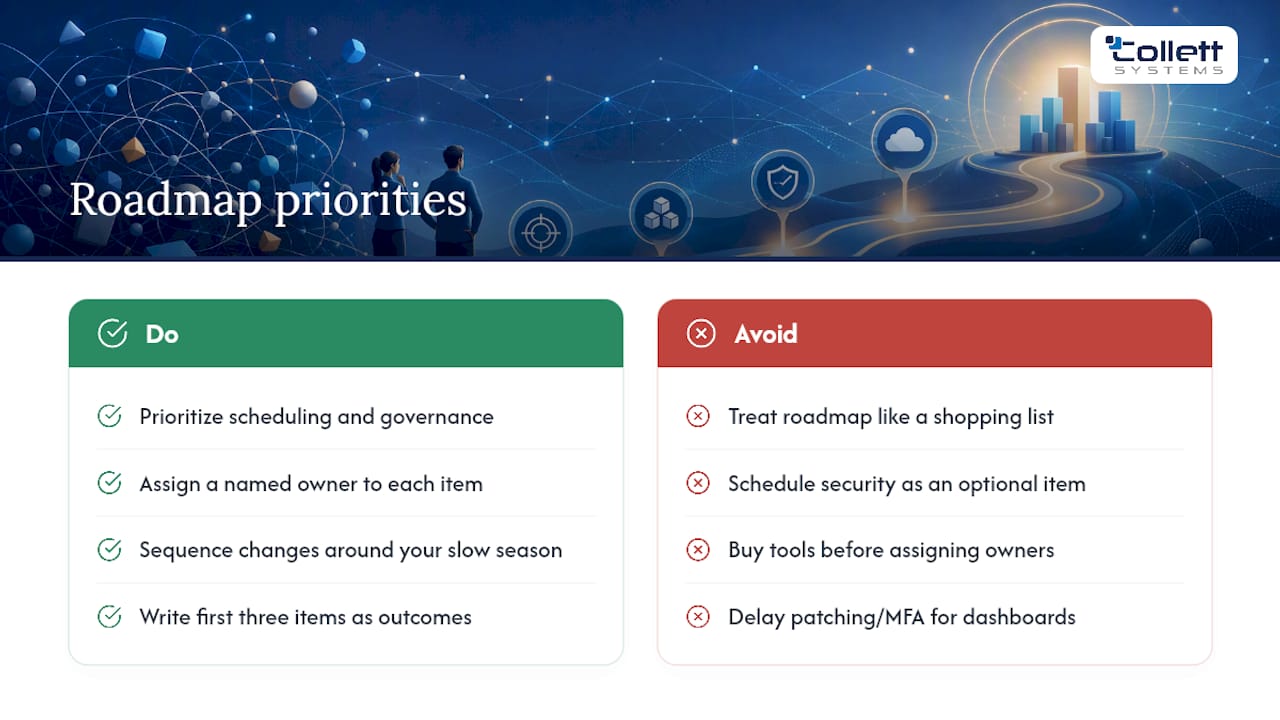
Where conventional advice really falls short is treating security as one line item among many. It isn't. A patching schedule or a multi-factor authentication rollout should jump the queue ahead of a nicer accounting dashboard, every single time, regardless of what the calendar says.
If you take one thing from this guide, prioritize this: write your first three roadmap items as outcomes, not products, and put a name next to each one before you spend a dollar. Everything else, the templates, the software, the review cadence, works better once that discipline is in place. If executing it alone feels like more than your team has time for, a managed IT partner can run the governance layer while you focus on the business itself.
, Dustin Collett
Get a Roadmap Built Around Your Business, Not a Generic Checklist
Building the roadmap described in this guide takes real hours: inventory, gap mapping, cost estimates, sequencing against your calendar. That work can be provided by a managed IT provider with a fixed per-user managed IT service model instead of tiered pricing structures, offering a predictable monthly cost rather than surprise invoices.
In practice, it can include 24/7 monitoring, proactive support, and security management integrated into client relationships rather than as optional upgrades. This model is particularly valuable for manufacturers and financial firms with compliance needs, where timely patching and access reviews are critical to managing risk.
The practical next step is a managed IT services conversation, where Collett Systems LLC builds your first prioritized 12-month roadmap, complete with named owners and cost estimates, based on the inventory and goals your business actually has.
Sources
The frameworks and tools referenced throughout this guide are worth bookmarking directly:
- Master the Technology Roadmap for Small Businesses
- How Small Businesses Can Build a Technology Roadmap
- PMI pulse / thought leadership
- How to align technology with business goals - Verteks Consulting
FAQ
What should a technology roadmap include?
A usable roadmap includes a system inventory with renewal dates, goals written as measurable outcomes, prioritized projects with named owners and budgets, a sequencing plan tied to your business calendar, and a quarterly review cadence.
Can ChatGPT create a technology roadmap for my business?
ChatGPT can help draft goal statements, organize an inventory list, or suggest a project sequence, but it can't gather your actual system data, renewal dates, or true costs. Treat it as a drafting aid for the roadmap document, not a substitute for the inventory and governance work described above.
What technology does a small business actually need?
The baseline for most small businesses covers reliable backup and disaster recovery, endpoint security with multi-factor authentication, patched and monitored infrastructure, and a documented support path for when something breaks. Beyond that baseline, needs vary by industry and should be driven by the specific outcomes in your roadmap, not a generic checklist.
How often should a small business review its technology roadmap?
Review the roadmap quarterly to check progress against milestones and budget, then rebuild it substantially once a year as priorities and business goals shift.
Does a small business need a vCIO to build a roadmap?
No, but a fractional or virtual CIO helps when no one internally has the time or expertise to run governance and quarterly reviews, and it typically costs less than hiring a full-time IT leader.