A backup retention policy is the set of rules that dictates how long you keep each backup copy, where it lives, and when it gets deleted. For most small and medium-sized businesses, the practical baseline is tiered retention (short, medium, and long-term windows tied to how critical the data is) plus at least one immutable or offline copy, following the 3-2-1-1-0 principle. Compliance rules and your recovery objectives, not habit, should decide the specific windows.
TL;DR:
- Retention periods must be based on data classification, legal requirements, and recovery objectives, not guesswork or uniform policies.
- Immutable or air-gapped backup copies are essential for ransomware resilience and should be kept for at least 30 to 90 days, with some needing longer due to compliance.
- Automated retention management and periodic restore testing are critical to ensure backups are valid and accessible during emergencies or audits.
- Cloud and SaaS platforms often retain less data than administrators assume, requiring separate retention policies for their data.
- The most common mistakes include applying a one-size-fits-all retention window and failing to verify restore functionality regularly.
Table of Contents
- What Is a Backup Retention Policy and Why It Matters
- How Do You Set the Right Retention Periods?
- Backup Retention Best Practices for Ransomware Resilience
- How Do You Implement and Automate Retention Policies?
- Sample Retention Schedules You Can Copy
- What Do Compliance Rules Require for Retention?
- How Should You Test and Review a Retention Policy?
- Collett Systems' Perspective on Retention Policy Mistakes
- Get Your Retention Policy Built Right the First Time
- Sources
- FAQ
What Is a Backup Retention Policy and Why It Matters
Retention is the rulebook covering how long each backup is kept, on what media, and what triggers deletion. Get it wrong and you either burn storage budget on data nobody needs anymore, or you delete something a regulator, auditor, or ransomware recovery effort desperately needed.
Retention length directly shapes your recovery point objective (RPO) and recovery time objective (RTO). If you only keep 14 days of backups and malware sits undetected for three weeks, which happens more often than most owners assume, you have nothing clean to restore. The main forces that should shape your policy:
- Ransomware and insider threats that corrupt live data and recent backups alike
- Tax, payroll, and HR record-keeping obligations
- Industry rules (HIPAA, PCI DSS) with their own minimums
- State privacy laws that increasingly require you to justify how long you keep personal data
Retention isn't just a storage decision. It's a recovery decision wearing a compliance hat.
How Do You Set the Right Retention Periods?
Guessing at retention windows is how businesses end up either drowning in old backups or missing the one they needed. A repeatable framework works better than intuition:
- Inventory and classify your data. Separate financial records, customer data, operational files, and disposable working files. Each class needs its own retention answer, not a blanket rule.
- Map each class to RPO and RTO. A manufacturing ERP system might tolerate four hours of data loss; a shared drive of internal memos can tolerate a day. Retention windows should follow from these targets, not the other way around. Our RPO vs. RTO guide walks through how to set these numbers for different systems.
- Layer in legal holds. Tax records, payroll files, and electronic protected health information (ePHI) often carry retention floors set by regulators, not by IT.
- Check what your SaaS vendors actually keep. Microsoft 365, Google Workspace, and similar platforms retain far less than most administrators assume, and rarely offer true point-in-time recovery for user error or deletion.
- Document the trigger for each retention clock, such as the date of collection, the last transaction, or the end of a client relationship, so the rule applies consistently instead of case by case.
This process takes a few hours the first time and becomes a review exercise after that.
Backup Retention Best Practices for Ransomware Resilience
The 3-2-1 backup rule: three copies of your data, on two different types of media, with one copy offsite, remains the foundation almost every serious backup strategy builds on. Modern ransomware has forced an update. Attackers now specifically hunt for and encrypt or delete backup files before triggering the main attack, which is why practitioners now talk about 3-2-1-1-0: three copies, two media types, one offsite, one immutable or air-gapped, and zero errors on verified restores.
Practical controls that make this real:
- Keep at least one backup copy immutable for a period that defends against typical ransomware dwell times, meaning it cannot be altered or deleted even by an administrator account.
- Separate backup credentials and storage accounts entirely from your production Active Directory or identity provider.
- Encrypt backups at rest and in transit, and store encryption keys somewhere the backup system itself can't reach.
- Automate retention enforcement through policy rather than manual deletion, so nobody can accidentally (or maliciously) shorten a retention window.
- Apply least-privilege access so only a small, audited group can modify or delete backup jobs.
Immutability and true air-gapping aren't identical. Cloud object storage can enforce immutability through write-once policies, while offline tape or removable media adds physical network isolation on top of that.
Pro Tip: Test what happens when someone with domain admin rights tries to delete your backups. If they can, your "immutable" backup isn't actually immutable, it's just inconvenient to delete.
How Do You Implement and Automate Retention Policies?
Writing the policy is the easy part. Operating it across on-premises servers, cloud infrastructure, and SaaS platforms takes a few concrete steps:
- Match backup method to your RPO. Full backups alone are too slow for tight recovery windows; most SMBs combine an initial full backup with incremental or differential jobs, and critical systems increasingly use continuous data protection (CDP).
- Map each backup job to a retention tier and storage class. Recent backups sit in hot storage for fast recovery; older copies move to cooler or archive-tier storage where retrieval is slower but far cheaper.
- Turn on lifecycle policies at the platform level so aging backups automatically transition storage tiers or expire, rather than relying on someone remembering to clean up manually.
- Flag immutability at the storage layer, not just in your backup software's settings, since software-level protections can be bypassed by anyone with admin access to the storage itself.
- Build a legal-hold process that can override normal deletion schedules the moment litigation or an audit is reasonably anticipated.
- Wire retention procedures into your incident response playbook so nobody scrambles to figure out which backup is trustworthy during an actual ransomware event.
Don't forget SaaS data in this process. Because platform vendors leave data protection largely to the customer, Microsoft 365 and Google Workspace data needs its own retention rules, not an assumption that the vendor already handles it.
Sample Retention Schedules You Can Copy
Two patterns cover most SMB situations. Adjust the numbers to your own compliance exposure before treating either as final.
Operational-first schedule (businesses without heavy regulatory retention requirements):
- Daily incremental backups retained for an operationally appropriate time, typically around a few months
- Weekly full backups retained for a medium-term period such as several months
- Monthly backups retained for about a year
- One immutable or offline copy refreshed regularly
Compliance-first schedule (businesses handling tax, payroll, or health-adjacent data):
- Daily backups retained for a period sufficient to meet operational needs
- Monthly backups retained long enough to satisfy applicable tax and HR archival requirements
- Yearly archives retained indefinitely where a regulation requires permanent record-keeping
Both examples use grandfather-father-son (GFS) rotation, where daily backups roll into weekly, weekly rolls into monthly, and monthly rolls into yearly. Place your immutable or air-gapped copy at the monthly or yearly tier at minimum. That's the copy that survives a ransomware event that dwells for weeks before detonating.
What Do Compliance Rules Require for Retention?
There's no single federal law dictating how long every business must keep every record. In practice, most businesses anchor their tax and financial retention around IRS guidance, which points to keeping supporting tax documents for up to seven years in many situations, depending on the specific record and circumstances.
Beyond taxes, layer in sector rules where they apply:
- HIPAA requires covered entities to retain certain records for six years from creation or last effective date.
- PCI DSS doesn't set a universal number but expects retention aligned with your own documented policy and any state law.
- State privacy laws increasingly require you to disclose retention periods, or at least the criteria used to set them, in your privacy notice.
When two rules conflict, apply the longer requirement and write down why. That documentation is what protects you in an audit, not the retention window itself.
How Should You Test and Review a Retention Policy?
A retention policy nobody tests is a guess dressed up as a plan. Build verification into the schedule itself:
- Run automated restore tests on a rotating sample of backups, aiming for zero errors on anything classified as critical.
- Log every change to retention settings, including who made it and why, and require more than one person's approval before shortening a retention window or deleting archived data.
- Review the policy at least annually, and immediately after any regulatory change, new client contract with its own data terms, or shift in how the business operates.
Pro Tip: Schedule your restore tests on the calendar, not "when someone has time." The businesses that skip this step almost always find out their backups were incomplete during an actual emergency, which is the worst possible moment to learn it.
Collett Systems' Perspective on Retention Policy Mistakes
The most common mistake we see is a one-size-fits-all retention policy applied to wildly different data. A business will set a single 30-day window for everything, then discover during a ransomware event or an audit that their tax records, customer contracts, or ePHI needed a completely different standard.
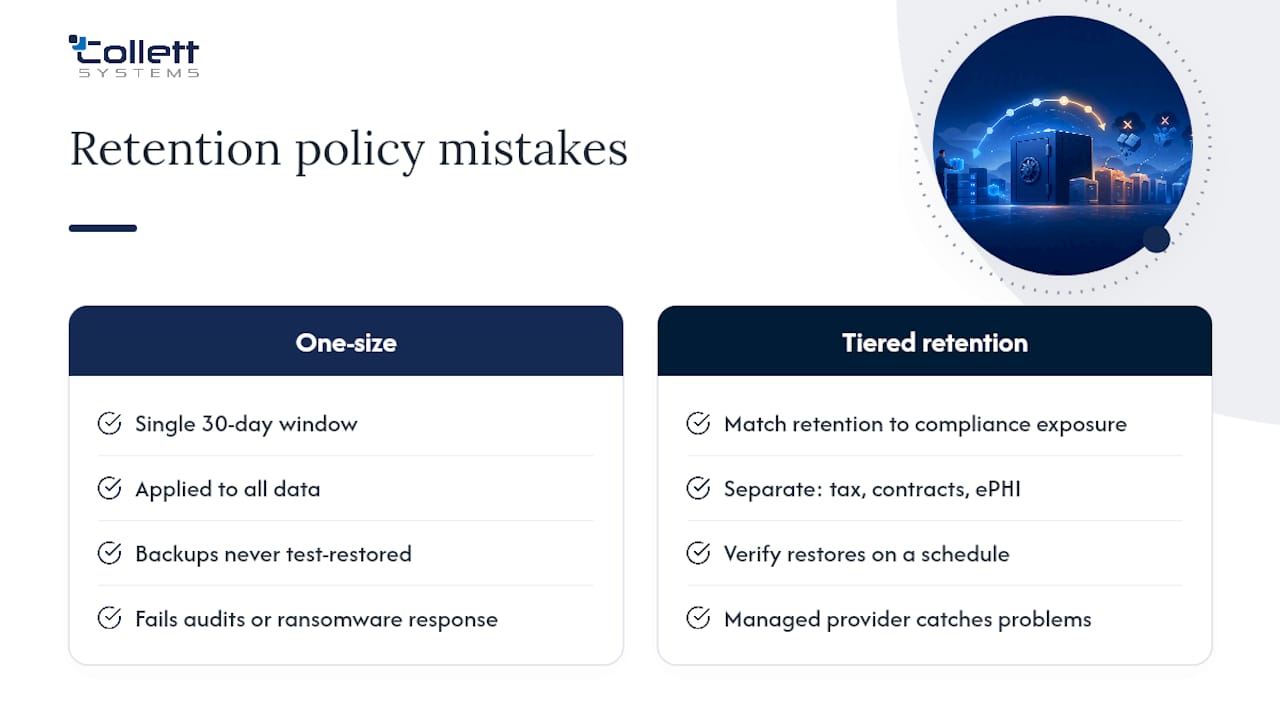
The second mistake is treating retention as a storage setting instead of a recovery plan. Backups that are never test-restored are a false sense of security, not a safety net. We've walked into environments where the backup job had been silently failing for months and nobody noticed because nobody had tried to restore from it.
A managed provider's job is to catch both problems: build tiered retention that matches your actual compliance exposure, and verify restores on a schedule instead of hoping they work when it matters.
, Dustin Collett
Get Your Retention Policy Built Right the First Time
Retention rules on paper mean nothing if the backup behind them was never tested. Collett Systems LLC builds and manages backup and disaster recovery programs for small and mid-sized businesses across Southeastern Wisconsin, with fixed per-user pricing and no surprise tiers hiding basic protection behind an upsell.
An IT & Security Assessment gets you a full inventory of what's currently being backed up (and what isn't), RPO/RTO targets mapped to your actual systems, and a retention schedule built around your real compliance exposure rather than a generic template. If you've never seen your backups actually restored, that's worth finding out before an incident forces the question. Book an assessment with Collett Systems LLC and get a retention policy that holds up under both a ransomware event and an audit.
Sources
- How long should I keep records? | IRS
- 3-2-1 backup strategy explained: Is it effective? | TechTarget
- Data retention policy: U.S. state privacy laws guide | PrivacyLawMap
FAQ
What Is a Good Backup Retention Policy?
A good policy uses tiered retention matched to how critical each data class is, keeps at least one immutable or offline copy, and follows the 3-2-1-1-0 framework: three copies, two media types, one offsite, one immutable, zero restore errors.
How Long Should Backups Be Retained?
It depends on the data. Operational files often need only 30 to 90 days of daily backups, while tax, payroll, and certain health records commonly require retention of up to seven years or longer under regulations like IRS guidance.
What Is the 3-2-1 Rule for Backups?
The 3-2-1 rule means keeping three copies of your data, on two different media types, with one copy stored offsite. Modern guidance extends this to 3-2-1-1-0, adding one immutable or air-gapped copy and zero-error restore verification.
What Is the 7-Year Retention Rule?
The seven-year figure comes from common IRS guidance for certain business tax records and supporting documents, though the actual required period varies depending on the specific record and situation, not a single fixed law.
Does Every Business Need an Immutable Backup Copy?
Any business facing ransomware risk, which is essentially every business today, benefits from at least one immutable or offline copy retained for 30 to 90 days, since that copy is what survives an attack that targets your primary backups directly.