Five controls determine whether your business Wi-Fi network is protected or exposed: strong encryption and identity-based authentication, network segmentation, current firmware and a device inventory, active monitoring, and enforced password policies with MFA. Skip any one and the rest weaken fast. The NIST Cybersecurity Framework treats these as a continuous cycle, not a one-time setup, and Collett Systems LLC builds managed Wi-Fi programs around exactly this sequence.
TL;DR:
- Most small business breaches result from default passwords and outdated firmware, making quick efforts like changing credentials and enabling automatic updates essential.
- Transitioning to WPA3 encryption and implementing WPA2-Enterprise with 802.1X authentication significantly improve security by authenticating devices individually.
- Segmenting networks into VLANs for staff, guests, IoT, and POS devices reduces attack surfaces and limits lateral movement after a breach.
- Regularly monitoring for rogue access points and unauthorized SSIDs, alongside active threat detection tools, catches most wireless threats early.
- Conducting annual or quarterly security assessments, including vulnerability testing and configuration reviews, helps maintain resilience against evolving wireless threats.
Table of Contents
- How Do You Secure Business Wi-Fi Right Now?
- Which Wi-Fi Encryption and Authentication Should You Use?
- How Should You Segment a Business Wireless Network?
- Why Does Firmware Get Overlooked, and How Often Should You Patch?
- What Should You Monitor for Wireless Threats?
- How Do Password Policies and Training Reduce Wi-Fi Risk?
- Should You Manage Wi-Fi Yourself or Hire a Managed Provider?
- How Often Should You Audit Your Wireless Network?
- Why Do Remote Employees Need a VPN for Wi-Fi Resources?
- What Should Your Incident Response Plan Cover?
- What Set-And-Forget Wi-Fi Actually Costs You
- Get a Wi-Fi Security Assessment Built for Your Business
- Sources
- FAQ
How Do You Secure Business Wi-Fi Right Now?
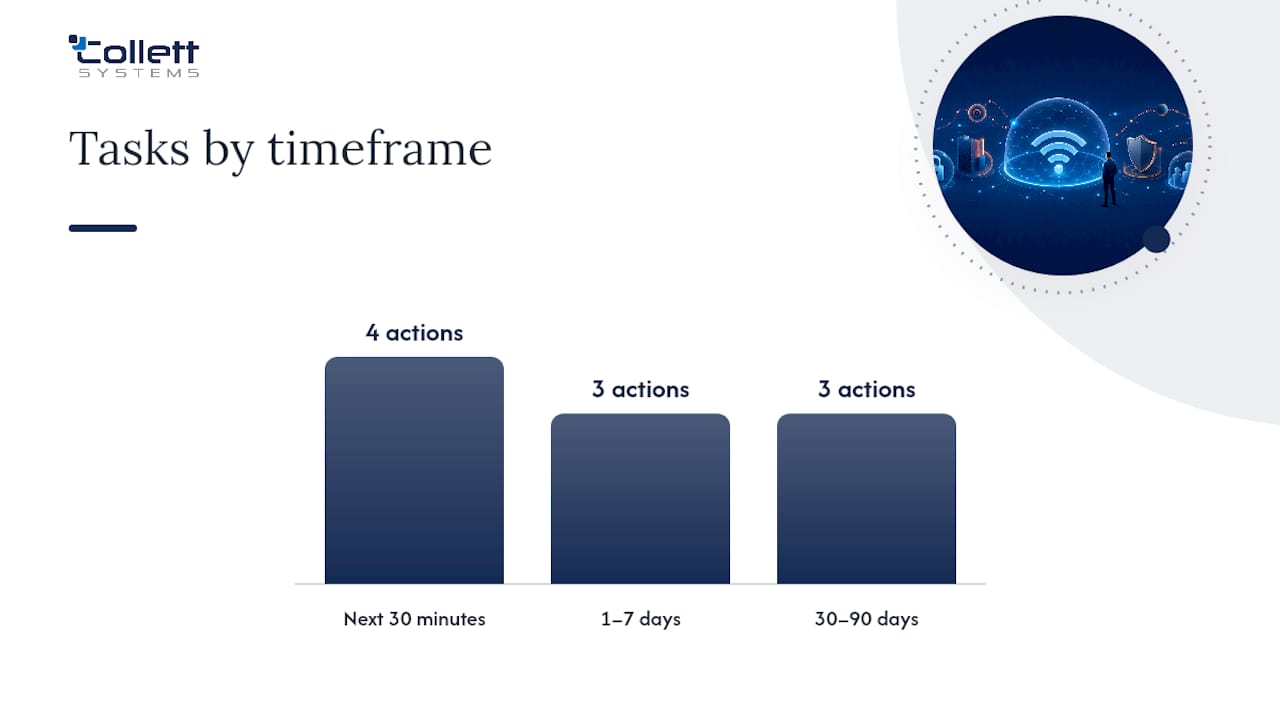
You don't need a security team to close the biggest gaps in your wireless network this week. Most breaches trace back to defaults nobody changed and firmware nobody updated, not sophisticated attacks. Work through this checklist in order.
In the next 30 minutes:
- Change the router's default admin username and password. This is among the most commonly exploited weaknesses in small business networks.
- Confirm your access points run WPA3, or WPA2 at minimum. If you see WEP or an open network anywhere, fix it today.
- Create a separate guest SSID isolated from your internal network.
Within 1 to 7 days: 4. Enable automatic firmware updates on every access point and router that supports it, or schedule regular manual updates. 5. Inventory every device connected to your network, including printers, cameras, and point-of-sale terminals. 6. Turn on your firewall's logging and review the last week of traffic for anything unfamiliar.
Within 30 to 90 days: 7. Migrate from a shared Wi-Fi password to identity-based authentication (802.1X) for staff devices. 8. Segment IoT and POS devices onto their own VLANs. 9. Schedule a recurring security review, with periodic assessments recommended at least annually, or quarterly if you lack continuous monitoring.
Pro Tip: Before switching to WPA2-Enterprise or 802.1X, test it on one access point with a small group of devices first. A botched rollout can lock out an entire office at once, and nothing kills momentum for security upgrades like an afternoon of employees unable to connect.
Which Wi-Fi Encryption and Authentication Should You Use?
WPA3 is the current standard, and it closes several vulnerabilities that made WPA2 crackable with patience and the right hardware. Most business-grade access points sold since 2020 support it, though older laptops, badge printers, and warehouse scanners sometimes don't. Check compatibility before flipping the switch network-wide.
For authentication, the real upgrade isn't the encryption protocol. It's moving away from one shared password everyone knows toward WPA2-Enterprise or WPA3-Enterprise with 802.1X, which authenticates each user or device individually against a directory server. That single change prevents lingering access after an employee leaves, since you revoke one credential instead of re-keying every device in the building.
- EAP-TLS with certificates offers a strong audit trail and revocation capability but requires a certificate authority to manage.
- Shared PSKs are simple to deploy but difficult to revoke when staff turnover occurs.
- Per-device keys (iPSK/PPSK) provide each device a unique password on the same SSID, useful for legacy devices incompatible with 802.1X.
| Method | Best for | Revocation ease |
|---|---|---|
| EAP-TLS / 802.1X | Staff laptops, phones | Easy, per user |
| iPSK / PPSK | Legacy printers, scanners | Moderate, per device |
| Shared PSK | Not recommended for business use | Difficult, network-wide |
How Should You Segment a Business Wireless Network?
Segmentation limits what an attacker reaches after compromising one device. If a staff laptop, a guest's phone, and a security camera all share the same flat network, one infected device can potentially see traffic meant for the others. Wireless security guidance treats this as a foundational protection, not an advanced option.
Build separate VLANs by role:
- Staff network: full access to internal resources, tied to identity-based authentication.
- Guest network: internet-only, no visibility into internal systems or other guest devices.
- IoT/device network: cameras, printers, smart thermostats, isolated from everything else.
- POS network: payment terminals on their own segment with firewall rules restricting traffic to only what payment processing requires.
Firewall ACLs between VLANs should block east-west traffic by default and only permit specific, necessary connections. Never dump every non-employee device onto one shared network just because segmentation setup feels tedious. Our network segmentation basics guide walks through the VLAN structure in more detail.
Why Does Firmware Get Overlooked, and How Often Should You Patch?
Firmware updates lose to more urgent fires almost every time, which is exactly why attackers target it. CISA recommends automated updates, or quarterly at minimum, because outdated firmware routinely contains exploits that are already public knowledge. An unpatched access point isn't a mystery vulnerability. It's a known one, documented, and waiting.
Most business-grade routers now support automatic updates, so enabling that setting once solves the recurring problem permanently.
Your device inventory should track:
- Access points and wireless controllers
- Firewalls and routers
- Printers, cameras, and POS terminals
- Firmware version and last update date for each
Tie inventory to patching directly: if a device isn't on the list, it isn't getting updated. Businesses without dedicated IT staff often centralize this through a managed provider that handles patch scheduling across the whole fleet.
What Should You Monitor for Wireless Threats?
Rogue access points and evil-twin SSIDs are the most common wireless-specific attacks, and they're invisible without active monitoring. Federal wireless security guidance recommends WIDS/WIPS even for businesses that don't officially offer guest Wi-Fi, since an unauthorized SSID can appear inside your physical space regardless.
Watch for:
- Repeated authentication failures on a single account
- New or unrecognized SSIDs broadcasting near your location
- Unusual traffic spikes on IoT or POS segments
Affordable options scale with your size: cloud-managed AP controllers with built-in rogue detection, periodic professional wireless scans, or lightweight WIDS sensors for larger footprints.
Pro Tip: Set alerts to your phone or email for repeated auth failures. Most SMBs discover a breach in server logs weeks later. A same-day alert on failed logins is often the difference between a contained incident and a costly one.
How Do Password Policies and Training Reduce Wi-Fi Risk?
Technical controls decay without the people and process work behind them. A rotated Wi-Fi password means nothing if five former employees still have it saved on personal phones.
- Require unique admin credentials for every network device, never a shared password across your whole fleet.
- Enable MFA on accounts with access to sensitive systems. NIST cites MFA as one of the fastest, cheapest protective steps available an SMB can take.
- Build offboarding into your checklist: revoke certificates, remove devices from inventory, and rotate any shared keys the departing employee had access to.
- Train staff to recognize rogue networks, report anomalies, and keep personal devices off the internal SSID entirely.
The FCC's small business cybersecurity guidance lists employee training alongside firewalls and secure Wi-Fi as core hygiene, not an optional add-on.
Should You Manage Wi-Fi Yourself or Hire a Managed Provider?
The honest answer depends on three factors: whether anyone on staff has the time to manage patching and monitoring consistently, whether you handle regulated data that triggers compliance obligations, and how much downtime a wireless outage would actually cost you.
A managed provider typically delivers:
- 24/7 monitoring and alerting
- Scheduled patching across the entire device fleet
- Identity-based Wi-Fi rollout and segmentation design
- Documented incident response when something goes wrong
Collett Systems LLC has built this exact model for over 150 organizations across Southeastern Wisconsin, with managed cybersecurity services delivered at a fixed per-user cost rather than tiered add-ons.
How Often Should You Audit Your Wireless Network?
Set-and-forget doesn't hold up against evolving threats, which is why NIST wireless security guidance recommends at least annual technical assessments, moving to quarterly if you lack continuous monitoring. An audit isn't a formality. It's the mechanism that catches drift: the access point someone added without telling IT, the guest network that quietly gained access to internal file shares, the firmware that stalled three versions behind.
A useful audit checks a few consistent things every time. Are your VLANs still isolating traffic the way they were designed to? Has anyone reconnected a legacy device using the old shared PSK you thought you retired? Are firewall rules between segments still matching your current org chart, or are they full of exceptions nobody remembers approving?
Vulnerability assessments go a layer deeper than a configuration review. They actively test whether your wireless perimeter can be breached, using the same techniques an attacker would try: weak encryption fallback, mis-associated clients, exposed management interfaces. Businesses in regulated industries, financial services and manufacturing especially, often need this documented for compliance purposes anyway, so scheduling it as a recurring event rather than a reactive scramble saves both money and stress.
If you don't have staff qualified to run this internally, a paid assessment from an outside provider is worth the cost. It gives you a dated, documented baseline you can measure future changes against.
Why Do Remote Employees Need a VPN for Wi-Fi Resources?
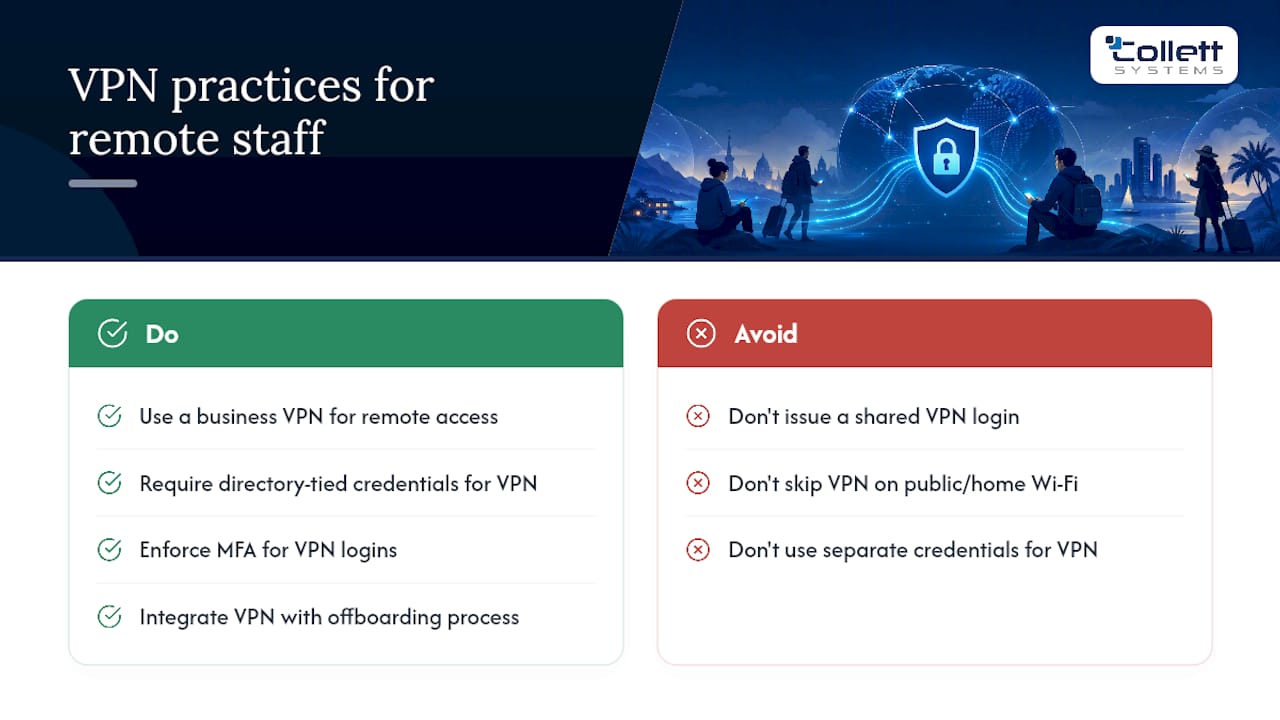
Remote and hybrid staff connecting to business Wi-Fi resources from outside the office need an encrypted tunnel, full stop. Without one, anyone accessing your file servers, internal applications, or VoIP systems from a coffee shop or home network is exposing that traffic to whatever else sits on that network.
A business VPN creates an encrypted connection between the remote device and your internal network, making it functionally similar to being plugged in at the office. This matters more than most owners realize because home routers are rarely patched with the same discipline as business equipment, and public Wi-Fi at airports, hotels, and cafes is a known hunting ground for traffic interception.
Set up VPN access with the same identity-based approach you use for in-office Wi-Fi. Tie VPN credentials to the same directory and MFA policy as everything else, so a single offboarding action revokes both office network access and remote access simultaneously. Avoid the common shortcut of issuing one shared VPN login for an entire remote team. It defeats the purpose the same way a shared Wi-Fi password does: you lose the ability to know who actually connected, and you can't revoke one person's access without breaking it for everyone.
Split-tunnel configurations, where only traffic bound for internal resources routes through the VPN, cut down on latency for everyday browsing while keeping sensitive traffic protected. For businesses with several remote employees, a managed VPN setup tied into your broader identity and access management is far more sustainable than ad hoc client software installed department by department.
What Should Your Incident Response Plan Cover?
A written plan matters more than a sophisticated one. Most SMBs have no documented steps for a wireless breach, which means the first hour after discovery gets spent figuring out who's in charge instead of containing the problem.
Your plan needs four things at minimum. First, a designated point person, whoever gets called the moment something looks wrong, whether that's an internal IT lead or your managed provider's emergency line. Second, immediate containment steps: which devices or VLANs to isolate first, and who has the authority to pull a segment offline without waiting for a committee decision. Third, a communication protocol covering who gets notified internally, and whether customers or regulators require notification depending on what data was potentially exposed. Fourth, a recovery and review step, restoring from clean backups, rotating every credential that touched the affected segment, and documenting what happened so the same gap doesn't reopen.
Test the plan before you need it. A tabletop walkthrough, just talking through a hypothetical rogue AP or compromised guest network scenario with your team, exposes gaps in minutes that would otherwise surface during a real incident at the worst possible time. Businesses without a plan almost always improvise one under pressure, and improvised responses are where breaches turn into extended outages.
What Set-And-Forget Wi-Fi Actually Costs You
The riskiest phrase in wireless security is "it's been working fine for years." Networks configured once and never revisited accumulate forgotten devices, stale credentials, and firmware nobody's checked since installation. Two lessons stand out from watching this pattern repeat across small businesses: identity-based access solves problems a password rotation never will, and monitoring catches what a rules-based firewall alone misses. Schedule an assessment before an incident forces the conversation.
, Dustin Collett
Get a Wi-Fi Security Assessment Built for Your Business
Some IT providers offer fixed-cost managed IT programs designed to simplify Wi-Fi security for businesses, providing comprehensive services including segmentation design, identity-based authentication, patch management, and monitoring under one predictable per-user price.
A Cybersecurity Risk Assessment starts with a full device inventory across your access points, firewalls, and connected hardware, then maps a segmentation roadmap and prioritizes remediation based on what actually puts your business at risk first. For very small teams working with a tighter budget, Total Secure delivers the same core protections scaled to fit. If your team relies on staff who move between office and remote work, our Co-Managed IT Services option pairs with your existing IT staff instead of replacing them.
Request an assessment through our managed IT services page and get a clear, documented picture of where your wireless network stands today.
Sources
For deeper implementation details beyond this article, CISA's small business guidance, NIST's Cybersecurity Framework quick-start guide, and the FCC's small business cybersecurity tips cover the standards referenced throughout this guide.
- CISA: Secure Your Business, Small and Medium Businesses
- NIST SP 1300: Cybersecurity Framework 2.0, Small Business Quick-Start Guide
FAQ
How Can I Protect My Business From Cyber Attacks?
Start with the fundamentals covered above: strong Wi-Fi encryption, network segmentation, current firmware, active monitoring, and MFA on sensitive accounts. Most attacks exploit basic gaps like default passwords and outdated firmware, not sophisticated techniques.
How Do I Secure a Small Business Network?
Segment staff, guest, IoT, and POS devices onto separate VLANs, enforce identity-based Wi-Fi authentication instead of shared passwords, and keep firmware updated on a quarterly cadence at minimum, per CISA guidance.
What Is the Most Secure Wi-Fi Setup for Work?
WPA3 with WPA2-Enterprise or WPA3-Enterprise authentication (802.1X) is the strongest combination available today, since it pairs modern encryption with per-user identity that can be revoked individually.
What Is the Best Cybersecurity Approach for a Small Business?
There's no single tool that covers everything. The strongest approach combines encryption, segmentation, patch management, monitoring, and policy enforcement, which is exactly why many small businesses turn to a managed provider like Collett Systems LLC to run all five consistently.
How Often Should I Update My Wi-Fi Router's Firmware?
Enable automatic updates where your hardware supports it, or patch quarterly at minimum, since CISA notes outdated firmware commonly contains publicly known exploits that attackers actively target.