Co-managed IT is the right call when your business already has at least one internal IT person who is stretched thin and needs backup, whether that's 24/7 monitoring, specialized security skills, or an extra set of hands for the next big rollout. If you have zero internal IT staff, this isn't your model, fully managed IT is. If you already have one or two people juggling help desk tickets, patching, and vendor calls, co-managed IT services let you keep that internal knowledge while filling the gaps.
The main wins are straightforward:
- Security and coverage: Round-the-clock monitoring and threat detection your internal team can't staff alone.
- Project capacity: Extra hands for migrations, rollouts, or compliance work without hiring more full-time staff.
- Enterprise tooling: Access to monitoring platforms and security stacks that would be too costly to buy and manage solo.
- Cost clarity: You budget for the MSP fee on top of what you already pay your internal team, not instead of it.
Your next move: build a simple RACI, a chart showing who's responsible, accountable, consulted, and informed for each IT function, and see where the gaps actually are before you call anyone.
Key Takeaways
Co-managed IT succeeds when a business keeps a capable internal IT hire and pairs them with a provider through a written RACI, clear SLAs, and transparent per-user pricing.
| Point | Details |
|---|---|
| Check your baseline first | Co-managed IT fits businesses with at least one internal IT staffer who needs backup, not zero internal capacity. |
| Write the RACI before signing | A documented responsibility matrix prevents the ambiguity that causes most co-managed engagements to break down. |
| Budget the full cost | Total cost includes internal payroll plus the MSP's per-user fee, roughly $40 to $100 monthly for broad coverage. |
| Insist on exit terms upfront | Contracts should specify credential handover, documentation transfer, and data export timelines before you sign. |
| Collett Systems LLC fits standardized, predictable engagements | Fixed per-user pricing and a fully-loaded, 24/7 monitored stack suit SMBs and manufacturers wanting no pricing surprises. |
Table of Contents
- What Is Co-Managed IT Services and How Does It Differ From Other Models?
- How Does a Co-Managed IT Partnership Actually Run?
- What Are the Real Benefits and Trade-Offs of Co-Managed IT?
- When Should You Choose Co-Managed Over Fully Managed IT?
- How Much Does Co-Managed IT Cost?
- What Should Be in Your Onboarding Checklist and Contract?
- How Collett Systems Structures a Co-Managed Engagement
- What SMB Buyers Get Wrong About Co-Managed IT
- Get a Scoped Quote for Co-Managed IT in Southeastern Wisconsin
- Sources
- FAQ
What Is Co-Managed IT Services and How Does It Differ From Other Models?
Co-managed IT is a shared-responsibility model where your internal IT staff and an outside provider divide the work by design. It's built to strengthen an existing team, not replace it, which Datto's overview of the model describes as its defining feature. Your team keeps ownership of business-facing decisions and the applications that run daily operations, while the provider handles the pieces that require scale, specialized tools, or after-hours coverage.
That's different from two other common setups:
- Fully managed IT hands the entire IT function to the provider. There's no internal IT staff, or the internal role is limited to a single point of contact. The MSP owns monitoring, help desk, security, and strategy end to end.
- Break-fix support is reactive and billed hourly. Nobody is watching your network at 2 a.m., and you only call when something breaks.
- Co-managed IT sits between the two. Common shapes include after-hours or overflow help desk support, security-only engagements like managed detection and response, shared monitoring and remote management tooling, or dedicated project support for a specific initiative.
Most SMBs that adopt co-managed IT solutions start with one of these shapes and expand as trust builds between the internal team and the provider.
How Does a Co-Managed IT Partnership Actually Run?
The mechanics matter more than the marketing pitch. A co-managed relationship works when responsibilities are written down, not assumed, and when both sides know exactly who owns what tool.
A basic RACI for a co-managed engagement typically covers:
- Business-hours help desk: Internal team leads, MSP backs up overflow tickets.
- After-hours help desk: MSP owns, escalates urgent issues per the agreed SLA.
- Monitoring and patching: MSP manages the remote monitoring and management (RMM) platform; internal team approves patch windows.
- Backups and disaster recovery: Shared, with the MSP typically owning execution and the internal team owning recovery testing sign-off.
- Security operations: MSP or a dedicated MDR/SOC partner monitors and responds; internal team handles policy decisions.
- Vendor management: Usually stays internal, since it involves contracts and business relationships.
- Projects: Scoped case by case, often split by task.
- vCIO/advisory: MSP-provided, feeding strategy back to internal leadership.
Tooling ownership needs the same clarity. Who holds admin rights to Microsoft 365? Who controls the SIEM or SOC dashboard? Who owns the RMM and professional services automation (PSA) platform? Ambiguity here is the single most common failure mode in co-managed engagements, according to procurement guidance from MyMSPHub.
Ask for defined severity levels (critical, high, normal) with separate response and resolution targets in the service level agreement (SLA), plus a documented escalation path. And insist on exit terms up front: credential transfer, full documentation handover, and data export timelines.
Pro Tip: Request a sample RACI matrix and a redacted SLA from any provider before you sign anything. If they can't produce one quickly, that tells you how disciplined their operations actually are.
What Are the Real Benefits and Trade-Offs of Co-Managed IT?
The upside is concrete. Your internal team stops carrying every after-hours alert alone, you get access to enterprise-grade tools without buying and managing them yourself, and your security posture improves because someone is watching around the clock. Projects that used to stall for months because your one IT person had no bandwidth suddenly move because the MSP absorbs part of the workload, a benefit Urban IT's breakdown of co-managed services highlights as one of the model's clearest outcomes.
The trade-offs are just as real:
- You pay twice, functionally. Internal payroll continues, and you add an MSP fee on top of it.
- Tooling can overlap. If nobody audits your stack, you may end up paying for two monitoring platforms that do the same job.
- Coordination takes effort. Weekly or monthly syncs between your team and the provider aren't optional, they're what prevents the ambiguity that breaks these arrangements.
Businesses that get this right typically see fewer on-call nights for internal staff and faster resolution times on tickets that used to sit in a queue.
When Should You Choose Co-Managed Over Fully Managed IT?
Five questions settle this faster than any vendor pitch:
- Do you have at least one internal IT staff member today? No means fully managed is almost certainly the better fit. Yes moves you toward co-managed.
- Do you carry meaningful compliance exposure (HIPAA, CMMC, financial regulations)? If yes, you likely need specialized security expertise your internal team doesn't have time to build.
- Do you need coverage outside business hours? If your internal team already burns out on 2 a.m. calls, that's a clear co-managed trigger.
- How fast is the business growing? Rapid headcount or location growth often outpaces what one or two internal IT people can support alone.
- How much control do you want to retain? If keeping institutional knowledge in-house matters strategically, co-managed lets you do that while still getting outside help.
Uprite's decision framework for co-managed versus fully managed IT draws the same line: co-managed fits when internal IT is capable but overloaded, and fully managed fits when there's no internal staff or the business wants one vendor fully accountable. In practice, this tends to apply once a company has 20 or more employees and at least one dedicated IT hire already on payroll.
How Much Does Co-Managed IT Cost?
Budget realistically, not by the hour. Focus on monthly per-user rates and total-cost math, because hourly-rate comparisons obscure the real cost of running IT this way, a point VC3's pricing guide makes directly.
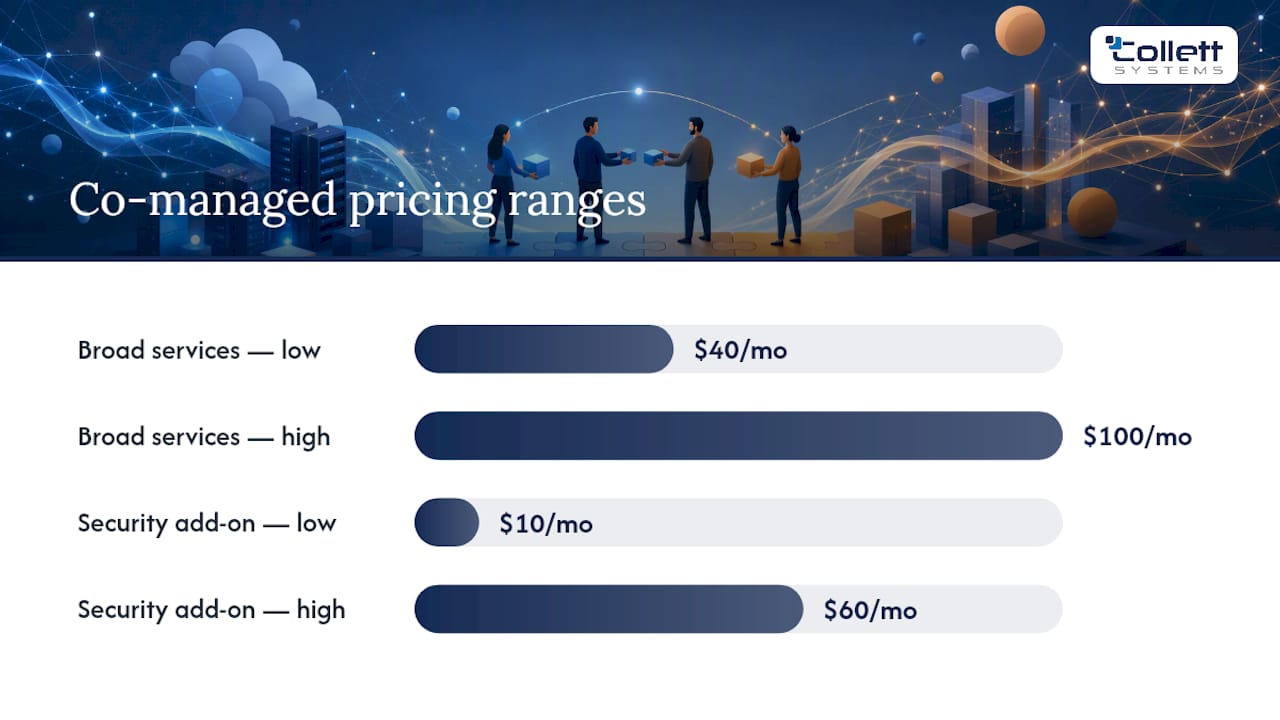
Typical co-managed pricing ranges from roughly $40 to $100 per user per month for broad services covering monitoring, help desk overflow, and patching. Security-only add-ons like managed detection and response commonly run $10 to $60 per user per month on top of that. Expect a one-time onboarding fee, often calculated as a multiple of the monthly rate, to cover initial documentation and tool deployment.
Your true cost calculation looks like this:
- Fully loaded internal IT payroll (salary, benefits, taxes)
- Plus the MSP's monthly per-user fee
- Plus onboarding and any new tool licensing
For smaller headcounts, this total can exceed what a fully managed contract would cost outright, since you're paying both a salary and a service fee. The total cost only favors co-managed once your internal team is large enough to justify keeping, but still needs the scale an MSP provides.
What Should Be in Your Onboarding Checklist and Contract?
Before you sign anything, walk through this sequence:
- Documentation review. The provider audits your existing network diagrams, asset inventory, and credentials.
- Agent rollout. Monitoring and management agents get deployed across endpoints and servers.
- Tenant and access review. Confirm who holds admin rights in Microsoft 365, your firewall, and your backup platform.
- Runbook creation. Document escalation steps, after-hours contacts, and recovery procedures.
- Baseline reporting. Establish the metrics you'll review together going forward.
Contract terms worth insisting on: a written RACI, defined SLAs with response and resolution targets, a change-control process for network modifications, clear billing terms with no surprise add-ons, and exit language covering credential handover and data export timelines. Ask about governance cadence too, quarterly vCIO reviews keep the relationship from drifting into ambiguity six months in.
Pro Tip: Put a specific SLA review date on the calendar at signing, 90 days out. Waiting until something breaks to renegotiate terms puts you in a weak position.
How Collett Systems Structures a Co-Managed Engagement
Collett Systems LLC builds its co-managed IT services around a standardized, fully-loaded stack rather than tiered packages, so there's no guessing what's included once you sign. Every engagement runs on fixed per-user pricing, with 24/7 monitoring and proactive support built in from day one, not sold as an upgrade later.
Mapped against the checklist above:
- RACI clarity: Responsibilities are documented before onboarding starts, not figured out reactively.
- Tooling ownership: Access and admin rights are defined up front so there's no ambiguity over who controls what.
- Security coverage: Threat monitoring and response are part of the standard stack, not an add-on tier.
- Predictable cost: Fixed per-user billing eliminates the pricing surprises common in tiered MSP models.
Businesses that treat IT as vital infrastructure, not just an expense line, tend to get the most out of a co-managed relationship. That's the mindset Collett Systems LLC builds its engagements around, particularly for manufacturers and financial firms in Southeastern Wisconsin that need predictable pricing and documented security controls.
Collett Systems LLC has earned the trust of more than 150 local organizations, a track record that shows up most clearly in fit for companies with an existing IT hire who needs backup, not a replacement.
What SMB Buyers Get Wrong About Co-Managed IT
The mistake I see most often is treating co-managed IT as a discount version of fully managed, something you buy because it's cheaper. It isn't automatically cheaper. Once you add internal payroll to the MSP fee, the math can land close to, or above, a fully managed contract for smaller teams. The real value of co-managed isn't price, it's control paired with capability: you keep institutional knowledge in-house while borrowing scale and security expertise you couldn't otherwise afford.

The second mistake is skipping the RACI because it feels like paperwork. It isn't. Ambiguity over who owns patching, who owns the SIEM dashboard, who gets the 2 a.m. call, is what turns a promising co-managed relationship into a finger-pointing exercise six months later. Write it down before you sign, not after something breaks.
If there's one thing conventional advice underplays, it's this: co-managed IT works when your internal person is good but outnumbered, not when they're absent. Get that distinction right before you shop for a provider.
Get a Scoped Quote for Co-Managed IT in Southeastern Wisconsin
If the checklist above left you with more questions than answers, that's normal, most SMB decision-makers don't have a procurement team dedicated to parsing MSP contracts. Collett Systems LLC built its model to remove that guesswork: one fixed per-user price, a fully-loaded stack instead of confusing tiers, and 24/7 monitoring included from the start rather than upsold later.
For businesses in West Bend and Southeastern Wisconsin already running lean internal IT, this means you get enterprise-grade security and monitoring without hiring three more specialists or guessing what your next invoice will look like. Manufacturers in particular benefit from Collett's industry-specific approach, where production uptime and compliance documentation matter as much as help desk speed.
Start with a scoped conversation: request a co-managed IT assessment and get a written breakdown of what your internal team would keep, what Collett Systems LLC would take on, and what it costs before you commit to anything.
Sources
- Co-Managed IT: Transform Your IT Services - Datto
- Co-Managed IT vs Fully Managed IT | Decision Guide - Uprite
- What Is Co-Managed IT? How It Works, Costs, and When to Use It - MyMSPHub
FAQ
What Is Co-Managed IT Services?
Co-managed IT is a shared-responsibility model where your internal IT staff and an outside provider split day-to-day responsibilities, with the provider typically handling after-hours monitoring, security operations, and specialized tooling while your team retains business-facing decisions.
What Are Co-Managed Services, Exactly?
They're an arrangement that augments an existing internal IT function rather than replacing it, commonly covering help desk overflow, remote monitoring, security operations, and project support split between your team and the MSP.
What Is the Hourly Rate for Managed IT Services?
Hourly rates vary too widely to use as a fair comparison; most providers, including Collett Systems LLC, price on a fixed monthly per-user basis instead, which typically runs $40 to $100 per user for broad co-managed coverage.
What Is the Difference Between Managed and Co-Managed IT?
Fully managed IT means the provider owns the entire IT function with no internal staff involved, while co-managed IT splits responsibilities between your internal team and the provider, letting you keep institutional knowledge in-house.
How Long Does It Take to Implement Co-Managed IT?
Onboarding typically runs through documentation review, monitoring agent rollout, tenant access checks, and runbook creation before both sides settle into a steady operating rhythm, usually within the first 60 to 90 days.