Email continuity means your people can still send and receive business email while your main mail system is unavailable. The options run from a simple queue that holds incoming mail, to an emergency inbox your staff can work from, to a full failover plan with independent sign-in. For most small and mid-sized Wisconsin businesses, the right answer is a continuity plan that is owned, documented and tested by the same team that runs your IT. A product bought and never rehearsed will not do that job.
That is how we approach it at Collett Systems: email is infrastructure, and infrastructure needs a plan for the day it fails.
TL;DR
- Email continuity is not backup and not archiving. It keeps mail flowing and readable during an outage. Backup restores lost data, and archiving keeps records.
- A queue-only service (backup MX or store-and-forward) holds inbound mail but gives your staff no inbox to work in. Only a continuity mailbox lets people read and reply.
- Microsoft 365 users should plan for sign-in too. If staff cannot authenticate during the incident, an emergency mailbox does not help.
- Compare options on activation time, how many days of mail are kept, whether it syncs back, and whether you have actually tested it.
- Manufacturers, law firms, dental practices and financial firms should also ask who else touches customer or client data when continuity is switched on.
Table of Contents
- Why continuity matters even with Microsoft 365
- What email continuity is, and what it is not
- The main email continuity options
- The problem most plans miss: sign-in
- How to choose: seven criteria
- Testing and the first hour of an outage
- What this looks like by industry
- Our perspective
- Get a plan that is owned and tested
- FAQ
- Sources
Why continuity matters even with Microsoft 365
Cloud email is reliable, but it is not immune. Microsoft's service agreement for Exchange Online promises 99.9% monthly uptime, according to LazyAdmin's tracker of the November 2026 incident. That same page documents a multi-hour Exchange Online outage starting on November 12, 2026, when users could not open their mailboxes. A 99.9% month still allows roughly 43 minutes of downtime, and an incident can run far longer than that.
For a manufacturer, that can mean a missed supplier confirmation or a stalled shipping release. For a law firm, it can mean a filing deadline communication that never arrives. For a dental office, it can mean patient appointment replies and insurer messages piling up unseen. The question is not whether your provider is good. It is what your team does during the hours the provider is down.
What email continuity is, and what it is not
These three terms get mixed up, and vendors use them loosely.
| Capability | What it does | When you need it |
|---|---|---|
| Email continuity | Keeps message flow and user access alive during an outage | The mail system is unreachable, but your data is intact |
| Email backup | Keeps a restorable copy of mailboxes | Mail was deleted, corrupted or encrypted |
| Email archiving | Preserves records for retention, search and legal review | Compliance, discovery, long-term retention |
Adaptive Security's August 2026 guidance draws the same line: continuity is active access during disruption, backup supports restoration after data loss, and archiving preserves records. Some continuity features are explicit about this. Mailprotector's help page says its continuity copy is a rolling 30-day window and does not synchronize or back up folders, contacts or calendars.
The practical lesson: owning one of the three does not cover the other two. If you are a law firm or financial firm with retention duties, see our guide to backup retention policy for seven years of records for how backup and retention fit together.
The main email continuity options
Option 1: Queue-only protection
Backup MX and store-and-forward services accept inbound mail while your primary system is down and deliver it when you recover. Comparitech's 2026 comparison describes this difference: queueing holds inbound mail for delivery after recovery, while full continuity gives users an alternate way to read and send during the outage.
Queueing is better than bounced mail, and it protects against lost messages. It does not give anyone an inbox. Your staff will not see the customer's urgent note until the primary system returns. Forwarding rules work in a similar way: whether you forward to a phone, a shared mailbox or a chat tool like Slack, the copy only arrives if the primary service delivers the message first, so forwarding on its own is not an outage plan.
Option 2: A continuity mailbox with web or Outlook access
This is what most people mean by email continuity. A separate service holds a rolling copy of incoming mail and lets users read, reply, forward and compose from a web portal or from Outlook while the main system is down. When the primary system returns, sent items and activity synchronize back.
Things that vary by product, and that you should settle before you buy:
- Activation. Some services start automatically after a short detection window, others wait for an administrator to trigger them. Product documentation we reviewed describes both patterns.
- History window. Rolling copies commonly cover somewhere between 10 and 30 days, with longer windows sometimes available at extra cost.
- Outage ceiling. Some services switch themselves off after a set number of days. A long outage needs a plan for what comes next.
- Setup before the outage. Users may need a separate continuity password provisioned in advance, and some services only begin accumulating mail after activation, so they import no history.
- Outbound scanning. Mail sent from an emergency mailbox should still be filtered for malware and data leaks.
With Microsoft 365, this kind of service sits in front of or beside Exchange Online and is configured by your administrator through mail routing records. That is why a configuration error in MX, SPF, DKIM or DMARC records is one of the common ways a continuity plan fails on the day it is needed.
Option 3: A built-in emergency path in your own tenant
Some businesses prepare an emergency mailbox or catch-all inside their own Microsoft 365 environment. This is cheap, but it carries real risk. The Australian Signals Directorate's business continuity guidance is Australian, not U.S. guidance, yet its technical warning applies anywhere: an emergency Microsoft 365 catch-all mailbox is unsupported by Microsoft, has weaker filtering and raises spam and phishing exposure, so it should be restricted and removed when no longer needed.
It also shares the failure domain. If the outage is in Exchange Online itself, an emergency mailbox inside Exchange Online goes down with it.
Option 4: A full failover plan
The most complete approach treats email as one piece of a communications plan: a continuity mailbox, independent sign-in, a way to reach staff when email and Teams are both affected, and a written runbook with named owners. Nobody has to improvise at 7:30 on a Monday morning. This is where a managed IT team earns its keep, because most of the plan is not a product at all. It is configuration, documentation and rehearsal.
The problem most plans miss: sign-in
Adaptive Security's guidance makes a point that small businesses often overlook: an alternate mailbox is not enough if users cannot authenticate during the same incident. In Microsoft 365, identity and mail are tightly connected. If your sign-in path depends on the same affected service, staff can be locked out of both the inbox and the backup.
Before choosing a product, answer three questions:
- How do users sign in to the continuity service, and does that path depend on Microsoft 365?
- If an employee loses their phone during the outage, can their password and multi-factor method be recovered without email?
- Who is allowed to trigger continuity, and can they do it from outside the affected system?
Strong identity controls make this easier. Our guides on enforcing MFA for Microsoft 365, phishing-resistant MFA and passkeys and identity-first security for small businesses cover the foundation.
How to choose: seven criteria
Comparitech's 2026 guidance suggests starting with two business decisions: how quickly access must return and how much recent mail you can afford to lose. Then check the following.
- Time to access. Minutes, or after someone notices and clicks a button? Write down the longest gap your operation can tolerate.
- Mail-history window. Match it to how far back your staff need to look to continue active conversations.
- Independence. The service should run outside the system it protects, including DNS, sign-in and hosting.
- Sync-back. Confirm what happens to sent items, read status and folders after recovery. Manual reconciliation is slow and error-prone.
- Licensing and cost. Continuity is often not part of a base email security license. Ask for the all-in per-user monthly cost, including any longer-history upgrades, before you compare quotes.
- Data handling. Continuity adds another party that may hold your messages. Ask where data is stored, how long it is retained, which subcontractors are involved and what the breach terms say. This matters most for law firms, dental practices and financial firms handling client, patient or customer information.
- Testing. A feature you have never run is a hope, not a plan.
A quick way to size the stakes
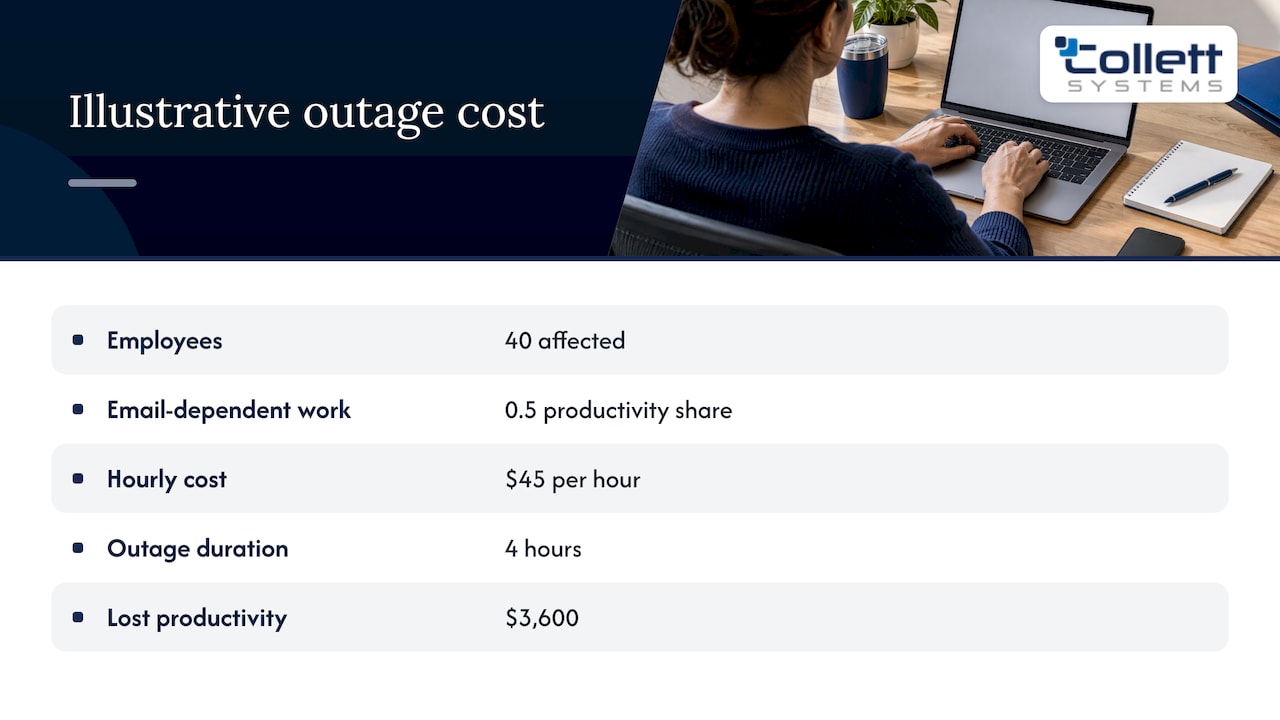
Outage cost is simple arithmetic: employees affected, times the share of their work that depends on email, times hourly cost, times outage hours. Take 40 employees, half of their productivity tied to email, a fully loaded cost of $45 an hour and a four-hour outage: 40 × 0.5 × $45 × 4 = $3,600 in lost productivity, before counting any missed order, deadline or patient message. These are illustrative numbers, so substitute your own. Even a modest per-user continuity cost compares well against a single bad morning.
Testing and the first hour of an outage
A continuity plan lives or dies on rehearsal. Run a controlled test at least once a year, and again after any change to your mail routing, domains or identity setup.
- Confirm the outage is real. Check Microsoft's service health page and any admin notices before triggering anything, so you do not activate failover over a local network problem.
- Notify staff by a channel that does not depend on email, such as a text group or phone tree.
- Activate the continuity mailbox and have two or three users from different departments send and receive test messages.
- Tell customers or suppliers who normally email you about any temporary address or delay.
- After recovery, verify sent items synchronized, then check that your MX, SPF, DKIM and DMARC records are back where they should be. Then disable any temporary emergency access you opened.
One more detail that catches people: Outlook problems that look like an outage are often a client issue, not a service failure. Our post on what to check when Outlook will not send helps rule that out before anyone declares an incident.
What this looks like by industry
Manufacturers. Email carries purchase orders, supplier confirmations and shipping notices. Downtime on the plant floor is expensive, so the email plan should tie to your wider uptime plan, not stand alone.
Law firms. Time-sensitive correspondence and client confidentiality both matter. Check data handling and outbound scanning closely, and make sure continuity access is covered by the same MFA rules as your main mailbox. Our guide to data loss prevention in Microsoft 365 shows how to keep sensitive content controlled.
Dental practices. Patient communications, insurer messages and referrals flow through email. Choose a service whose data handling you can document for your own compliance obligations.
Financial firms. Expect to document your safeguards and your oversight of service providers. A continuity vendor is another provider with access to customer information, so keep records of what you asked and what you were told.
Our perspective
We treat email continuity as an infrastructure decision, not a product purchase. The tool matters less than whether somebody owns the plan.
When we look at a small business's Microsoft 365 setup, we ask the unglamorous questions first. Who can trigger failover? How do people sign in if Microsoft is the thing that is down? Where is the runbook, and when was it last used? The answers usually show that the weak point is not the continuity feature. It is an undocumented process, an untested setting, or a single administrator who is on vacation.
That is why we run IT as a fixed cost per user with a standardized, fully loaded stack, including 24/7 monitoring, proactive support, backup and disaster recovery, and compliance documentation. When continuity is part of the stack, it is monitored, documented and covered by the same service levels as everything else, not a separate line item nobody remembers to check. And with local support, a real person who knows your environment answers when you call.
If your plan today is hoping Microsoft stays up, start by finding out where you stand. Then decide what level of continuity your operation really needs.
Dustin Collett
Get a plan that is owned and tested
If you want to know where your email setup stands, our IT & Security Assessment is the place to start. It gives you a clear picture of your environment, including how your Microsoft 365 setup would hold up in an outage and which gaps to close first. Businesses that want the plan run for them can look at our Managed IT Services, and teams with their own IT staff can look at Co-Managed IT Services. You can also book the IT & Security Assessment.
For a narrower look at your Microsoft 365 tenant, see our Microsoft 365 Environment Assessment or our Microsoft 365 consulting in Wisconsin. If you are weighing quotes, our guide to converting any per-user quote to one all-in monthly number makes them comparable.
FAQ
Is email continuity the same as email backup?
No. Continuity keeps you able to send and receive during an outage. Backup restores mail that was deleted or damaged. Some continuity features keep only a rolling copy of recent messages, so they do not replace a real backup. Most businesses need both, plus archiving if they have retention duties.
Does Microsoft 365 already include email continuity?
Microsoft 365 includes a service level agreement of 99.9% monthly uptime for Exchange Online, but that is a commitment about availability and service credits, not an inbox for your staff to work in during an outage. A continuity plan adds an alternate path for reading and sending mail, along with sign-in and procedures. We can review your tenant and tell you what you have.
How long should a continuity service keep mail?
Choose a window that covers the conversations your staff need to continue working on, and a maximum outage length longer than any you realistically expect. Products commonly offer somewhere between 10 and 30 days of stored mail, and some offer longer windows for a fee. Confirm the details in writing before you buy.
How often should we test email failover?
At least once a year, and after any change to your domains, mail routing or identity setup. A test should include real users sending and receiving, a check that mail syncs back after recovery and a review of who did what, so the runbook gets better each time.
Sources
- LazyAdmin: Microsoft 365 outage status and SLA credits
- Adaptive Security: Email security business continuity
- Mailprotector Help: XtraMail overview and configuration
- Comparitech: Best email continuity software
- Australian Signals Directorate: Business Continuity in a Box, communications
- Otto: Forward email to Slack
Check your domain's email trust score
Free 60-second tool, see how your SPF, DKIM, and DMARC look to recipients.