Never expose RDP directly to the internet. Put it behind a VPN, RD Gateway, or bastion host, then enforce MFA and Network Level Authentication (NLA) on that chokepoint. Automated scanners, not sophisticated attackers, cause the vast majority of exposed RDP compromises. These two controls alone stop most of the ransomware and credential-stuffing incidents that land on an admin's desk at 2 a.m.
TL;DR:
- Exposing RDP directly to the internet is highly risky because scanners exploit open ports, with 90 to 95 percent of ransomware cases involving such scans.
- The most effective security measures are to put RDP behind a VPN, RD Gateway, or bastion host, and enforce MFA and Network Level Authentication at that access point.
- Regularly patch all hosts, disable unsupported Windows versions, and use tamper-protected endpoint detection to prevent remote-execution vulnerabilities.
- Tightly scope firewall rules to management networks, set expiration dates on temporary access, and perform quarterly external scans to identify exposed RDP ports.
- Centralize log collection of failed and successful logins, and prioritize rapid response with clear incident triage protocols to contain breaches early.
Table of Contents
- What Makes Remote Desktop Security So Difficult to Get Right
- The Hardening Checklist That Stops Most RDP Incidents
- Choosing Between VPN, RD Gateway, and Bastion Hosts
- Where MFA and NLA Actually Belong
- Host Hardening: Patches, EDR, and Session Controls
- Logging, Alerting, and Triage When Something Goes Wrong
- Keeping RDP Posture Honest Over Time
- How a Managed Provider Applies This Baseline for Smaller Teams
- The Checklist Everyone Skips, and Why It's the One That Matters
- Get Your RDP Exposure Checked Before an Attacker Finds It
- Sources
- FAQ
What Makes Remote Desktop Security So Difficult to Get Right
RDP encrypts traffic by default, but that encryption doesn't matter much if the port sits open on the public internet with a weak password behind it. The protocol itself isn't the problem. The exposure is. Older configurations still permit legacy encryption levels, and unsupported Windows builds carry known remote-execution flaws that never get patched because nobody's tracking which machines still run them.
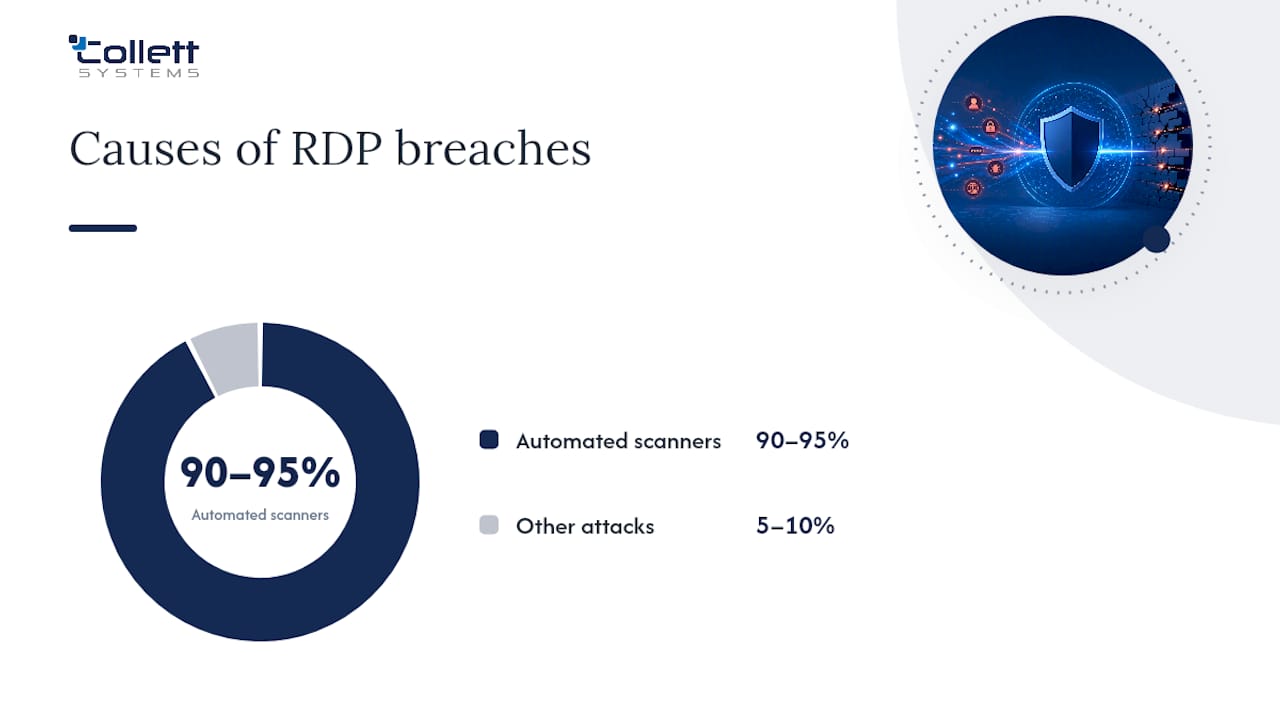
The math on this is stark: automated scanners account for 90 to 95 percent of ransomware cases involving exposed RDP, according to CISA's Stop Ransomware guidance. These aren't targeted attacks. They're internet-wide sweeps hunting for port 3389 responding on any public IP address, then throwing credential lists at whatever answers.
Three failure modes account for almost every RDP breach an admin will encounter:
- Direct exposure. Port 3389 open to the internet, discoverable by any scanner within hours of being provisioned.
- Weak or single-factor authentication. Passwords alone, often reused ones, guarding the only door.
- Unpatched hosts. Systems running outdated Windows builds vulnerable to remote-execution flaws that were fixed years ago.
Remote access security only works when you close all three gaps at once. Fixing one while ignoring the others just changes which door the attacker walks through.
The Hardening Checklist That Stops Most RDP Incidents
Treat this in order. Each step closes a bigger hole than the one after it, and skipping to step four while step one sits undone is how organizations end up rebuilding servers from backup.
- Remove public exposure first. Put every RDP endpoint behind a VPN, RD Gateway, or bastion host. No exceptions for "just this one server." University hardening guidance treats this as the non-negotiable baseline, not an optional hardening step.
- Enforce MFA at the access layer. Require multifactor authentication on the VPN, gateway, or identity proxy, not just on the RDP session itself.
- Require Network Level Authentication. NLA forces credential verification before a full session even starts, cutting off a big slice of pre-authentication attack surface.
- Restrict who can log on via RDP. Use least-privilege group membership. Domain admins should almost never have direct RDP rights to end-user machines.
- Patch aggressively and retire unsupported systems. Remote-execution flaws like CVE-2019-0708 (BlueKeep) exist specifically because someone left an old build running past its patch window.
- Deploy EDR and keep it tamper-protected. Endpoint detection catches the lateral movement that happens after a credential gets through anyway.
- Scope firewall rules to management networks. Allowlist by source IP wherever the business can tolerate it.
- Set an account lockout policy. Five to ten failed attempts within a defined window, with a lockout duration long enough to blunt brute-force scripts.
Changing the default RDP port from 3389 to something else is popular advice, and it's mostly noise reduction, not security. It filters out the laziest scanners but does nothing against anyone actually enumerating open ports. Spend that effort on the access layer instead.
Pro Tip: Run an external port scan against your own IP ranges quarterly. If 3389 answers on anything, you have a policy failure, not a technical one, and you want to find it before a scanner does.
Choosing Between VPN, RD Gateway, and Bastion Hosts
Each network control solves the exposure problem differently, and the right one depends on how many remote users you're supporting and how much operational overhead your team can absorb.
- VPN works well for smaller teams. It's simple to deploy, integrates with most identity providers, and gives you a single choke point for MFA enforcement. The tradeoff is that a compromised VPN credential can expose more of the network than a scoped gateway would.
- RD Gateway is built specifically for RDP traffic. Microsoft's own guidance recommends it as the preferred pattern for organizations standardizing on Windows remote access, since it supports certificate-based authentication and granular connection authorization policies without needing a separate VPN client.
- Bastion hosts (jump servers) add a hardened, heavily monitored single point of entry that all RDP traffic must pass through. They cost more to maintain but give you a natural place to concentrate logging and session recording.
Nearly all ransomware incidents tied to exposed RDP trace back to scanners finding an open port, which is the statistic that should decide this argument for you: whichever control you pick, the requirement is the same, no direct exposure, ever.
Whichever you choose, scope the firewall rules tightly. Management network only, not "any source." Just-in-time access, where a firewall rule opens only when someone requests it and closes automatically after a set window, cuts your exposure window from permanent to a few hours. Temporary exceptions need an expiration date attached at creation, not a promise to remember to remove them later. Managed firewall services can automate that expiry so it doesn't depend on someone's memory.
Where MFA and NLA Actually Belong
MFA on an individual RDP host is better than nothing, but it's the wrong layer for most organizations. Enforce it at the VPN, RD Gateway, or identity proxy instead, and you get centralized policy control, one place to revoke access, and consistent logging. Over 99 percent of accounts compromised through remote access lacked MFA entirely, which tells you the gap isn't a weak implementation, it's a missing one.
NLA and MFA solve different problems. NLA authenticates the connection before a session opens, shrinking the window an attacker has to exploit pre-auth vulnerabilities. MFA authenticates the person. You need both, not one instead of the other.
A few practices round out the identity layer:
- Require modern TLS and rotate certificates before they expire, not after someone notices a browser warning.
- Disable legacy encryption levels that older RDP clients default to.
- Document a break-glass process for emergency access: a specific account, short-lived approval, and a mandatory audit entry every time it's used.
Pro Tip: Store break-glass credentials in a sealed process, not a shared spreadsheet. If your emergency account has been used and nobody remembers approving it, that's an incident, not a convenience.
Getting identity architecture right the first time saves you from retrofitting it under pressure. Identity-first security treats the login event, not the network perimeter, as the real boundary worth defending, which is exactly the mindset RDP protection needs.
Host Hardening: Patches, EDR, and Session Controls
The network layer keeps attackers out. Host hardening limits the damage when one gets through anyway.
- Patch on a fixed cadence, not "whenever someone gets to it." Unsupported Windows versions are the single biggest source of exploitable remote-execution flaws.
- Deploy EDR with tamper protection enabled. A compromised account trying to disable your endpoint agent should trigger an alert, not succeed silently.
- Use Local Administrator Password Solution (LAPS) to rotate local admin credentials automatically instead of leaving a static password reused across every machine in the fleet.
- Disable clipboard and drive redirection on RDP sessions where the business case doesn't require it. Both are common paths for moving malware between a compromised client and a server.
- Set session timeouts via Group Policy so idle RDP sessions don't sit open indefinitely, waiting for someone to notice.
Endpoint detection and response that's properly tuned catches the behavior that follows a successful login, which matters because no single control here is airtight on its own.
Logging, Alerting, and Triage When Something Goes Wrong
Three Windows event IDs matter more than any others for RDP: 4625 (failed logon), 4624 (successful logon), and 4776 (credential validation). Forward all three, along with TerminalServices logs, to a central logging platform. A server's local event log is useless if the attacker wipes it on the way out.
Set alerts on two specific patterns:
- A spike in 4625 events against any single account or host, which usually signals an active brute-force attempt in progress.
- A successful Logon Type 10 event from an unfamiliar IP address, especially one outside your normal geographic range or business hours.
When an alert fires and it looks real, move fast:
- Isolate the host from the network immediately, before investigating further.
- Preserve the logs on that machine and forward a copy before anyone touches anything else.
- Check for lateral movement using EDR telemetry to see what the compromised account touched.
- Restore from backup rather than trying to clean a host you can no longer fully trust.
- Validate the recovery by confirming patches, MFA enrollment, and firewall rules before bringing the system back online.
A triage plan written down before an incident happens is the difference between a contained event and a weekend spent guessing.
Keeping RDP Posture Honest Over Time
Controls decay. A firewall rule someone opened for a vendor visit in March is still open in November if nobody's checking.
- Inventory every host with RDP enabled and review the access paths monthly, not annually.
- Set expiration dates on temporary firewall rules at the time they're created.
- Review RDP-capable group membership on the same cadence, removing accounts that no longer need access.
- Run external exposure scans against your own IP ranges quarterly.
- Run a recovery drill at least once a year so your backup and restore process gets tested before you need it under pressure.
- Document an owner and a service level agreement for every access exception, so "temporary" access doesn't become permanent by default.
How a Managed Provider Applies This Baseline for Smaller Teams
A managed VPN or RD Gateway, MFA enrollment across every user, EDR deployed fleet-wide, and 24/7 monitoring with centralized logging: that's the operational reality behind the checklist above. These managed controls can be built into a fixed per-user stack for small and mid-size organizations, standardizing the same controls across every client instead of offering a stripped-down tier.
If your team has the bandwidth to own patch cadence, log review, and after-hours alerting, keep it in-house. If those tasks keep sliding to next week, that's the signal to bring in a provider before an exposed port finds you first.
The Checklist Everyone Skips, and Why It's the One That Matters
Most RDP advice reads like a compliance checklist: change the port, enable NLA, call it done. That advice isn't wrong, it's just backwards. Changing the port stops the least competent scanners and nothing else. Meanwhile, the two controls that actually move the needle, killing public exposure and enforcing MFA at the access layer, get treated as optional hardening steps instead of the baseline they should be.
Here's what the numbers actually support: nearly every exposed-RDP ransomware case traces back to a scanner finding an open port, and nearly every compromised account lacked MFA. That's not a coincidence pattern. That's the whole attack chain in two facts. Everything else in this article, patching, LAPS, session timeouts, matters for reducing damage after something goes wrong. Removing exposure and requiring MFA is what keeps something from going wrong in the first place.
If you only have budget and time for two things this quarter, do those two. The rest can wait a cycle. Most organizations do it backwards, spending weeks on log retention policy while port 3389 sits open to the world.
Get Your RDP Exposure Checked Before an Attacker Finds It
Fixing remote desktop security in-house means someone on your team owns patch schedules, MFA enrollment, firewall rule expiration, and log review, on top of everything else already on their plate. Managed IT providers can run all of it as a standard part of a fixed per-user contract, so nothing gets skipped because someone was busy that week.
For solo operators and very small teams without a dedicated IT person, the Total Secure managed security offering covers the same baseline, MFA, EDR, monitoring, and gateway management, without requiring you to build an internal security function from scratch. If you're not sure where your current RDP exposure actually stands, start with a cybersecurity risk assessment to see exactly what's open, what's unpatched, and what needs fixing first.
Sources
- CISA Stop Ransomware: Ransomware Guide
- Securing Remote Desktop (RDP) for System Administrators, UC Berkeley
- Security guidance for remote desktop adoption, Microsoft
- NVD, CVE-2019-0708
FAQ
Is Remote Desktop secure?
RDP itself uses encryption, but security depends entirely on how it's deployed. Left exposed to the internet with weak authentication, it's one of the most commonly exploited entry points for ransomware; behind a VPN or RD Gateway with MFA and NLA enforced, it's a reasonably safe remote access method.
How do I make a remote desktop connection more secure?
Remove direct internet exposure by routing connections through a VPN, RD Gateway, or bastion host, then require MFA and NLA on that access point. Patch hosts on a fixed schedule and restrict RDP logon rights to only the accounts that need them.
What are the risks of a remote desktop connection?
The biggest risks are direct port exposure to automated scanners, weak or single-factor credentials, and unpatched hosts vulnerable to known remote-execution flaws like BlueKeep. Each risk compounds the others, since a scanner finding an open port is only dangerous if the credentials behind it are weak.
What is the safest way to set up remote desktop access?
There's no single "safest" configuration, but the strongest pattern combines an RD Gateway or VPN chokepoint, MFA enforced at that layer, NLA enabled, least-privilege group membership, and centralized logging on events 4625, 4624, and 4776. Organizations without in-house capacity to maintain that stack often turn to a managed provider like Collett Systems LLC to run it consistently.