Hidden IT costs are the recurring, off-invoice expenses (downtime, unused licenses, emergency repairs, shadow IT) that don't show up on a monthly bill but quietly erode margins. For a small business, these gaps can add a substantial amount annually on top of visible IT spend. The fix isn't complicated: find the leaks with a structured audit, measure them against real benchmarks, then close them with proactive management instead of reactive fixes.
TL;DR:
- Small businesses often overlook hidden IT costs that can add 15% to 25% to their visible expenses each year.
- Key hidden expenses include downtime, unused licenses, emergency repairs, aging hardware, and security gaps that may not be reflected in invoices.
- Conducting a 90-day audit involving inventory, license usage, downtime logs, and shadow IT discovery helps surface these hidden costs.
- Implementing fixed-rate, proactive managed IT services can eliminate emergency premiums and license creep, saving money long-term.
- The true IT cost per employee typically ranges from $2,000 to $5,000 annually, encompassing all visible and hidden expenses.
Table of Contents
- What Are Hidden IT Costs and How Do They Show Up?
- The Hidden IT Cost Categories Most SMBs Miss
- How to Calculate Your True IT Cost Per Employee
- A 90-Day Audit to Surface Hidden IT Costs
- Practical Ways to Reduce and Control Hidden IT Costs
- A Fixed-Fee Model That Removes the Guesswork
- When Predictable IT Spending Is Worth Paying For
- Get an Assessment Instead of Guessing
- Sources
- FAQ
What Are Hidden IT Costs and How Do They Show Up?
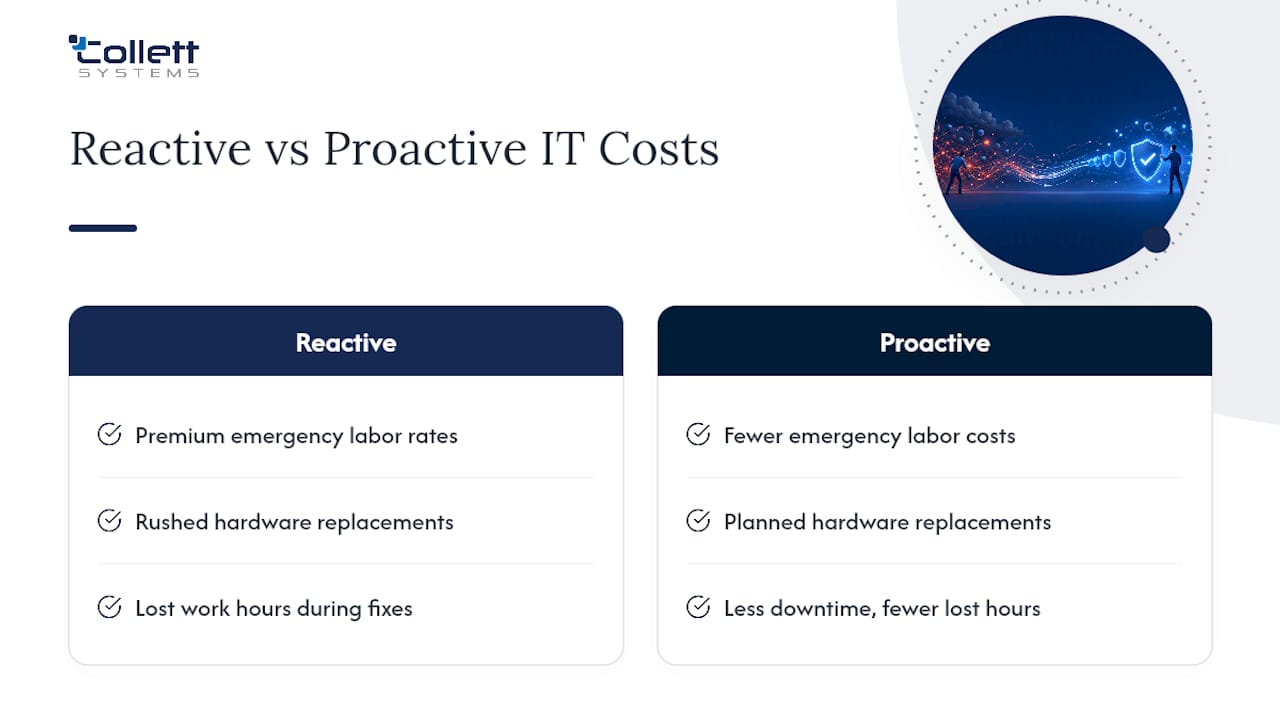
Hidden IT costs grow out of how a business supports its technology, not just what it buys. A company running on reactive support, calling someone only when something breaks, pays a premium every time: emergency labor rates, rushed hardware replacements, and lost work hours while a fix gets sorted out. Proactive support flips that cost profile by catching problems before they cause an outage, but most SMBs never compare the two models side by side.
Shadow IT and subscription creep make the problem worse. Employees sign up for tools without its knowledge, free trials roll into paid plans nobody remembers approving, and duplicate software piles up across departments. Behavioral research on pricing shows that when costs are hidden until later, buyers spend more and notice less, which is exactly what happens inside a company that never audits its software footprint. The same dynamic that makes dripped fees profitable for a checkout page makes forgotten SaaS subscriptions profitable for vendors and painful for you.
The Hidden IT Cost Categories Most SMBs Miss
Some of these costs are invisible until you go looking. Others show up on a bill but get written off as "just how IT works." Either way, they compound fast.
- Downtime and outages. A single hour offline can cost far more than the IT bill that caused it, once you count lost sales, idle payroll, and missed deadlines.
- Productivity loss. Every minute a non-IT employee spends fighting a slow laptop or resetting a password is billable time you're not getting back.
- Unused or duplicate licenses. Seats nobody uses and overlapping tools purchased by different departments quietly inflate software spend every month.
- Emergency repair premiums. After-hours and rush-project rates run well above standard support pricing, and they hit hardest when you can least afford the surprise.
- Onboarding and offboarding gaps. Manual account setup and, worse, accounts left open after someone leaves create both cost and security exposure.
- Compliance fines and reputation loss. A missed patch or an unmanaged endpoint can trigger a breach that costs far more in fines and lost trust than prevention ever would.
- Aging hardware. Old machines need more support tickets, run software slower, and eventually fail all at once, forcing a costly emergency refresh instead of a planned lifecycle swap.
Pro Tip: Log every unplanned IT interruption for 30 days, even the small ones. Most owners are stunned by how often "quick fixes" happen and how much time they actually eat.
| Hidden Cost Category | Typical Trigger | Business Impact |
|---|---|---|
| Downtime/outages | Server or network failure | Lost revenue, missed deadlines |
| Unused licenses | No offboarding process | Recurring waste, monthly overbilling |
| Emergency repairs | Reactive-only support model | Premium labor rates, rushed decisions |
| Aging hardware | No lifecycle replacement plan | Rising support tickets, sudden failures |
| Compliance gaps | Unpatched or unmonitored systems | Fines, breach costs, client churn |
Vendor and managed-service audits consistently point to this same set of categories, which suggests these aren't edge cases. They're the default state for a business that hasn't built a system to catch them, according to a breakdown of common hidden IT expenses.
How to Calculate Your True IT Cost Per Employee
Most owners look at their IT invoice and call that the cost of IT. That number is almost always incomplete. A more honest formula adds every category, visible and hidden, then divides by headcount:
- Add hardware, software licensing, and support contract costs.
- Add security tools, cloud services, and connectivity.
- Add estimated hidden costs: downtime, emergency repairs, and productivity loss from IT friction.
- Divide the total by your number of employees.
Industry calculators that run this math across real SMBs land on a typical range of $2,000 to $5,000 per employee per year once hidden costs are folded in, with those unseen expenses often adding 15% to 25% on top of what shows up on invoices, according to one SMB IT cost breakdown. For a 50-person company, that math puts total true IT cost somewhere between $100,000 and $250,000 annually. If your visible invoices only total $70,000, the gap is hiding somewhere, and it's worth finding before it finds you.
A 90-Day Audit to Surface Hidden IT Costs
Treat this like a discovery project with deadlines, not an open-ended review that never finishes.
- Days 1 to 30: Inventory everything. Build a full asset inventory covering devices, software licenses, and cloud subscriptions tied to every department.
- Days 31 to 60: Audit licenses and log downtime. Cross-reference active seats against actual usage, and start logging every outage with start time, end time, and affected staff.
- Days 61 to 90: Map shadow IT and review contracts. Run a shadow IT discovery pass to catch unapproved tools, then compare every vendor contract against what it actually delivers.
Helpdesk analytics tools and SaaS management platforms make this faster, but a spreadsheet and a disciplined timeline work too.
Pro Tip: Present findings to leadership as a dollar figure, not a technical report. "We found $38,000 in unused licenses" gets budget approval faster than a list of software names.
Practical Ways to Reduce and Control Hidden IT Costs
Fixing the leak matters more than finding it, but the two go hand in hand.
- Consolidate overlapping SaaS tools and assign one owner accountable for renewals and usage.
- Move from reactive fixes to proactive monitoring and patching with a defined service level agreement.
- Standardize hardware purchasing and set a fixed replacement cycle instead of buying reactively.
- Build a formal onboarding and offboarding process so accounts open and close on schedule.
- Negotiate contracts that spell out exactly what's included and what triggers an extra charge.
For businesses weighing whether to build this internally or bring in outside help, comparing an MSP against internal IT staffing is a useful next step before committing budget either way. Integration gaps between systems create their own hidden tax too. Partners like 121 Group that specialize in connecting platforms cleanly can prevent the duplicate data entry and manual workarounds that quietly consume staff hours.
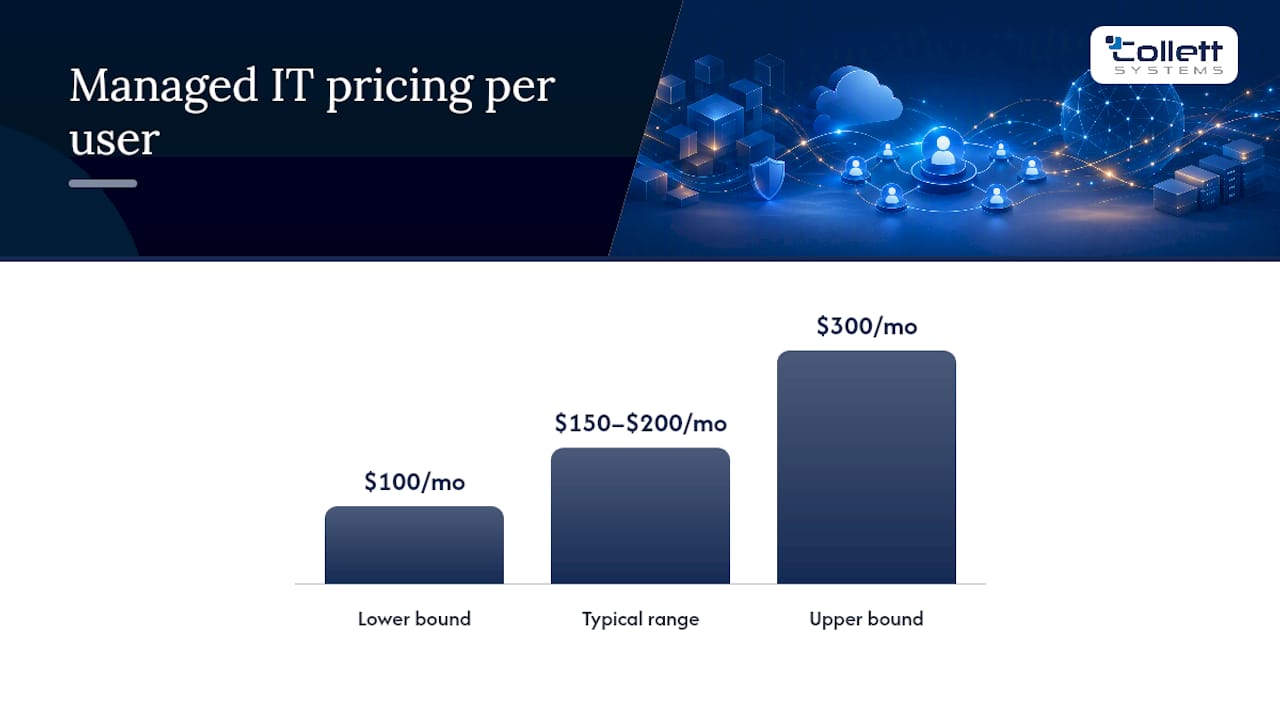
Pro Tip: Market pricing guides show most managed IT services run $100 to $300 per user per month, with $150 to $200 typical. A quote well under that range is a signal something essential got left out.
A Fixed-Fee Model That Removes the Guesswork
A fully loaded, per-user managed IT model changes the incentive structure entirely. When a provider bills a flat rate regardless of ticket volume, they profit from preventing problems, not from billing extra hours when something breaks. That single shift closes several of the gaps this article just walked through.
- No emergency premiums, because after-hours support is already included.
- No license creep, because ongoing monitoring catches unused seats before renewal.
- No surprise project fees, because infrastructure management is treated as one continuous service, not a series of billable events.
This is the logic behind Collett Systems LLC's approach for small business IT support: a standardized stack instead of tiers, so the audit findings above map directly to features already included rather than costly add-ons.
When Predictable IT Spending Is Worth Paying For
A lower sticker price feels smart until the hidden costs surface: the emergency invoice, the compliance gap, the ticket that repeats for the third time. Run the audit first. Let the number decide.
, Dustin Collett
Get an Assessment Instead of Guessing
An alternative to piecing together IT support from reactive vendors and one-off repair bills is a fixed per-user price that includes 24/7 monitoring, proactive support, and security management, helping prevent surprise invoices from the categories in the audit checklist above.
If you're not sure where your business stands, start with the IT & Security Assessment, which walks through the same discovery work outlined in the 90-day checklist but with a team that does it for a living. Businesses that want ongoing coverage rather than a one-time review can move straight into Managed IT Services, which replaces the patchwork of hourly billing and emergency premiums with one predictable monthly rate. For teams that already run an internal IT staff but want backup on specialized work, Co-Managed IT Services fills the gaps without replacing what's working. The fastest first step is free: run the 60-second IT risk score and see where your exposure sits before committing to anything.
Sources
- Doi
- Hidden IT Costs That Are Draining Your Small Business Budget
- How Much Should IT Cost a Small Business? (2026 Guide)
FAQ
What Are Examples of Hidden IT Costs?
Common examples include downtime and lost productivity, unused software licenses, emergency repair premiums, aging hardware replacement, and compliance fines tied to unpatched or unmonitored systems.
What Does "Hidden Costs" Mean in an IT Context?
Hidden IT costs are expenses that don't appear on a standard invoice but still hit the budget, such as staff time lost to slow systems or the cost of an outage measured in missed revenue.
What Is Another Word for "Hidden Costs"?
Hidden costs are also called indirect costs, unseen expenses, or dripped fees, a term used in pricing research to describe charges revealed only after a purchase decision is made.
What Do Hidden Fees Mean for a Small Business Budget?
Hidden fees mean your real IT spend is likely higher than your invoices suggest, often by 15% to 25%, once downtime, license waste, and emergency costs are factored in.
How Much Should IT Cost Per Employee?
Most SMBs land between $2,000 and $5,000 per employee per year once hardware, software, support, security, and hidden costs are all counted together.