An IT onboarding checklist works only when it's a phased, security-first playbook with named owners and automation, so devices, accounts, and multi-factor authentication are ready before a new hire's first hour ends. The structure runs pre-boarding, day one, and first week, and it never grants production access until MFA and mobile device management (MDM) enrollment are confirmed. Some managed IT service providers build similar onboarding models for clients in their regions.
TL;DR:
- Pre-boarding should start at least five to seven business days before the start date to allow enough time for device setup, account creation, and testing access.
- Ownership of each task must be clearly assigned using a RACI model to prevent onboarding failures caused by ambiguity or lack of accountability.
- Security gates such as MFA enrollment, MDM onboarding, and least-privilege access must be completed before granting full production access, with phishing-resistant MFA required for privileged roles.
- Automations like HRIS-to-IdP sync, device imaging, and onboarding ticket generation provide significant time savings and reduce manual errors.
- Offboarding should mirror onboarding processes, with immediate revocation of access, hardware recovery, and license reclamation within the same workflow to maintain security and traceability.
Table of Contents
- What Belongs in a Pre-Boarding IT Checklist (T-7 to T-1)?
- What Happens in the First 60 Minutes on Day One?
- How Do You Handle the First Week and 30/60/90 Stabilization?
- Who Owns Each Step? A Sample RACI Breakdown
- What Security Gates Must Clear Before Access Is Granted?
- How Should Devices Be Provisioned and Shipped?
- What's the Right Way to Handle SaaS and Identity Provisioning?
- Which Automations Actually Reduce Onboarding Workload?
- Why Does Good Onboarding Make Offboarding Faster?
- What Fields Belong in Your Checklist Template?
- How a Fixed Per-User Onboarding Playbook Runs in Practice
- Why Most Onboarding Checklists Fail Before They Start
- Need Help Building or Auditing Your Onboarding Checklist?
- Sources
- FAQ
What Belongs in a Pre-Boarding IT Checklist (T-7 to T-1)?
Most onboarding failures trace back to one thing: IT finding out about a new hire the same week they start. A pre-boarding window of five to seven business days gives your team enough runway to provision accounts, order hardware, and test access before anyone shows up expecting a working laptop.
HR should submit a standardized intake packet the moment an offer is signed, not the week before start date. That packet needs:
- Legal name and preferred name for account creation
- Role, department, and reporting manager
- Confirmed start date and work location (office, hybrid, remote)
- Accessibility requirements, if any
- Equipment preference (laptop model, monitor setup, mobile device needs)
Once IT has that information, the real work begins. A practical pre-day-one schedule with assigned owners and milestones reduces first-day failures, according to Atlantic Computer Systems' new employee setup guide, and zero-touch imaging tools cut manual setup time dramatically compared to hand-configuring each machine.
Your pre-boarding checklist should include:
- Order and image the device using a gold image or Autopilot/Apple Business Manager profile
- Reserve loaner inventory in case shipping is delayed or a device fails quality checks
- Create the identity in your identity provider (IdP) with the account disabled until identity verification clears
- Preliminarily assign role-based groups so licenses and permissions activate the moment the account is enabled
- Map the app bundle tied to the new hire's job title and confirm license availability
- Set an SLA for each step, typically 48 hours from intake to device shipment confirmation
Skip any of these, and day one turns into a scramble. Skip all of them, and you've built a checklist in name only.
What Happens in the First 60 Minutes on Day One?
The first hour sets the tone for everything that follows. New hires who spend their first morning locked out of email or fumbling with a temporary password start forming opinions about your organization fast, and those opinions stick.
A tight runbook keeps that hour productive instead of chaotic:
- Welcome and device handoff, manager or IT liaison confirms hardware, cables, and access badge are physically ready
- First login and MFA enrollment, new hire signs in with a temporary access pass (TAP) or one-time password, then immediately enrolls a second factor
- Email and calendar walkthrough, confirm inbox access, calendar sync, and that the correct distribution lists are already applied
- Collaboration tools check, verify access to chat, video conferencing, and shared drives tied to their team
- Security brief, a five-minute walkthrough of acceptable use policy, phishing reporting, and who to call when something looks wrong
- Open and close a test helpdesk ticket, this confirms the new hire knows how to reach support before they actually need it
If MFA enrollment fails or the temporary access pass doesn't work, escalation contacts need to be posted somewhere obvious, not buried in an internal wiki nobody can find under pressure. Treating first-day readiness as a blocking gate matters here: don't issue production credentials until device compliance and MFA both check out, a standard Rippling's onboarding checklist also recommends.
Pro Tip: Have the new hire's manager physically confirm sign-off at the end of hour one, not IT alone. A manager who says "yes, they're logged in and working" closes the loop faster than a ticket status ever will.
How Do You Handle the First Week and 30/60/90 Stabilization?
Day one covers survival. Week one covers everything else, and this is where most checklists quietly fall apart because nobody planned past the first 24 hours.
Split app access into tiers instead of granting everything at once:
- Day-1 essentials: email, calendar, core collaboration tools, VPN if remote
- Week-1 bundle: department-specific software, shared drives, project management tools
- Month-1 bundle: specialized systems, reporting dashboards, vendor portals requiring approval workflows
Security awareness training deadlines belong in this window too. Given that 92% of jobs now require digital skills while a large share of workers report low or no digital proficiency, assume your new hire needs structured training, not a one-time video link. Track completion in your learning management system (LMS) and set a hard deadline, usually five business days.
Build in these checkpoints:
- A 30-day manager check-in confirming the new hire has everything they need
- A 60-day access review to catch permissions that should have expired but didn't
- A 90-day full audit comparing granted access against the role's actual requirements
Backlog clearance matters here too. Any access request logged during week one that didn't get resolved needs a name attached to it by day 30, or it disappears into the void.
Who Owns Each Step? A Sample RACI Breakdown
Ambiguous ownership is the single most common reason onboarding tasks slip. A RACI model (Responsible, Accountable, Consulted, Informed) fixes that by naming exactly one accountable party per task.
- Intake submission: HR is Responsible and Accountable; IT is Informed
- Identity creation: IT is Responsible; IT manager is Accountable; HR is Consulted
- License assignment: IT is Responsible and Accountable; department head is Consulted
- Device ordering and shipping: IT is Responsible; procurement is Accountable
- MDM enrollment: IT is Responsible and Accountable
- MFA enrollment: New hire is Responsible; IT is Accountable for verification
- Training completion: New hire is Responsible; HR is Accountable
- Manager sign-off: Manager is Responsible and Accountable
Any step without a completed SLA by its due date should trigger an automatic escalation. Small teams without a dedicated IT department should still name one person as Accountable for security gates specifically, even if that person wears three other hats.
What Security Gates Must Clear Before Access Is Granted?
Security can't be a phase you get to eventually. It has to be built into onboarding from day one, with multi-factor authentication, strong password policies, and least-privilege access enforced before the new hire's first login, a principle Rippling's checklist treats as non-negotiable.
Four gates should block production access until cleared:
- MFA enrollment, with phishing-resistant methods like FIDO2 keys or passkeys required for privileged and administrative roles
- MDM/UEM enrollment, with disk encryption and endpoint detection and response (EDR) reporting confirmed before the device touches your network
- Least-privilege access, meaning no standing admin rights; elevated access requires a time-bound, approved request
- Evidence capture, attaching MFA enrollment logs, MDM enrollment IDs, and training completion certificates directly to the onboarding ticket
That last point matters more than most checklists admit. Building an onboarding playbook that captures auditable evidence like MFA logs and MDM enrollment IDs helps organizations meet cybersecurity control requirements and simplifies audits later, as LakeRidge's guide to onboarding cybersecurity controls points out. Without that evidence trail, you're reconstructing access history from memory during an audit, which is a bad place to be.
Pro Tip: Require phishing-resistant MFA (not just SMS codes) for anyone touching financial systems or admin consoles from day one. Retrofitting that later means chasing down every privileged account one by one. Reviewing your current setup against an MFA configuration guide for Microsoft 365 is a reasonable place to start.
How Should Devices Be Provisioned and Shipped?

Zero-touch provisioning is the difference between an IT team spending twenty minutes per laptop versus two hours. Use a gold image paired with Autopilot or Apple Business Manager so devices self-configure on first boot instead of requiring manual setup at a desk.
For remote hires, ship a fully imaged device with a clearly labeled instruction card covering MFA setup and a direct support contact, then schedule a 15-minute video walkthrough for their first login. Record every serial number, asset tag, and MDM enrollment ID in the onboarding ticket immediately, not after the fact.
- Mail FIDO2 security keys separately from the device, never in the same box
- Provide a temporary access code by phone or secondary email, not embedded in shipping paperwork
- Confirm endpoint detection and response is reporting before the device leaves the imaging station
- Log the shipping carrier and tracking number against the employee record for accountability
What's the Right Way to Handle SaaS and Identity Provisioning?
Manual account creation is where most access errors originate. Map each job title to a defined app bundle, then provision through SCIM (System for Cross-domain Identity Management) or your SSO platform so accounts get created and deactivated automatically rather than by hand.
- Use consistent username conventions across every system, no exceptions for "just this one app"
- Document who owns each shared or service account, since these often outlive the employees who set them up
- Monitor license consumption monthly and reclaim idle seats the moment someone offboards
- Test SSO and conditional access policies with a dummy account before the new hire's actual first login
An identity-first security approach treats the identity provider, not the network perimeter, as the real control point, which matters more every year as remote and hybrid work expand what "the network" even means.
Which Automations Actually Reduce Onboarding Workload?
Not every automation is worth building. Prioritize identity and device provisioning first, since HRIS-to-IdP sync, SCIM for SaaS apps, and Autopilot or Jamf for devices deliver the largest time savings for the least engineering effort, according to Atlantic Computer Systems.
- Sync your HRIS system directly to your identity provider so a new hire record auto-triggers account creation
- Auto-generate onboarding tickets in your IT service management (ITSM) platform the moment HR confirms a start date
- Use Intune/Autopilot or Jamf for zero-touch imaging with EDR agents deployed automatically
- Automate welcome emails and LMS training enrollment tied to the employee's start date
- Track SLA compliance monthly: percentage of devices shipped on time, percentage of MFA enrollments completed in hour one
A follows the same logic even outside IT: automate the repetitive, measurable steps first, then layer in judgment calls where a human still needs to weigh in.
Why Does Good Onboarding Make Offboarding Faster?
Offboarding is onboarding in reverse, and it only moves fast when your onboarding records are actually good. On a departing employee's last day, revoke IdP and SaaS access, recover all hardware, rotate any shared passwords they had access to, and reclaim their licenses immediately.
- Pull the same device IDs and MDM enrollment records captured during onboarding to confirm exactly what needs to come back
- Use training completion certificates and access logs to verify what that employee actually had permission to touch
- Keep offboarding inside the same ticketing workflow as onboarding so the full lifecycle stays traceable in one place
Organizations that treat onboarding evidence as disposable end up rebuilding an access map from scratch during every departure, which is slower and riskier than it needs to be.
What Fields Belong in Your Checklist Template?
Keep the template simple enough that people actually use it. Seven fields cover nearly every use case: task, owner, due date, status, evidence link, SLA, and escalation contact.
- Export to CSV or a shared Google Sheet for small teams just getting started
- Move to a Trello or Asana board once you need visual tracking across multiple hires at once
- Build it directly into your ITSM workflow when volume justifies the setup time
Pilot the template with two or three hires before rolling it out organization-wide, then revise anything that caused confusion. A checklist that isn't tested is just a wish list.
How a Fixed Per-User Onboarding Playbook Runs in Practice
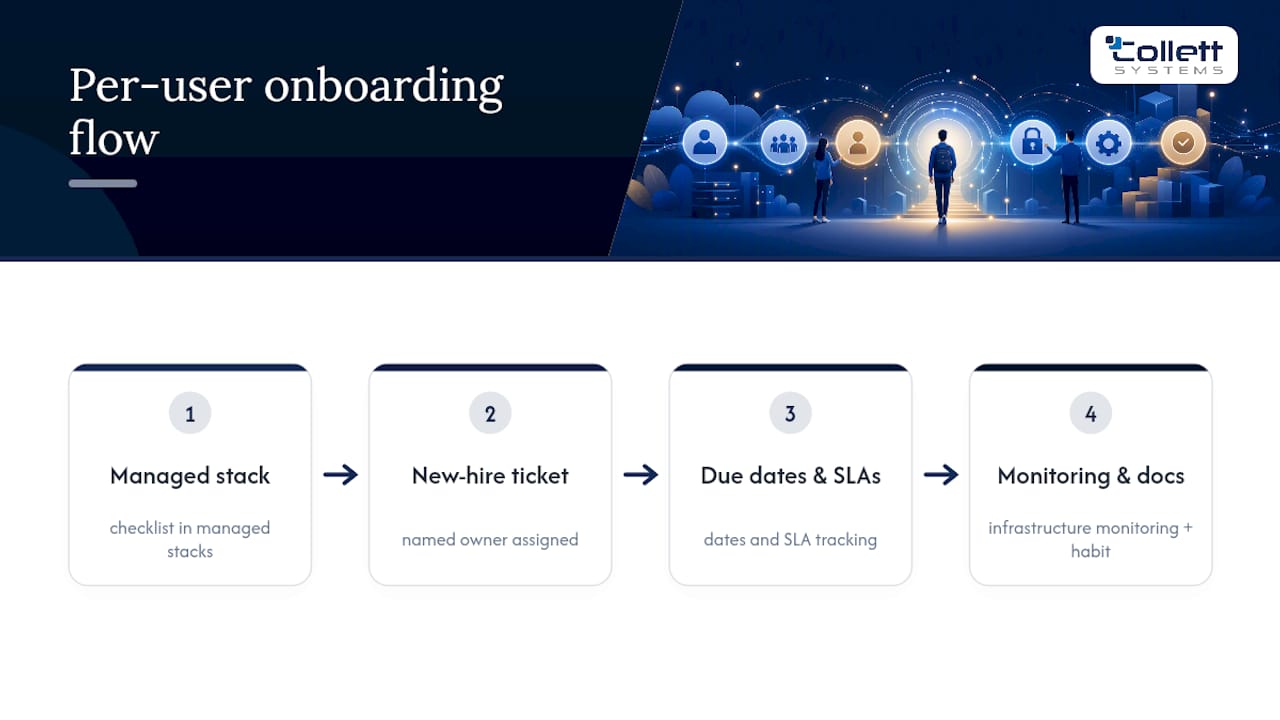
Some managed IT providers build onboarding into their managed stacks, making the checklist part of ongoing monitoring. New hire tickets often carry named owners, due dates, and SLAs tracked alongside other infrastructure.
The failures we see most often aren't exotic. They're licenses assigned to the wrong bundle, MFA enrollment skipped because nobody blocked access until it was done, and devices shipped without asset tags logged anywhere searchable. None of that requires new technology to fix. It requires a checklist someone actually owns, and a documentation habit that survives past the first 90 days.
Why Most Onboarding Checklists Fail Before They Start
The conventional advice treats onboarding as an IT problem to solve with better software. That's backwards. The research on this is consistent: HR and IT coordination, not tooling, correlates most strongly with onboarding that actually works, a pattern SHRM's research on onboarding and retention backs up directly.
What gets underestimated is how much a blocking security gate protects everyone, including the new hire. Organizations that let people log into production systems before MFA and device compliance clear aren't moving faster. They're just deferring the cleanup to a worse moment, usually during an audit or after an incident.
If you're prioritizing anything first, prioritize the RACI assignment. A checklist with no named owner per task is a wish list with good intentions. Automation matters, evidence capture matters, but neither survives contact with reality if nobody's accountable when a step gets missed. Fix ownership first. Everything else on this checklist becomes easier to enforce once that's settled.
, Dustin Collett
Need Help Building or Auditing Your Onboarding Checklist?
Certain managed IT providers offer integrated, fixed per-user stacks that include monitoring, proactive support, and security gates as part of their onboarding solutions.
Our IT & Security Assessment is where most clients start. It maps your current onboarding gaps against the phases covered here: pre-boarding automation, MFA enforcement, MDM enrollment, and evidence capture for audits. If your internal IT team needs backup rather than a full handoff, our Co-Managed IT Services fill the gaps without replacing what already works. For organizations ready to hand the whole stack over, Managed IT Services from Collett Systems LLC delivers the same standardized, fully-loaded approach to every client, with no tiered surprises in pricing. Book the assessment and find out exactly where your current checklist has holes.
Sources
For teams building out their own process, Rippling's IT onboarding checklist covers the three-phase structure in more depth. Atlantic Computer Systems' SMB setup guide offers a practical pre-day-one schedule. LakeRidge's cybersecurity controls guide explains evidence capture for audits, and UCSD's IT support knowledge base shows real-world service documentation in action.
- Complete IT onboarding checklist for new hires
- New Employee IT Setup Guide: Onboarding Checklist for SMBs | ACS
- How to Create an Employee Onboarding Checklist That Meets Essential Cybersecurity Controls (ECC, 2: 2024) - LakeRidge
- National Skills Coalition press release on digital skills
- Don't underestimate the importance of good onboarding | SHRM
FAQ
What Is an IT Onboarding Checklist?
An IT onboarding checklist is a phased set of tasks, owners, and deadlines that get a new hire's accounts, devices, and security settings ready before and during their first days. It typically spans pre-boarding, day-one activities, and ongoing follow-up, a structure Rippling's onboarding guide outlines in detail.
How Long Should Pre-Boarding Take?
Most organizations run pre-boarding for five to seven business days before start date, giving IT time to order hardware, create accounts, and test access. A shorter window increases the risk of shipping delays or license mismatches on day one.
Does MFA Need to Be Set Up on Day One?
Yes. MFA enrollment should happen during the first login and act as a blocking gate before granting broader system access, since treating first-day readiness as mandatory prevents lingering security gaps later, as Rippling notes. Privileged roles should use phishing-resistant methods like FIDO2 keys rather than SMS codes.
Who Should Own the IT Onboarding Checklist?
Ownership should be split using a RACI model: HR typically owns intake and training deadlines, while IT owns identity creation, device provisioning, and MFA verification. Managers own final sign-off confirming the new hire has working access.
Can Collett Systems LLC Help Set Up Our Onboarding Process?
Yes. Collett Systems LLC's IT & Security Assessment identifies onboarding gaps and automation opportunities, and our Managed IT Services plan includes onboarding support as part of a fixed per-user, fully-loaded IT stack. Pricing details are available directly on our site.