Passwordless authentication replaces the typed password with a cryptographic key held on a device your people already carry, unlocked by a fingerprint, face scan or PIN. For a business, the move is worth making because stolen and phished passwords stop being the easy way in. But the technology is the small part of the job. The harder parts are deciding which accounts go first, planning recovery, and getting every employee enrolled without a flood of lockouts. This guide walks through all of it, in the order a Wisconsin manufacturer, law office, dental practice or financial firm would need it.
TL;DR
- Passkeys are the mainstream form of passwordless sign-in. They use FIDO standards and resist phishing because the login is bound to the real website, so a fake page gets nothing.
- Start with email, your identity provider, banking and file storage, plus every administrator account. Federal small-business guidance names exactly these as the first places for phishing-resistant MFA.
- Recovery is where passwordless projects fail. Plan a second passkey or hardware key per person and a recovery path that does not quietly fall back to email or SMS codes.
- NIST's 2025 digital identity guidelines are guidance, not a mandate for private businesses, but they show where the standard of care is heading.
- A pilot with administrators, then a small group, then everyone, is safer than a company-wide switch on a Monday morning.
Table of Contents
- What passwordless authentication actually means
- Why this matters more than another password policy
- The passwordless methods a business can choose from
- What NIST's 2025 update does and does not require
- Passwordless is not the same as risk-free
- Recovery: the part that decides whether the project works
- How to move beyond passwords: a five-stage rollout
- Special cases for manufacturers, law offices, dental practices and financial firms
- Common mistakes
- Where we come in
- Our perspective
- FAQ
- Sources
What passwordless authentication actually means
With a password, you prove who you are by typing a secret that the website also knows. Anyone who tricks you into typing it on a fake page, or who finds it in a leaked database, can use it.
Passwordless sign-in removes the shared secret. In a passkey setup, your device creates a key pair. The private key stays on the device, and the service keeps only the public key. OWASP's passkey guidance describes this as discoverable WebAuthn public-key credentials: the authenticator holds the private key and the relying party (the service you are logging into) stores the public key. When you sign in, the device proves it holds the private key after you unlock it with a biometric or PIN. Nothing reusable crosses the network, and nothing useful sits in a database for a thief to steal.
Two terms you will see often:
- FIDO2 and WebAuthn are the open standards behind passkeys. They are built into current versions of Windows, macOS, iOS, Android and the major browsers.
- Phishing-resistant means the login cannot be replayed on a look-alike site. NIST's small-business page names FIDO authenticators used with the W3C Web Authentication API as the most common widely available phishing-resistant option.
Why this matters more than another password policy
Most of the break-ins a small organization faces start with a stolen login: a convincing email, a fake Microsoft 365 sign-in page, a code read out over the phone. Texted codes and app-generated one-time codes help, but NIST notes that OTPs and SMS codes can still be phished, which is why it recommends phishing-resistant authenticators for sensitive information and for users with elevated privileges.
CISA, the federal cyber agency, goes further. It strongly urges all organizations to implement phishing-resistant MFA, while noting that any MFA is better than none. If you have not yet turned on basic MFA everywhere, do that first; our guide to why multi-factor authentication matters covers the reasoning, and our Microsoft 365 MFA setup guide covers the admin steps.
For small businesses, NIST's 2026 publication goes as far as saying to avoid passwords whenever possible by using passkeys. Where passwords remain, it recommends at least 15 characters. That second point matters in practice, because every business will keep some passwords for years: older line-of-business software, vendor portals, a shop-floor system that predates passkeys.
The passwordless methods a business can choose from
There is no single product called "passwordless." You choose among a few authenticator types, and most businesses end up using two of them.
| Method | How it works | Where it fits | Watch for |
|---|---|---|---|
| Synced passkeys | Credential is stored on the device and copied across the user's devices through their platform account | Office staff on their own phone and laptop; easiest to roll out | Security now depends on the sync account and on recovery |
| Device-bound passkeys (platform) | Key lives in the laptop's secure hardware, for example Windows Hello for Business | Company-managed Windows laptops | Lost or replaced device needs a re-enrollment process |
| Hardware security keys | A physical FIDO key that you tap or plug in | Administrators, shared workstations, shop-floor terminals, executives | Buy two per person so one is a backup |
| Authenticator app with number matching or similar | Push prompt on a phone | A stepping stone where passkeys are not supported yet | Weaker against phishing than FIDO keys |
| SMS or emailed codes | One-time code sent to the user | Last resort only | NIST flags these as susceptible to phishing |
The synced versus hardware-bound trade-off is the one that deserves attention. NIST's SP 800-63B-4 describes syncable authenticators as copying credentials through a sync fabric, which makes multi-device use easy but brings specific security requirements. The FIDO Alliance's enterprise paper makes the same split in practical terms: synced credentials ease use across devices, while hardware-bound keys suit shared-device settings but need backup and recovery planning. For a plant floor with shared terminals, hardware keys are usually the better fit. For an office of laptops and phones, synced passkeys remove the most friction.
What NIST's 2025 update does and does not require
NIST published SP 800-63B-4 in July 2025. It supersedes the 2017 edition and sets authentication assurance requirements for government information systems. At the highest level, AAL3, it requires non-exportable private keys and prohibits syncable authenticators.
That is guidance for federal systems, not a rule for every private company. But it is the reference auditors, insurers and customers often reach for. If you handle sensitive manufacturing data for a defense or aerospace customer, or you must produce compliance documentation as a financial firm, the practical reading is: use hardware-bound keys for your most privileged accounts, and document why you chose each method for each group of users.
Passwordless is not the same as risk-free
A passkey stops a phishing page from stealing your login. It does not fix everything else. OWASP is direct about this: passkeys do not protect against compromised sessions, devices, sync accounts, applications, or weak account-recovery paths. So the surrounding controls still matter:
- A stolen, unpatched laptop with a logged-in session is still a problem.
- A sync account protected only by a weak password undermines every passkey inside it.
- Attackers who cannot phish a login will phone your help desk and ask for a reset. This is a real social-engineering route, and our phishing training guide and note on real emails that are still phishing cover the human side.
Broader cyber hygiene belongs in the same plan. NIST's small-business publication pairs authentication with asset inventory, tested backups and software updates. If you want a wider view of how authentication fits with other, treat the login as one layer in a stack, not the whole defense.
Recovery: the part that decides whether the project works
Every passwordless rollout meets the same Tuesday morning: an employee drops a phone in a lake, or a new laptop arrives, and nobody can sign in. How you handle that moment determines your real security level.
OWASP puts it plainly: an account is only as strong as its weakest recovery route. For high-risk accounts it recommends another registered passkey, a separately secured recovery code, or high-assurance identity checks, not email or SMS recovery that silently bypasses the stronger login. It also advises registering multiple authenticators, requiring reauthentication before credential changes, and sending notifications when something changes.
In practice:
- Two authenticators per person. The FIDO Alliance recommends two hardware security keys per user when you choose that approach, so one serves as backup. For synced passkeys, register a passkey on a second device.
- A written help desk procedure. Define how your support team verifies a caller before issuing a temporary access method. Callers who are "the owner, in a hurry" are the classic attack. A call-back rule or a mutual verification step closes that gap; see how Collett Verify approaches mutual call verification.
- Break-glass accounts. Keep one or two emergency administrator accounts, protected by hardware keys stored in a safe, excluded from the normal policy so a configuration mistake cannot lock everyone out.
- Logging. Make sure sign-in and credential-change events are recorded. For regulated firms, this log is part of your compliance documentation.
How to move beyond passwords: a five-stage rollout
This is the sequence we would follow for a company of 10 to 200 people. The timing depends on your size and how many applications you run.
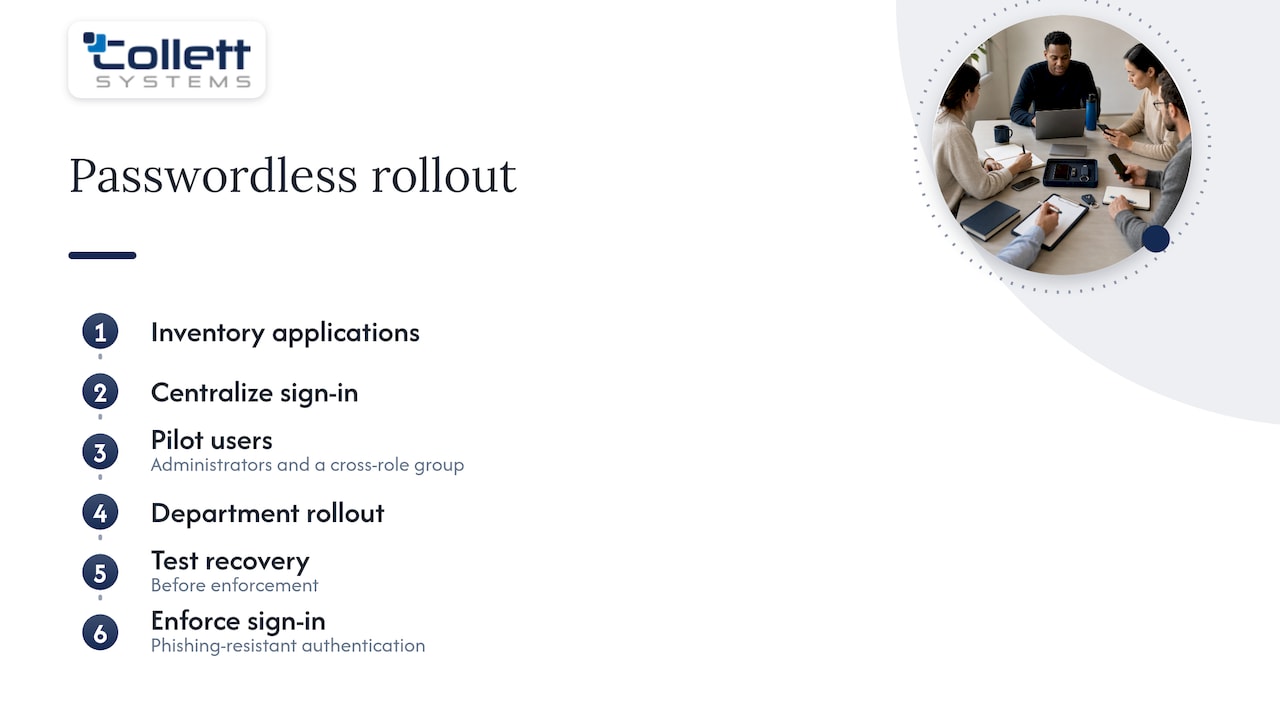
1. Inventory what you sign in to
List every application, who uses it, and how it signs in. NIST's small-business guidance starts with inventorying important business assets and services, and this is why: you cannot move to passwordless what you do not know exists. Our 90-day IT asset inventory roadmap shows one way to build the list. Mark each app as supporting single sign-on, supporting passkeys directly, or password-only.
2. Centralize sign-in
The FIDO Alliance's enterprise paper notes that adding passkey support at your identity provider can extend authentication to federated applications, while independent password-based apps may need separate prioritization or migration into federation. For most small businesses, the identity provider is Microsoft 365 or Google Workspace. Put as many applications behind it as you can; each one you federate is one fewer password.
3. Pilot with administrators and a friendly group
Enroll your administrators first. They have the most access and the most to lose. Then add a small group of ten or so willing users from different roles: front office, a plant supervisor, finance. Use the pilot to test enrollment instructions, second-device registration and your recovery process. Run any enforcement policy in report-only mode first if your platform supports it, so you can see who would be blocked before anyone actually is.
4. Roll out in waves and enforce
Move department by department. Offer a clear deadline, in-person or remote enrollment help, and a hardware key for anyone without a suitable phone or computer. Once a group is enrolled, require phishing-resistant sign-in for that group and remove weaker fallbacks such as SMS. NIST's guidance on prioritizing is useful here: enable phishing-resistant MFA first on email, banking, sensitive file storage, password managers and business-critical cloud services.
5. Measure and clean up
Track a few numbers monthly:
- Share of users enrolled with two authenticators.
- Share of sign-ins using phishing-resistant methods.
- Number of apps still on passwords, and a date to retire or protect each.
- Help desk tickets for lockouts, trending down after each wave.
- Time to restore access for a locked-out user, verified correctly.
For the passwords that remain, use a password manager and 15-character minimums, as NIST advises.
Special cases for manufacturers, law offices, dental practices and financial firms
Manufacturers. Shop-floor terminals are often shared, and some run older software that cannot do passkeys. Use hardware keys or badge-style FIDO tokens for shared stations, and wall off legacy systems on their own network segment. Downtime is the real cost for you, so test recovery before enforcement, not after.

Law offices and dental practices. Client and patient records live in a handful of cloud systems plus email. That makes the inventory short and the payoff fast: email, practice or case management, and file storage first. Plan for staff who share a front-desk computer: per-person sign-in with a key is better than a shared login.
Financial firms. Auditors want to see what you decided and why. Keep a short written standard: which authenticators are approved for which roles, how recovery works, who approves exceptions, and how often you review sign-in logs.
Common mistakes
- Turning on passkeys but leaving SMS and password sign-in enabled, so attackers simply pick the weaker door.
- Enrolling a single device per user and having no recovery plan.
- Skipping the legacy apps list, then discovering a critical system that cannot use the new method on go-live day.
- Treating the help desk as outside the security model.
- Announcing the change by email only, with no walkthrough, and then having a day of tickets.
Where we come in
If you would rather not run this yourself, our Managed IT Services cover full infrastructure management at a fixed cost per user, with 24/7 monitoring, proactive support and unlimited help desk. Moving a company off passwords touches identity, devices, applications and your help desk procedures, which is the kind of work that belongs to whoever owns your infrastructure day to day. Our IT & Security Assessment is the place to start: it shows where you stand on authentication, backups and compliance documentation before you commit to a rollout plan.
If your internal IT person wants a partner rather than a replacement, Co-Managed IT Services is built for that. You can also get a quick read on your exposure with the free IT Risk Score, and our passkeys and phishing-resistant MFA article goes deeper on the technology.
Our perspective
Business owners tend to hear "passwordless" as a product they can buy. It is a change in how every person in the company proves who they are, and it only holds up if the boring parts are done well: an accurate list of systems, devices that are managed and patched, backups that have been restored in a test, and a help desk that cannot be talked into a reset.
That is why we run IT as infrastructure we own, not as a ticket queue. With a standardized stack and a fixed cost per user, the work of moving your people to passkeys, retiring weak fallbacks and documenting the decisions for an auditor is part of the service, not a project quote that grows. Our team handles strategic IT planning and audit readiness as included features.
If we were advising a Wisconsin manufacturer or a ten-person law office today, we would say the same thing: protect email and administrators with phishing-resistant sign-in this quarter, plan recovery before you enforce anything, and then work down the list of applications. Do it in that order and your people will barely notice the change, except that sign-in gets faster.
Dustin Collett
FAQ
Is passwordless authentication more secure than passwords?
For phishing and credential replay, yes. Passkeys are cryptographically bound to the real service, so a fake site cannot capture a usable login. They do not protect against a compromised device, a hijacked session or a weak recovery route, so the surrounding controls still matter.
What is the difference between passkeys and regular MFA?
Regular MFA adds a second step, such as a texted code, to a password. A passkey replaces the password with a key on your device and checks you locally with a biometric or PIN. NIST notes that SMS and one-time codes can still be phished, while FIDO-based passkeys are designed to resist that.
Do we need to get rid of every password?
No. Most businesses keep a few for older software and vendor portals for a time. Protect those with a password manager and at least 15 characters, as NIST recommends, and put a retirement date next to each one on your application list.
Is passwordless required by law for my business?
No general federal rule requires it for every private business. NIST's SP 800-63B-4 applies to government systems, but it is widely used as a benchmark. If you are in a regulated field such as finance, ask your compliance adviser which MFA rules apply to you and document how your sign-in methods meet them.
What happens if an employee loses their phone or key?
They sign in with their second registered passkey or backup key, then register a replacement. If they have neither, your help desk uses a verified recovery process, such as a time-limited temporary access method issued after identity checks. That process should be written down before rollout.
Sources
- Passkey Security Cheat Sheet, OWASP Cheat Sheet Series
- Digital Identity Guidelines: Authentication and Authenticator Management, NIST SP 800-63B-4
- Multi-Factor Authentication, NIST Small Business Cybersecurity
- Small Business Cybersecurity: Non-Employer Firms, NIST CSWP 50
- Replacing Password-Only Authentication with Passkeys in the Enterprise, FIDO Alliance
- Implementing Phishing-Resistant MFA, CISA
Check your domain's email trust score
Free 60-second tool, see how your SPF, DKIM, and DMARC look to recipients.