The right approach to patch management is risk-based and automated: inventory every asset, prioritize known-exploited and internet-facing vulnerabilities first, test changes in a mirrored environment, roll out in phased canary groups, and verify remediation with an independent scan. That sequence, grounded in NIST SP 800-40 Rev.4 and CISA's "patch smarter, not harder" guidance, replaces the old "patch everything, patch now" habit that burns out IT teams without actually shrinking real risk. The sections below walk through how to build that program from the ground up.
TL;DR:
- Prioritize known-exploited vulnerabilities and internet-facing assets for rapid patching, while scheduling lower-risk updates on monthly or quarterly cycles.
- Build a comprehensive asset inventory, assign SLAs with clear owners for each risk tier, and implement staged testing with canary groups before full deployment.
- Confirm patches by independent scans, verify backups are current, and enforce expiration dates for exceptions to prevent unresolved vulnerabilities.
- Automate vulnerability detection, patch scheduling, and reporting, but keep humans responsible for critical judgment calls and exception approvals.
- Focus on risk-based metrics like mean time to remediate and verification success rates to demonstrate real reduction in exposure rather than simply tracking patch volume.
Table of Contents
- What Patch Management Actually Covers
- Why Risk-Based Prioritization Beats Patch-Everything Thinking
- Building Your Patch Management Checklist
- Testing, Staging, and Rollback That Actually Protect Uptime
- Automating Patch Management Without Losing Control
- Metrics That Prove Your Patch Program Works
- Turning Patching Into an Enforceable Policy
- Where Patch Programs Break Down
- How Collett Systems LLC Supports Patch Programs Locally
- A Phased Rollout Plan for Resource-Strapped Teams
- Get a Patch Program That Actually Holds Up Under Audit
- Sources
- FAQ
What Patch Management Actually Covers
Patch management is the process of finding, prioritizing, testing, deploying, and confirming software and firmware updates across your environment. NIST frames it as preventive maintenance, not a one-off IT chore, and the lifecycle runs in a loop: identify, prioritize, acquire and test, deploy, verify, and document. Skip a step, and you're guessing rather than managing.
Scope matters more than most teams assume. Operating systems and business applications get attention, but firmware, network devices, and third-party software with silent auto-updaters routinely slip through the cracks.
The NCCoE practice guide reinforces this: preventive maintenance done consistently reduces both the odds of compromise and the operational chaos of emergency fire drills. That's the whole point of building a patch management policy instead of reacting patch by patch.
Why Risk-Based Prioritization Beats Patch-Everything Thinking
Trying to patch every CVE with equal urgency is how teams burn out and still miss the vulnerabilities attackers actually use. CISA's guidance reframes prioritization around four signals: is the asset exposed to the public internet, can the vulnerability be exploited automatically at scale, how severe is the potential impact, and is there evidence it's already being exploited in the wild.
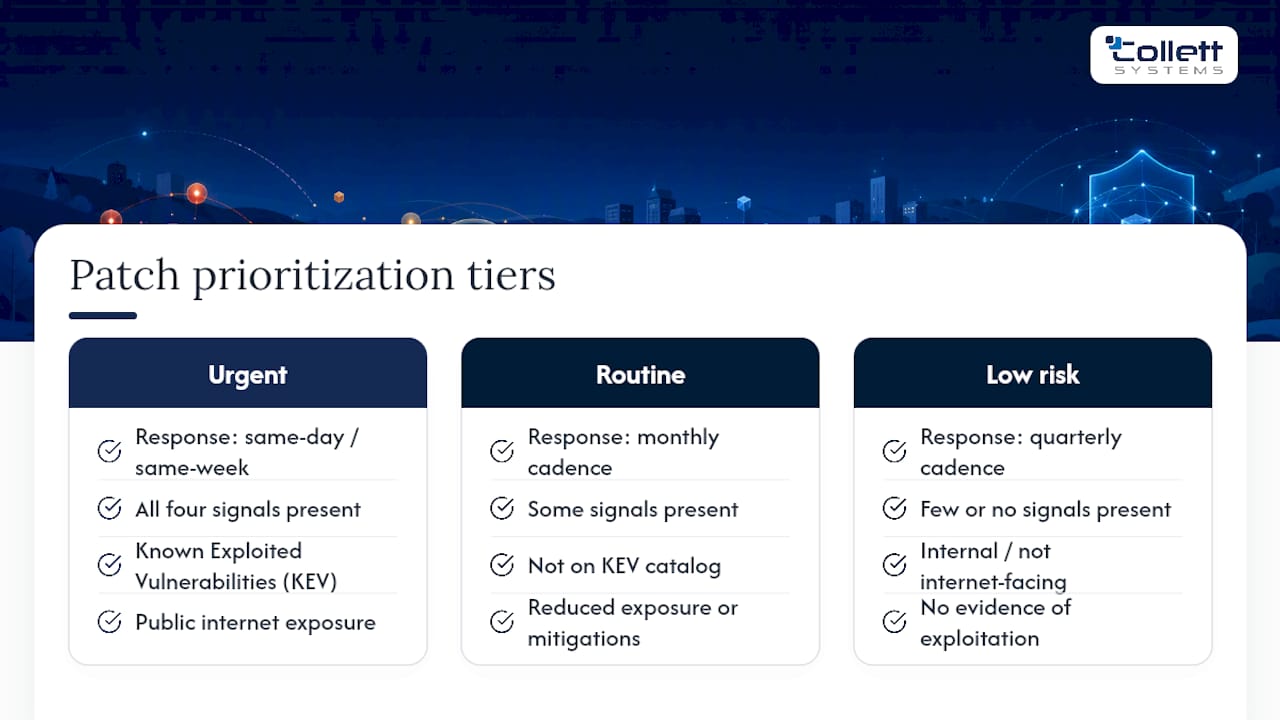
Map those four signals directly to your internal SLAs. A vulnerability that hits all four criteria, especially one on the Known Exploited Vulnerabilities catalog, deserves a same-week or even same-day response. Everything else can sit on a tiered schedule. CISA's own directive structure shows that only a small slice of disclosed vulnerabilities warrant an urgent, days-long window; the rest fit into a monthly or quarterly cadence without meaningfully raising your exposure.
Building Your Patch Management Checklist
A working patch program comes down to five operational pillars: know what you have, know how urgent each fix is, prove it works before it ships, roll it out carefully, and confirm it actually closed the hole.
1. Asset inventory and maintenance groups. You cannot patch what you don't know exists. Build a configuration management database (CMDB) that tracks each asset's OS, installed software, firmware version, and business criticality. NIST recommends grouping assets by both technical similarity and business function, so a point-of-sale terminal and a marketing laptop never share the same maintenance window by accident. Shadow IT is the usual blind spot here. Unmanaged SaaS tools and personal devices connecting to company resources routinely fall outside patch scope entirely, which is why discovering shadow IT has to happen before you can claim full coverage.
2. SLAs by risk tier, with named owners. Set explicit deadlines: rapid response for KEV-listed and internet-facing vulnerabilities, shorter timelines for high-severity internal systems, and longer timelines for low-risk assets. Every tier needs an owner responsible for discovery, another for testing, another for deployment, and someone independent for verification. Without named owners, "patch it soon" becomes nobody's job.
3. Testing workflow. Push patches into a staging environment that mirrors production configuration, not a stripped-down sandbox. Deploy first to a canary group representing a small representative subset of affected assets, watch for a defined monitoring window, and set clear criteria for when to abort or roll forward.
4. Deployment workflow. Phase the rollout in waves tied to maintenance windows, reserving a fast-track emergency path for KEV entries that bypasses the normal queue but still requires a sign-off.
5. Verification and audit trail. Deployment success reported by your patch tool is not the same as remediation. Run an independent vulnerability scan to confirm the CVE is actually closed, log the result for compliance, and track every exception with a firm expiration date rather than an indefinite "will fix later."
Pro Tip: Set exception expirations to a calendar reminder, not a ticket status. Tickets get closed by accident; calendar reminders don't.
Testing, Staging, and Rollback That Actually Protect Uptime
Staging environments fail most often because they drift from production. Different OS build numbers, missing group policy objects, or a config change nobody documented can make a "clean" test result meaningless. Rebuild staging from a current production image on a regular cadence rather than treating it as a permanent, static copy.
Canary deployments buy you an early warning system. Push the patch to a small representative slice first, monitor performance and error logs for 24 to 72 hours depending on criticality, and only expand once nothing looks wrong.
- Mismatched staging configs are the single biggest cause of "it worked in test" failures.
- Canary groups should represent every major hardware and software variant in your fleet, not just the easiest machines to reach.
- For critical systems, the safer rollback pattern is a standby swap: patch the standby instance, verify it, cut production traffic over, then patch the old production box once it becomes the new standby. This limits downtime while keeping an immediate fallback available.
- Always confirm backups are current and restorable before you touch a critical system. A managed backup and disaster recovery process that has not been tested recently is just a hope, not a safety net.
There's one legitimate exception to full testing: an actively exploited KEV vulnerability on an internet-facing system. In that scenario, minimal testing paired with compensating controls, such as isolating the asset or restricting access, beats waiting for a full staging cycle while attackers already have a working exploit.
Pro Tip: If a patch fails canary testing twice for the same reason, stop patching and start investigating your baseline image. The patch usually isn't the problem.
Automating Patch Management Without Losing Control
Automate the repeatable parts: vulnerability discovery, patch scheduling, phased rollout sequencing, emergency KEV triggers, and reporting. Keep humans in charge of judgment calls, exception approvals, and anything touching a system where downtime carries real business cost.
A single centralized view of patch status across every asset type beats fragmented tooling every time. When Windows machines report to one console, servers to another, and network gear to a spreadsheet nobody updates, gaps hide in the seams between systems. That fragmentation is exactly what auditors flag first.
When evaluating tools, check for:
- Coverage across operating systems, cloud workloads, and endpoints, not just Windows. (Microsoft's own WSUS documentation is a solid baseline for Windows-only shops, but most environments need broader reach.)
- Native integration with your CMDB or ITSM platform so patch status ties back to asset records automatically.
- Built-in rollback support, not a manual, undocumented process improvised during an incident.
- Reporting and API access sufficient to feed the metrics your leadership and auditors will ask for.
If your internal team lacks the staffing to run this cycle every month without letting other priorities slide, a co-managed or fully managed patching arrangement fills that gap without requiring a full rebuild of your IT department.
Metrics That Prove Your Patch Program Works
Leadership doesn't care how many patches you deployed; they care whether risk actually went down. Track:
- Mean time to remediate (MTTR): the gap between disclosure and verified remediation, broken out by risk tier.
- Patch coverage for internet-facing and high-risk assets specifically, not a blended average that hides gaps.
- Verification success rate: the percentage of "completed" patches confirmed closed by an independent scan.
- Exception count and age: how many systems are running unpatched, and for how long.
- Time-to-verify: how long it takes after deployment to confirm the fix actually worked.
CISA's directive framework makes a useful point for board conversations: because only a narrow slice of vulnerabilities require urgent action, a well-run risk-based program can show declining MTTR on the metrics that matter most, even while total patch volume stays flat. That's a far stronger story for executives than "we installed 4,000 updates this quarter."
Report monthly at minimum, and retain evidence such as scan results, change tickets, and exception approvals for as long as your compliance framework requires audit trails.
Turning Patching Into an Enforceable Policy
A patch management policy only works if it's specific enough to settle arguments before they start. At minimum, document:
- Scope covering every asset category, including firmware, network gear, and third-party applications.
- Maintenance groups with defined windows and blackout periods around business-critical events.
- SLAs tied to the risk tiers already covered, with explicit hours or days per tier.
- Testing and rollback requirements, including who signs off before a wave moves to full production.
- Exception handling, requiring a business justification, a compensating control, and a hard expiration date reviewed on a fixed cadence.
Assign named roles for discovery, testing, deployment, and verification, and route any deviation through a change control board rather than an individual's judgment call. Patching also needs to connect to adjacent programs: incident response for when a patch fails or an exploit hits first, configuration and infrastructure management for asset ownership, backup and disaster recovery for rollback capability, and procurement for tracking vendor end-of-life dates before support quietly disappears.
Where Patch Programs Break Down
The same mistakes show up across most SMB environments: patching ad hoc instead of on a schedule, having no real inventory, letting end users decide whether to install updates, skipping post-deployment verification, and letting exceptions live forever with no review date.
The fixes are straightforward, even if they take discipline to sustain:
- Centralize your tooling so nothing patches outside the main system of record.
- Set short, KEV-focused SLAs and let lower-risk items follow a slower, predictable cycle.
- Automate verification scans so "deployed" and "remediated" stop being treated as the same thing.
- Enforce exception expirations with an actual review meeting, not a silent renewal.
One-afternoon health check: pull your last 90 days of patch tickets, confirm every KEV-listed CVE affecting your environment got remediated within its SLA, and count how many exceptions have no expiration date. If that last number is greater than zero, you've found your next fix.
How Collett Systems LLC Supports Patch Programs Locally
Collett Systems LLC runs patch management as a core part of our fixed-fee managed IT stack for businesses across Southeastern Wisconsin, not an add-on billed separately. Every client environment gets 24/7 monitoring, documented maintenance windows, and verification scanning built into the standard service, backed by infrastructure management practices designed for SMB teams without a dedicated patch engineer on staff. We've applied this approach across more than 150 local organizations, which means the checklist above isn't theoretical for us; it's Tuesday.
A Phased Rollout Plan for Resource-Strapped Teams
You don't need a perfect program on day one. Start with a complete asset inventory, then lock down internet-facing and high-risk systems first, then automate the KEV response workflow before broadening coverage to everything else. Bring in outside help once your backlog outpaces your staff's bandwidth. For leadership buy-in, tie every patch SLA to a business risk statement, not a technical one.
, Dustin Collett
Get a Patch Program That Actually Holds Up Under Audit
Building the risk-based program outlined above takes real hours: inventory work, SLA design, testing infrastructure, and ongoing verification. Collett Systems LLC folds all of it into one fixed per-user price instead of billing it as a separate project or a tiered upsell, which means you get 24/7 monitoring, phased patch deployment, and documented compliance evidence without watching a line-item invoice grow every quarter.
If you want a clear picture of where your current patching gaps sit before committing to anything, our cybersecurity risk assessment maps your highest-risk assets against KEV and exposure criteria and hands you a prioritized remediation list. From there, our managed IT services take over the ongoing patching, monitoring, and verification work directly. Schedule a cybersecurity briefing with our team to see exactly where your environment stands today.
Sources
- Guide to Enterprise Patch Management Planning: Preventive Maintenance for Technology (NIST SP 800-40 Rev.4)
- Improving Enterprise Patching for General IT Systems (NCCoE / NIST SP 1800-31)
- Patch Smarter, Not Harder | CISA
FAQ
What is the best practice for patch management?
The strongest approach is risk-based and automated: inventory all assets, prioritize KEV-listed and internet-facing vulnerabilities, test in a mirrored environment, deploy in phased canary groups, and verify remediation with an independent scan.
What are the key steps in patch management?
The core lifecycle is identify, prioritize, test, deploy, verify, and document, with each step tied to a defined owner and SLA rather than handled informally.
What is the ISO standard for patch management?
There isn't a single dedicated ISO standard for patch management specifically; most organizations instead follow NIST SP 800-40 Rev.4 for program structure and reference ISO 27001's broader vulnerability management controls for compliance alignment.
Which of the following is a patch management best practice?
Testing patches in a staging environment that mirrors production, then rolling out in phased canary groups before full deployment, is consistently cited as a best practice over pushing updates to every system at once.
How often should patch management schedules run?
High-risk and KEV-listed vulnerabilities need same-day to 72-hour response, high-severity internal systems fit a 7 to 14 day window, and low-risk assets can follow a monthly or quarterly cycle without materially raising exposure.